

Milk deliveries — record, correct and follow payment
What this page helps you do
Section titled “What this page helps you do”Deliveries is the farm’s ledger of milk collected by buyers. It connects a dated, measured load to its buyer route, verified tank milk, estimated payout, collection proof and eventual bank credit. Use it to check what left the farm and what the buyer has paid. A delivery is separate from the animal milk recordings and tank collection that supplied it.
Open Livestock → Milk → Deliveries for the selected farm. Viewing and changing this payout ledger requires Manage milk payouts, normally held by a farm Owner or Manager. Set up a buyer, payout formula and farm route first. Record and verify the relevant tank collection so the load has clean milk available to reserve.
Read and filter the ledger
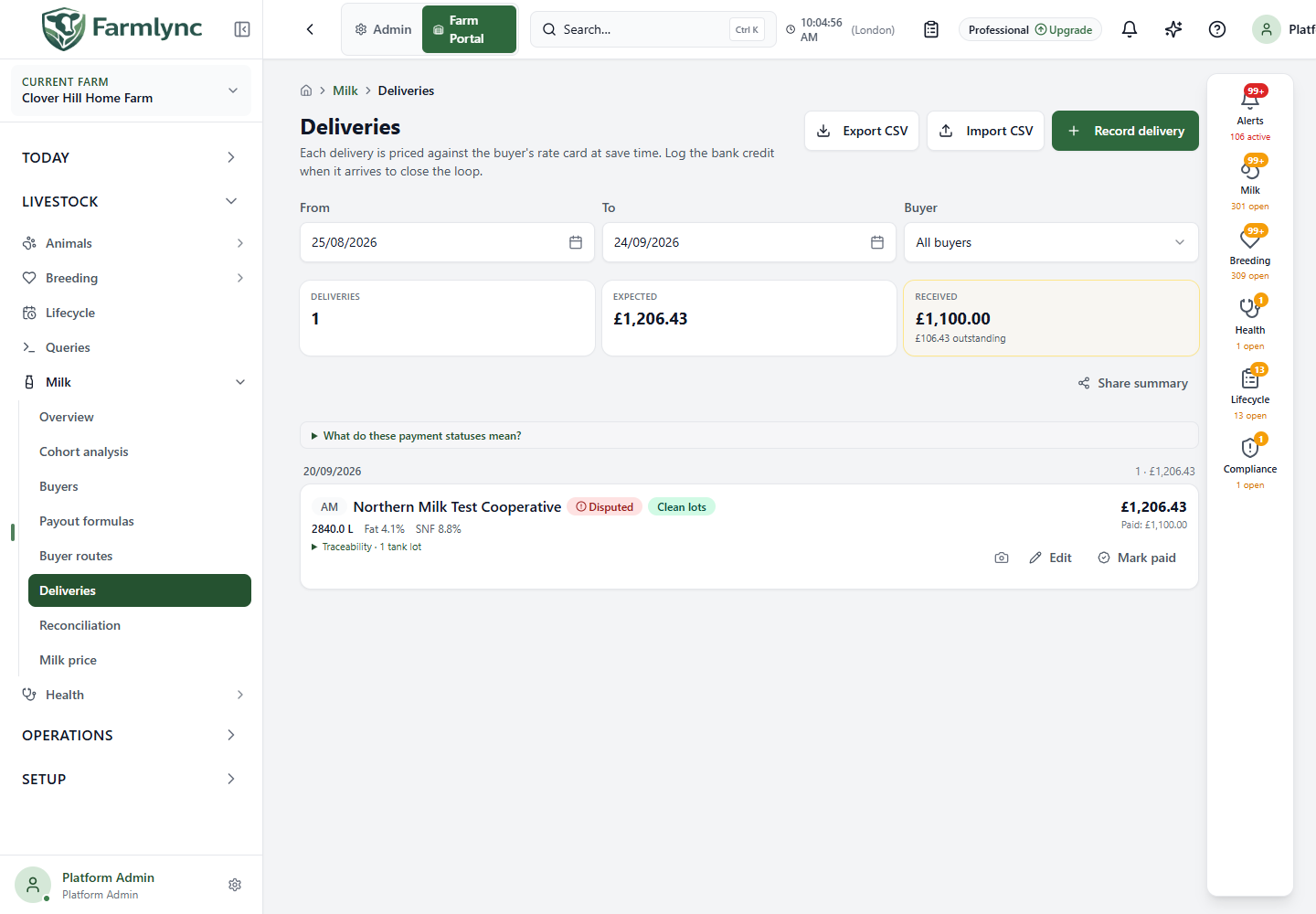
Section titled “Read and filter the ledger”The From and To dates start with the last 30 farm-local calendar days. Widen them to find an older slip, up to 366 days per request; the page does not show every historical delivery at once. Buyer defaults to all buyers and narrows the list to one buyer. The summary shows the number of deliveries, expected payout, amount received and outstanding difference for the filtered results. These amounts are estimates and recorded credits, not a bank feed. If a farm has deliveries in more than one currency, filter and reconcile them separately: the current summary displays the first result’s currency but does not convert the other amounts before adding them.
Rows are grouped by delivery date. Each row shows its session, buyer, payment and compliance status, quantity with its recorded unit, available quality readings, estimated payout and any different paid amount. Open Traceability to see the reserved tank lots and any compliance reason. Clean lots refers to tank evidence, while Pending, Paid, Partial or Disputed refers to payment; they answer different questions.
Use Export CSV to download the currently filtered deliveries, including quality, payout, status and lot lineage. Share summary prepares a period summary for the device’s available sharing method. Check the date and buyer filters first so you do not share an incomplete period.
Record one buyer collection
Section titled “Record one buyer collection”Select Record delivery and work from the buyer’s collection slip. The panel shows the route and payout preview before you save.
| Control | What to enter or check |
|---|---|
| Date | Required collection date; starts at today in the farm’s timezone. A historical date can use a route version that covered that date. Record only milk that has actually left the farm: the current single-record form and API do not reject a future date, although CSV import does. |
| Session | Required Morning (AM), Evening (PM) or Extra. The initial choice follows farm-local time: AM before 14:00, PM afterwards. Use Extra only for a genuine additional collection covered by the selected route. |
| Going to / Buyer route | A single matching route is displayed automatically. If several routes match, choose the intended buyer route. A route must cover the date and session; otherwise go to Routes first. |
| Collection readiness | Review the available verified tank milk and any safety or reservation warning. The form will not save unless the preflight says the load can be delivered. A recorded animal yield alone is not sufficient tank evidence. |
| Quantity | Required positive collected amount in the unit shown beside the control. Use the quantity on the collection evidence. The server caps the converted load at 5,000 litres and also checks clean tank capacity. |
| Fat % / SNF % / Protein % / CLR | Optional only if the selected payout formula does not need that measurement. Enter the buyer’s actual receipt values; accepted ranges are fat 0–10, SNF 0–15, protein 0–8, CLR 0–40. SNF means solids-not-fat; CLR is corrected lactometer reading. A missing value needed by the formula prevents pricing and saving. |
| Receipt ref | Optional collection slip reference, maximum 100 characters. |
| Notes | Optional explanation retained with the delivery. |
Expand Why these matter for quality guidance, and Receipt ref + notes to enter the optional text. The live Payout preview uses the route’s saved formula and shows the expected amount; it does not mean the buyer has paid. Check unusual quality warnings against the slip. Some hard ranges and the 100-character receipt-reference limit are checked only after submission, so keep to the values above even if the browser initially accepts more. Select Record delivery, then find the new row under its date and check the route, quantity, compliance badge and estimated payout. If the button remains unavailable, review the route, positive quantity and tank reservation message.
Correct a delivery, add proof or void it
Section titled “Correct a delivery, add proof or void it”Choose Edit on a row to correct the quantity, fat, SNF, protein, CLR, receipt reference or notes. The date, session and buyer route remain fixed. A compliance-blocked delivery cannot be edited until its source incident is resolved. The form rechecks clean tank capacity and previews the recomputed payout. A correction to a delivery that already has a recorded payment can change its expected amount and payment variance; check the status afterwards. If another user changed the row, reload it before retrying rather than overwriting their change. The current edit contract treats an empty receipt reference or notes field as “leave unchanged”, so it cannot reliably remove already-saved text; retain the corrected evidence elsewhere and ask an administrator to review the record rather than pretending the old value was cleared.
The camera button Attach proof photo or Replace proof photo stores a photo of the collection evidence. It accepts JPEG, PNG, WebP, HEIC or HEIF up to 5 MB. When a photo exists, use the image button to view it. Keep the receipt reference as text too when the buyer supplies one.
Void appears on a Pending delivery. Enter a reason and confirm. The original remains in the audit trail, but leaves operational lists and releases its verified tank-lot reservation. A paid or reconciled delivery needs a financial reversal rather than this void action. Do not void a real collection merely to clear a payment discrepancy.
Record the buyer’s bank credit
Section titled “Record the buyer’s bank credit”Use Mark paid on a Pending, Partial or Disputed row when you know what was actually credited. Amount starts at the computed payout; replace it with the real non-negative bank credit. Paid on starts at today in the farm’s timezone; use the actual bank-credit date and never a future date. Save and inspect the resulting badge:
| Status | Meaning in this page |
|---|---|
| Pending | No bank credit has been recorded for this delivery. |
| Paid | Recorded credit is at least 99% of the current expected amount. |
| Partial | Recorded credit is at least 95% but below 99% of expected. |
| Disputed | Recorded credit is below 95% of expected. |
The tolerance band is a comparison, not a confirmation from the buyer or bank. If the amount is short, retain the slip and open Reconciliation to examine the cycle before changing any source record. The Mark paid action is not offered once a delivery is Paid.
Import collection slips
Section titled “Import collection slips”Select Import CSV to upload a buyer/co-op spreadsheet. Map its columns in the preview. Required columns are Delivery date, Session, Buyer (name or code) and Quantity. Dates accept yyyy-MM-dd or DD/MM/YYYY; session accepts AM, PM or Extra; quantity must be positive. An optional Quantity unit can be kg, litre, pound, us_gallon or uk_gallon. Optional columns include fat, SNF, protein, CLR, Bactoscan, somatic cell count, receipt reference, amount paid, paid date and notes. Buyers and covering routes must exist before import; the server resolves each row’s route using buyer, session and date and calculates its payout.
Review the mapped preview before importing. A request accepts at most 1,000 rows. Invalid rows are skipped with their row number and reason; valid rows may import with advisories. However, a duplicate farm/date/session/route detected by the database cancels the whole save, including otherwise valid rows, and asks you to remove duplicates before retrying. Review both the error and warning lists, then find the imported date range in the ledger. Export CSV includes extra calculated and traceability columns; when reusing an export as an import, verify the column mapping and avoid importing the same deliveries again.