

Pregnancy diagnosis — single and batch recording
What this page helps you do
Section titled “What this page helps you do”Pregnancy diagnosis records an observed check and its result against a breeding history. Use it to update reproductive status and schedule any needed rescan without treating a planned check as a diagnosis.
PD means pregnancy diagnosis. Record the result of the examination that was actually performed. Positive changes pregnancy state and planning dates; Negative can record pregnancy loss if the linked service had an earlier Positive check. Open Breeding → Record → PD Check for one animal or Batch PD for a round. Work items can supply an animal or service.
You need Record breeding events permission. Use the actual examination date and an eligible breeding animal. The normal selectors exclude animals on a breeding hold; do not bypass that protection through a fixed animal or selection-tray batch. The current commands do not reject a future Check Date, so review it before saving.
Single PD — every field
Section titled “Single PD — every field”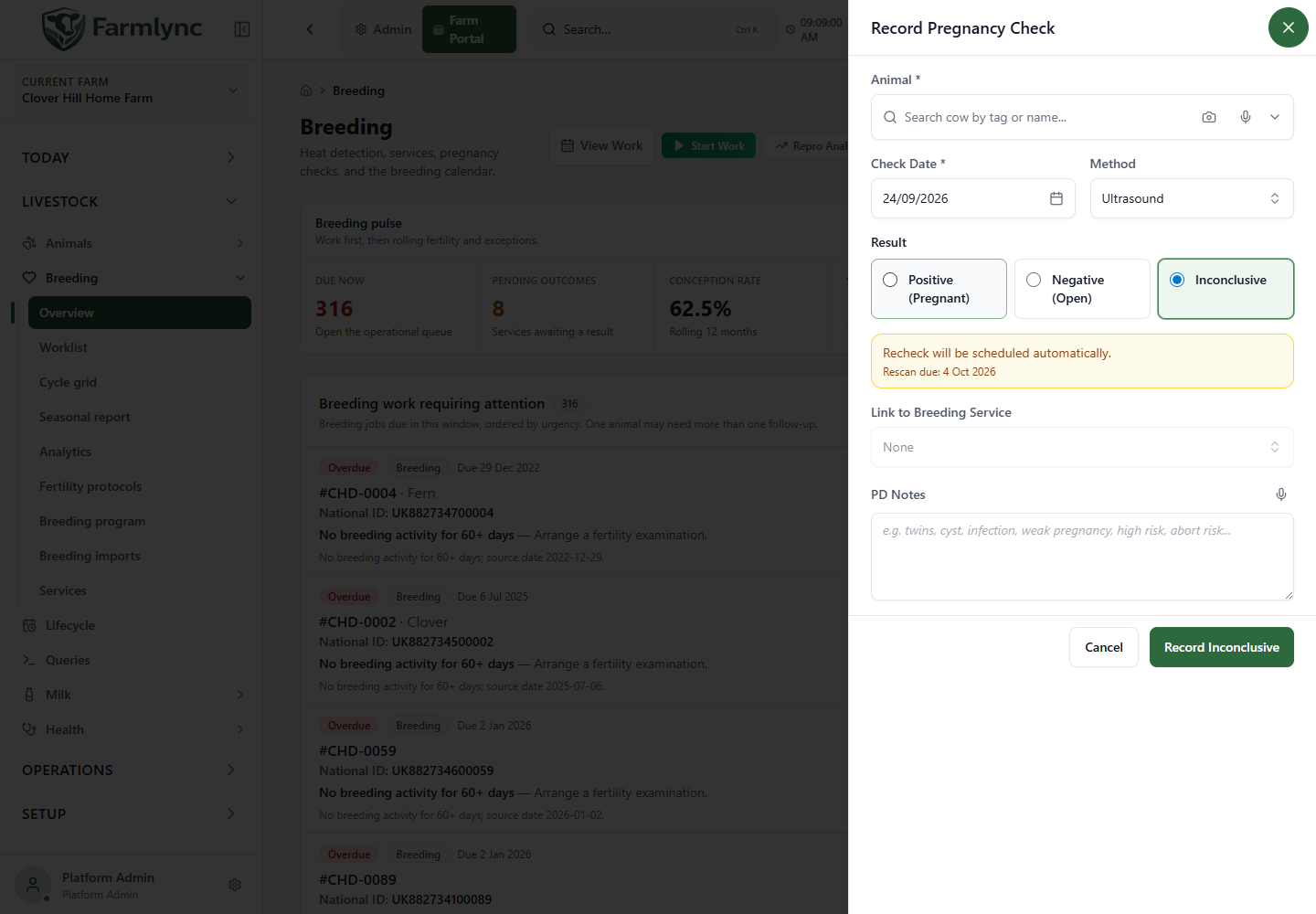
| Control | Meaning, accepted values and behaviour |
|---|---|
| Animal | Required. Select the examined animal. An animal-specific action can fix this selection. Normal save requires an active female beyond Calf stage and enrolled in the Breeding Program. |
| Check Date | Required farm-local date; defaults to today unless supplied by the opening action. Use the actual examination date. |
| Method | Required; default Ultrasound. Choices: Rectal, Ultrasound, Blood Test and Milk Progesterone. The confidence captions are application hints, not a diagnosis. |
| Result | Positive (Pregnant), Negative (Open), or Inconclusive. Defaults to Inconclusive so a pregnancy is not confirmed inadvertently. |
| Expected Calving Date | Shown and required for Positive. With a linked service, defaults to service date plus configured gestation length. Edit it if the examination supplied a different date. A manual change is distinguished from a derived date. Review that a manual date is after the examination; the current form and command do not enforce that ordering. |
| Number in Utero | Optional for Positive only; whole number 1–4. Leave blank if not assessed. |
| Link to Breeding Service | Select the service being checked. Choices show attempt number, date, type and outcome. The form suggests an eligible Pending service, otherwise a Conceived service for reconfirmation. Review it when the animal has multiple services. A prelinked service can be fixed. |
| PD Notes | Optional, maximum 1,000 characters. Explain findings or uncertainty. |
| Record Positive / Negative / Inconclusive | Saves the chosen result. The button caption follows Result. |
| Cancel | Discards the unsaved check. |
Changing away from Positive clears Expected Calving Date and Number in Utero. Selecting another animal resets the service selection. If a fixed service cannot be loaded, close and retry instead of guessing it.
Timing and service checks
Section titled “Timing and service checks”Farmlync compares farm-local calendar days, not elapsed hours:
- A check cannot precede its linked service.
- Before day 28 after a linked service, the form permits Inconclusive only. Changing into that window resets a chosen Positive or Negative to Inconclusive.
- The single-record handler rejects another check for the same animal on the same farm day.
- A selected service must belong to this animal and farm.
Choosing None is not a reliable way around timing checks. For conclusive results, the server can find a current-cycle service. For Positive without a recorded service, it may infer natural service from a recorded bull-in-group period. Review the saved history and record known service facts explicitly where possible. The single form can save Positive with a manually supplied expected date even without a linked service. The batch UI requires service context for Positive.
What each result changes
Section titled “What each result changes”| Result | Saved outcome and next action |
|---|---|
| Positive | Saves PD, changes pregnancy state to Confirmed, and marks a linked service Conceived. Expected calving feeds planning. If confirmed before day 60 after a linked service, reconfirmation is scheduled for day 60. |
| Negative, no earlier Positive for linked service | Changes pregnancy state to Open, marks linked service Failed, and schedules a heat watch 14 days after the check. |
| Negative after an earlier Positive for linked service | Changes state to Open and marks the service as pregnancy loss. This does not replace a separate abortion record where its details are needed. |
| Inconclusive | Saves uncertainty without forcing Confirmed/Open or Conceived/Failed. Schedules a rescan for the later of check date + 10 days and service date + 28 days when a service is linked. |
The form’s simple “rescan in ~10 days” hint can be earlier than the actual scheduled date for a very early check. Use saved work/calendar dates for follow-up. Recording PD completes applicable pending breeding actions. A single PD can also complete a matching fertility-protocol PregCheck step when its date is within two days of the step due date; batch PD does not currently do this, so review the protocol checklist after a batch. Alerts depend on enabled rules and due windows.
After save, the result panel explains the record, linked service and next action. View calving forecast opens Breeding after Positive; View current breeding work opens work after Negative. A backdated Negative may show a historical watch window, not a new future one.
Batch PD — per-animal results
Section titled “Batch PD — per-animal results”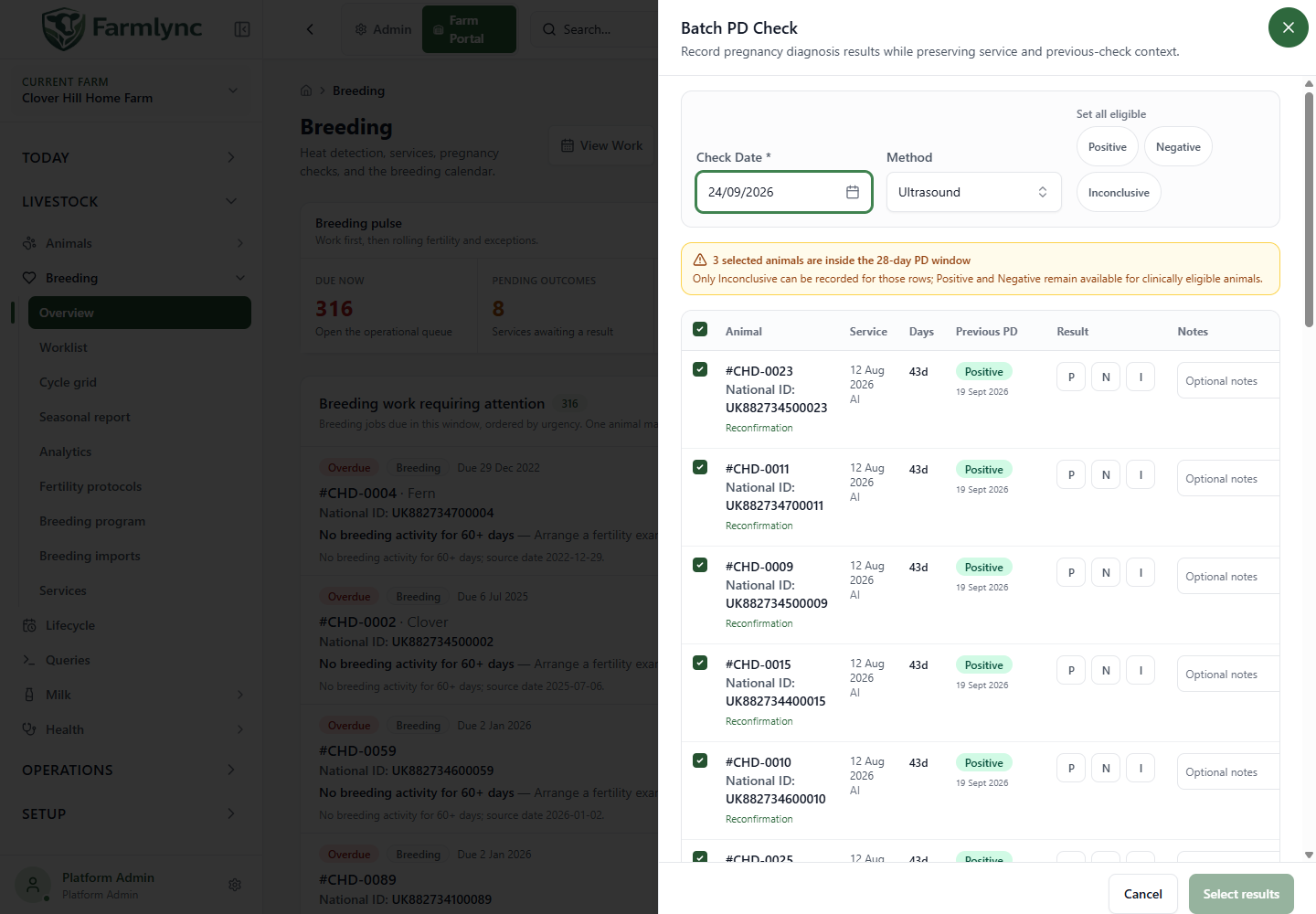
Batch PD loads animals due for a check, or animals supplied by selection/work context. It loads service and previous-check information before saving. If that query fails, use Retry loading; do not submit without reliable context. The due roster is not paged, so split an unusually large round into manageable selections and review every submitted row.
| Control/column | How to use it |
|---|---|
| Check Date | Shared required farm-local date, default today. All submitted animals use it. |
| Method | Shared required method, default Ultrasound. Split different methods into separate batches. |
| Set all eligible | Positive, Negative or Inconclusive; affects selected rows only where that result is allowed. Review exceptions. |
| Select all / row checkbox | Controls inclusion. Unselected animals are not sent. |
| Animal | Check tag, name and national identifier. |
| Service | Linked date/type. “No service” warns that context is missing; this table has no service picker. |
| Days | Farm-local days from service to chosen Check Date; recalculates when date changes. |
| Previous PD | Previous result/date or First check. Negative after Positive is highlighted as possible loss. |
| Result | Desktop P, N, I mean Positive, Negative, Inconclusive; mobile cards show the full names. New rows have no result selected. |
| Notes | Optional per-animal text, maximum 1,000 characters. |
| Summary / Save N records | Shows counts including selected, result types, invalid and pending. Only selected rows with a result and valid timing are sent. |
There are no expected-calving-date or foetus-count controls in batch PD. Positive dates are derived from linked service and configured gestation length. Use single PD for a manually determined date or Number in Utero.
Invalid and warning rows
Section titled “Invalid and warning rows”- Check date before service: invalid; the result is cleared.
- Less than 28 days post-service: Positive/Negative unavailable; a previous choice changes to Inconclusive when the date moves into this window.
- No service in loaded context: Positive unavailable; other results can show a warning.
- No result: pending, so not sent.
- Prior Positive followed by Negative: pregnancy-loss warning, but save remains possible after review.
“Save 12 records (2 skipped)” means those two invalid rows will not be recorded. A warning does not necessarily mean invalid.
Save and recover
Section titled “Save and recover”- Set common date and method, then each actual observed result.
- Review loss/timing warnings and the count being submitted.
- Save once and inspect both successes and failures.
- Retry failures restores only failed submitted animals and their results/notes. Correct the reason before retrying.
- Close the result to acknowledge completed animals to the opening work screen.
Do not re-run successful rows because another animal failed. The single and batch handlers have different duplicate checks; inspect history after an uncertain response before submitting another batch.
The single command refuses a second pregnancy check for the animal on the same farm-local day. The current batch command does not perform that duplicate check and also omits the single command’s beyond-Calf-stage rule. Do not use batch to enter a second same-day result, a Calf-stage animal or an animal on a breeding hold. Its API also has no explicit item ceiling or complete field validator; use the web controls and smaller reviewed batches until those boundaries are aligned.
Example
Section titled “Example”An animal served 20 days ago cannot receive a conclusive result in this workflow; if the examination was inconclusive, record that and check the saved rescan date. A different animal served 40 days ago can receive its actual Positive result, with reconfirmation scheduled for day 60. These examples explain software behaviour, not examination advice for a particular animal.