

Register an animal — every field
What this page helps you do
Section titled “What this page helps you do”Registration creates the animal’s first farm record. Enter the actual identity, entry event and current state so later health, breeding, milk and registry work start from the right animal.
Open Farm → Animals → Register animal. This adds an animal to the selected farm. Check the farm name in the sidebar first. The form has two steps: Identity & Birth and Farm Entry & Parentage. Nothing is registered when you press Next; registration happens only with a final Register button.
If an animal already belongs to another farm in your organisation, use Internal farm transfer instead of registering a duplicate. To record a calving and its calf as one event, use the calving workflow. A standalone registration is not a recorded calving for the dam.
Before opening the form
Section titled “Before opening the form”Have the animal’s physical tag, national identification where required, birth date, breed and arrival information ready. For an adult already in milk or pregnant, also obtain its current lactation and pregnancy information. Choose actual facts from the animal’s records; the form’s defaults are suggestions.
Your farm needs animal-management permission and available animal capacity under its plan. If the farm settings cannot load, the form prevents progression: retry loading the settings rather than entering under an assumed farm type.
Step 1 — Identity & Birth
Section titled “Step 1 — Identity & Birth”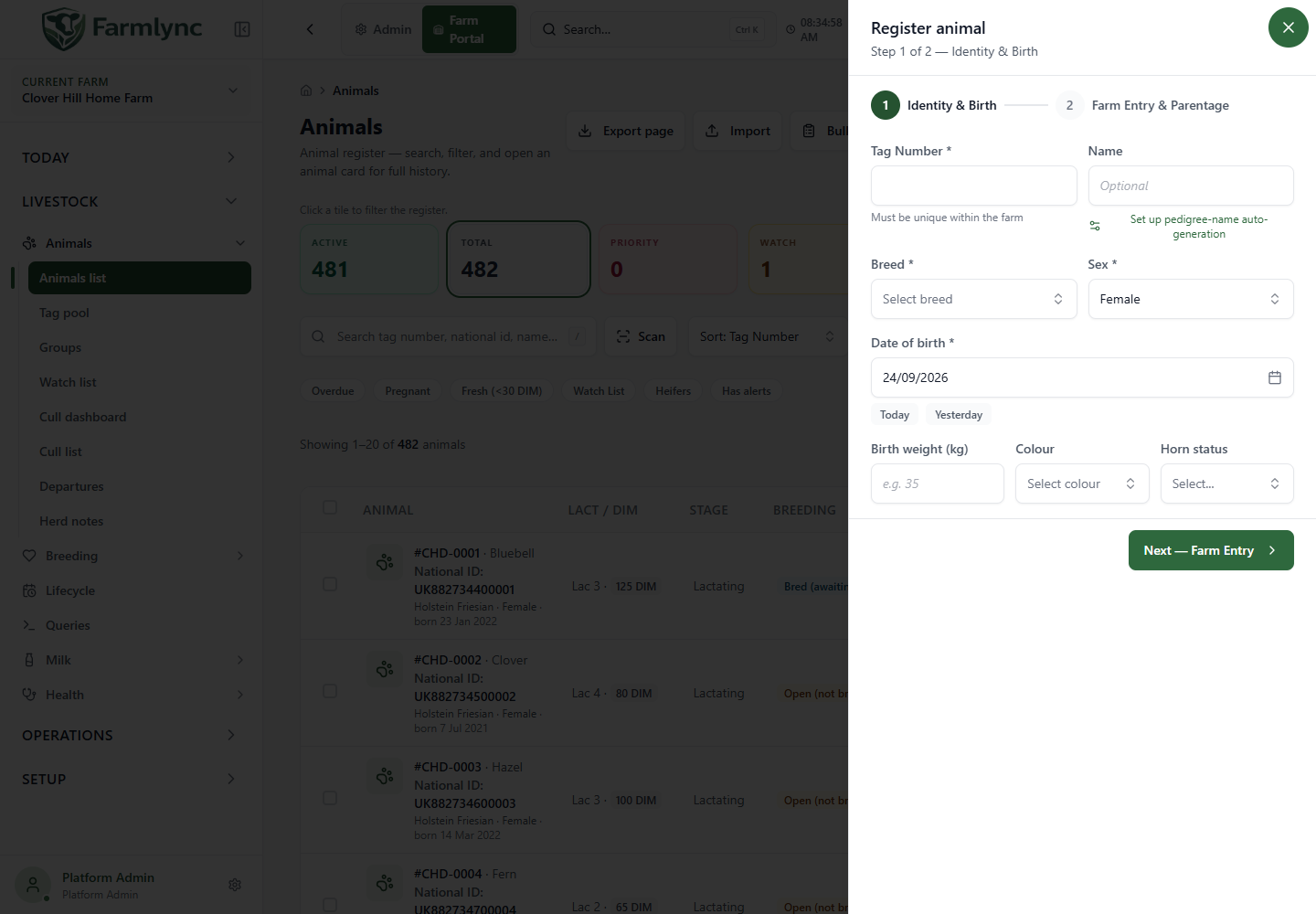
An asterisk marks a required field. Some requirements depend on the farm type or its identification rules.
| Field/control | What to enter and accepted values |
|---|---|
| Tag Number * | The management tag used within this farm. Required; at most 50 characters. Surrounding spaces are removed and letters are stored uppercase. It must be unique in the farm regardless of letter case. Your farm may use a different label for this field. |
| Name | Optional familiar or pedigree name, at most 100 characters. Names do not replace the unique tag. |
| Breed * | Select from the farm’s breed list. Dairy farms see dairy/dual-purpose breeds; beef farms see beef/dual-purpose breeds; mixed farms see the applicable combined list. Use the appropriate listed breed rather than an invented code. |
| Sex * | Female or Male. Beef/Mixed farms also allow Steer for an animal arriving already castrated. Choosing Steer changes a Born entry to Purchased. A newborn must be registered as Male and its later castration recorded separately. |
| Date of birth * | Actual birth date, no later than today in the farm’s timezone. Today and Yesterday are shortcuts, not estimates of an unknown birth date. |
| Birth weight (kg) | Positive number in kilograms. Required for Beef and Mixed farms; optional for Dairy. Enter birth weight, not the animal’s present weight. |
| Colour | Select a colour offered for the chosen breed, where known. Optional; maximum stored text length 50 characters. |
| Horn status | Optional: Horned, Polled, Dehorned, Disbudded or Unknown. Choose the current known status; blank means it was not supplied. |
| Next — Farm Entry | Validates the first-step fields and opens step 2. It does not save the animal. |
Leaving the tag field triggers an availability check. Already in use means you should search the animal register before creating another record. An availability message is not a reservation: the final save checks again.
Optional pedigree name generator
Section titled “Optional pedigree name generator”Where available below Name, Set up pedigree-name auto-generation lets an authorised user save a herd/stud prefix. Generate pedigree name then fills a serial name such as OAKWOOD 0001. The displayed next value is a preview. Generation advances the sequence immediately; cancelling the animal afterwards does not mean that number was never used. The prefix Save is also a separate settings change.
You can simply type a name instead. Generating a name does not register the animal with a breed society.
Carried-over values
Section titled “Carried-over values”After a successful registration the form can remember breed, colour, horn status, sex, pen, groups, dam and sire for that farm. The banner lists what was carried over. Start blank clears those remembered fields; it does not delete registered animals.
Check every carried-over parent and group when registering unrelated animals. Tags, national IDs, RFID, names and birth dates are not copied from the previous animal.
Step 2 — Entry
Section titled “Step 2 — Entry”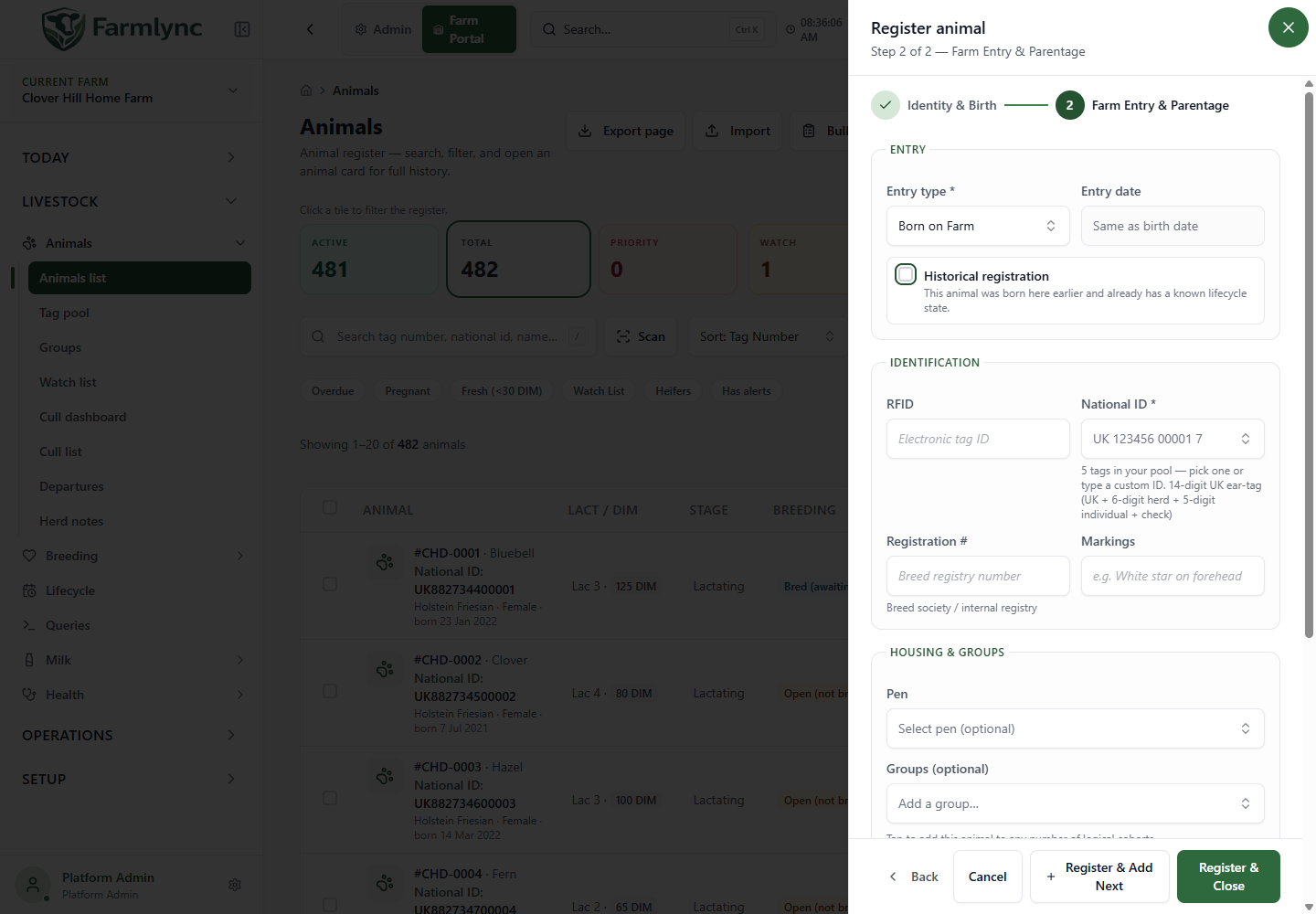
| Field/control | What to enter and when it appears |
|---|---|
| Entry type * | Born on Farm, Purchased, Transferred In, Gifted or Leased, as displayed by the entry-type list. This records how the animal came to this farm. |
| Entry date * | For Born on Farm this is automatically the birth date. For other types, enter the date it actually arrived. It cannot precede birth. |
| Historical registration | Appears for Born on Farm. Select it when entering an animal born here in the past whose current state is already known. It exposes the Current state fields; it does not change the birth or entry date. |
| Source | Appears for animals not Born on Farm. Identify where the animal came from, such as the selling farm or market. |
| Purchase price | Appears for Purchased. Optional non-negative amount in the displayed currency. Zero is allowed. This is not a stock receipt or payment transaction. |
Choosing Transferred In here describes an arrival from outside the current record. It is not a substitute for moving an existing Farmlync animal between your farms.
Current state — incoming or historical animals
Section titled “Current state — incoming or historical animals”This section appears for non-Born entries and for Born entries with Historical registration selected. It describes the animal now, rather than its stage on the historical arrival date.
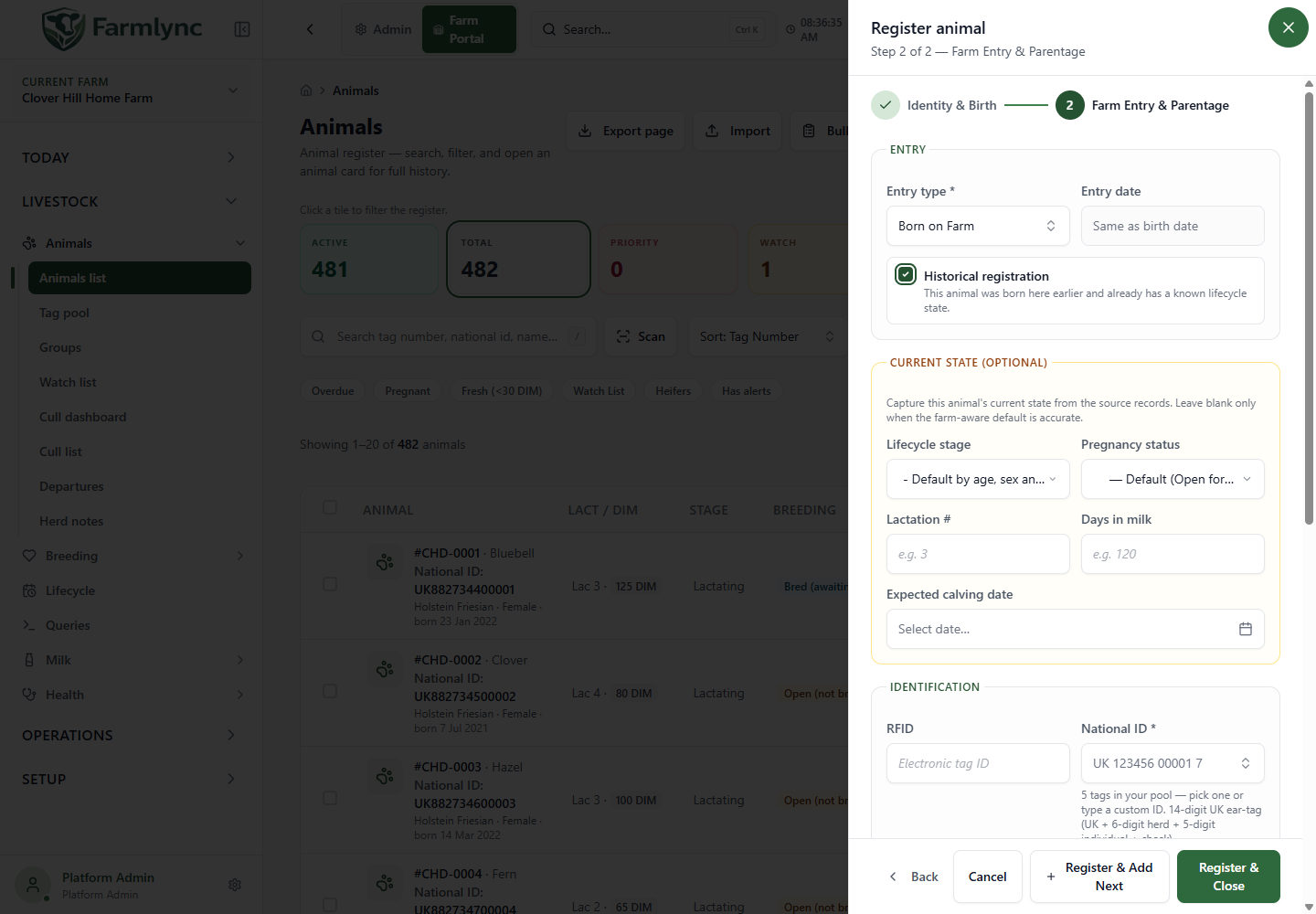
| Field | Input and meaning |
|---|---|
| Lifecycle stage | Leave Default only if classification by current age, sex and farm type is accurate. Otherwise choose the actual available stage. The list changes with sex and farm type. |
| Pregnancy status | Female animals only: Open (not bred), Bred (service recorded, awaiting PD), Confirmed pregnant or Late gestation. For a non-calf female, blank uses the default Open. |
| Lactation # | Female animals only. Whole number 1–20, counting lactations rather than age. Required by the form when Lactating is selected. |
| Days in milk | Female animals only. Whole number 0–600. For a Lactating animal, the opening start date is today in the farm minus these days; do not enter a milk yield here. |
| Expected calving date | Female animals only. Required when Confirmed or Late pregnancy is selected. Use the documented expected date. |
Available stages are:
- Dairy female: Calf, Heifer, Lactating or Dry.
- Dairy male: Calf or Bull.
- Beef female: Calf, Weaner, Stocker/growing, Finisher or Cow.
- Beef male: Calf, Weaner, Stocker/growing, Finisher or Bull.
- Mixed female: dairy female choices plus Weaner, Stocker, Finisher and Cow.
- Mixed male: the beef male choices.
- Steer on Beef/Mixed: Calf, Weaner, Stocker or Finisher.
An animal under 56 days must enter as Calf. Above that age the automatic default is Heifer for Dairy/Mixed females, Bull for intact males, and Weaner for Beef females or Steers. These are registration defaults: an adult milking cow should not be left as Heifer merely because it was suggested.
An explicitly Lactating registration with a lactation number creates an opening lactation. It does not fabricate earlier individual milk recordings. Male/Steer entries do not submit the female lactation and pregnancy fields.
Identification
Section titled “Identification”| Field | Purpose and limits |
|---|---|
| RFID | Optional electronic tag identity, at most 100 characters. It must not duplicate an existing RFID in the farm. |
| National ID | Official identification. Required where the farm’s identification policy says so. Maximum 100 characters, but the selected registry may enforce a much narrower format/check digit. Follow the format hint shown below the field. |
| Registration # | Optional breed-society/internal registry number, at most 100 characters. Distinct from National ID. |
| Markings | Optional distinguishing description, at most 200 characters. |
If the farm has available tags in its Tag Pool, National ID becomes a searchable picker. Select an allocated tag or type and commit a custom ID. Selecting a pooled tag can also fill its electronic identity into RFID. Without pool entries, the same field is a text box.
The National ID duplicate check runs when you finish the entry or commit a selection. Saving checks identity again and associates an eligible pooled tag with the animal. A format-valid or available ID does not mean a government registry has accepted a registration; registry submission is a separate workflow.
Housing, groups and parentage
Section titled “Housing, groups and parentage”| Field/control | Purpose and accepted selection |
|---|---|
| Pen | Optional pen on this farm. Clear it if housing is not yet assigned. |
| Groups | Optional multiple logical cohorts. The animal can belong to more than one; groups are not substitutes for the physical pen. |
| Dam (Mother) | Search an existing female by tag/name. The picker uses the calf’s birth date for eligibility. A linked dam must be at least 15 months old at that birth. |
| Dam not in system? Skip for now | Leave the dam unlinked. This does not create an external mother record. Put any reliable external parentage information in Notes if needed. |
| Sire (Father from herd) | Search an existing intact male. A linked sire must be at least 12 months old at the calf’s birth. Selection fills the sire name and breed. |
| External sire name | When the sire is outside this herd, enter its name, at most 100 characters. A name alone is not a linked Farmlync animal. |
| External sire breed | Optional external sire breed, at most 100 characters. |
| Notes | Expand for factual additional information. A microphone can append dictated text where supported; review the transcription. |
A parent ID must belong to the selected farm. Do not choose a similarly named animal merely to complete the form. Dam is recommended for born animals but is not universally mandatory.
Save and check
Section titled “Save and check”| Button | Result |
|---|---|
| Back, or the completed step 1 indicator | Return to Identity & Birth without registering. |
| Cancel / Close | Leave without registering this animal. Separately saved pedigree settings or a generated sequence number are not rolled back. |
| Register & Close | Register one animal, show a success message and close. |
| Register & Add Next | Register one animal, then open a fresh first step with the retained cohort values. Birth date resets to today and entry type resets to Born (Purchased for Steer), so re-enter them for each purchased/historical animal. |
After success, find the tag in Animals and inspect identification, current stage, farm/pen/groups and parentage. If you entered an opening lactation, check its number and start date too.
Common reasons a save cannot complete include a duplicate tag/RFID/national ID, an invalid official-ID format, missing required birth weight, an impossible sex/stage combination, a parent too young at birth, an unavailable pen/group, insufficient animal capacity, or changed access. Read the shown message and correct its cause; do not create a new identity for the same animal to bypass it.
Worked example: a purchased milking cow
Section titled “Worked example: a purchased milking cow”- In step 1 enter the actual tag, breed, Female and birth date. Add name and birth weight where known/required.
- In step 2 choose Purchased, enter the arrival date and source, and optionally price.
- Choose Lactating; enter the true lactation number and days in milk. Enter documented pregnancy information if applicable.
- Enter the national/electronic identifiers and select the correct pen and groups.
- Link known parents or leave them unlinked; record supporting context in Notes.
- Register & Close, then open the animal and verify the result before recording today’s milk.