

Reproductive worklist
What this page helps you do
Section titled “What this page helps you do”The reproductive worklist groups animals needing breeding attention. Use it to choose the next observation or action for a specific animal and keep overdue work visible.
Open Livestock → Breeding → Worklist. This page groups breeding cows by the work or waiting state derived from their recorded calving, heat, service and pregnancy-check events. It does not let you set a cow’s status directly.
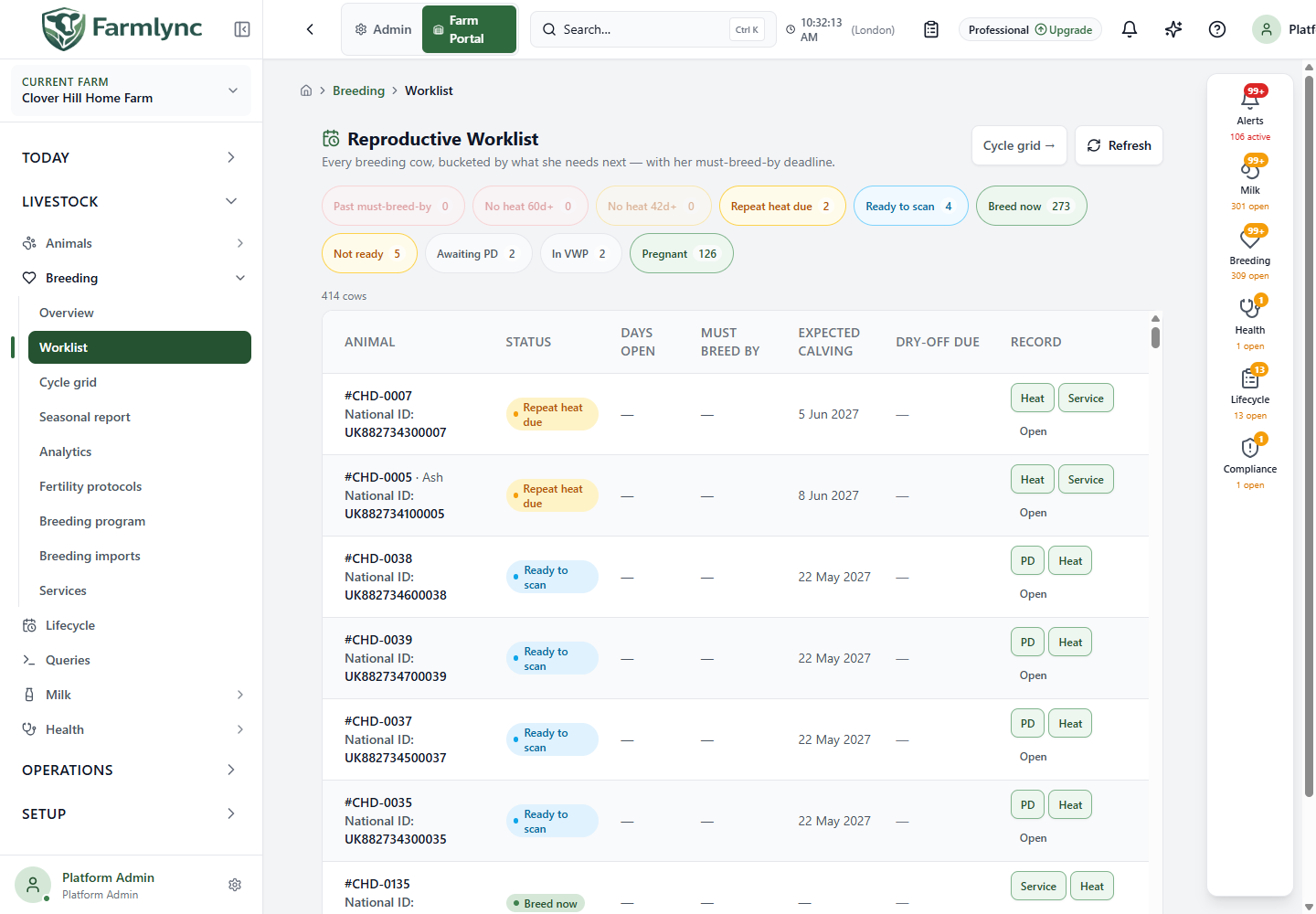
Select a status chip to see only that bucket; the number on the chip is its current count. Refresh fetches current records. Cycle grid opens a different layout of the same breeding buckets, with more event context. An error is shown as an error, not as an empty herd; use Retry rather than treating it as no work.
Understand the status buckets
Section titled “Understand the status buckets”Farmlync calculates these states from the animal’s facts; selecting an action does not manually set a bucket.
| Status | Meaning |
|---|---|
| Past must-breed-by | The animal is open beyond the farm’s breeding deadline and needs review or a recorded observation. |
| No heat 60d+ | No heat has been observed for at least 60 days among cows in the breeding cohort. This is not the same population or measure as Today’s Work “no breeding activity” jobs. |
| No heat 42d+ | No heat has been observed for at least 42 days among cows in the breeding cohort. Investigate whether an observation, service or exam is appropriate. |
| Repeat heat due | The animal was served and is in a period where a returning heat may be observed. |
| Ready to scan | The animal was served at least 30 days ago, or has reached the configured gestation length when that is shorter. Farmlync’s single PD form can accept a conclusive result from day 28; a cow may therefore remain in Awaiting PD for one or two days after the earliest valid diagnosis date. |
| Breed now | The animal is open and has passed the voluntary waiting period. |
| Not ready | Age, weight or breeding-programme evidence currently blocks service. Read the readiness message on the row. |
| Awaiting PD | The animal was served but has not yet reached the Worklist’s 30-day scan threshold. |
| In VWP | The animal calved recently and remains in the voluntary waiting period. |
| Pregnant | A pregnancy has been confirmed from recorded reproductive evidence. |
Waiting states are deliberately visible so you can account for the breeding cohort, but Pregnant, In VWP, Awaiting PD and Not ready do not manufacture a recording task before it is valid.
Read a row
Section titled “Read a row”| Column | Meaning |
|---|---|
| Animal | Farm identity for the animal. Select it to open the full record. |
| Status | Current calculated bucket. Not ready also shows the reason supplied by the readiness calculation. |
| Days open | Number of days the cow has been open where the calculation applies. A dash means the value does not apply or cannot be calculated from the available records. |
| Must breed by | Farm-local deadline for breeding. An overdue deadline is emphasised in red. |
| Expected calving | Expected farm-local calving date from the current reproductive evidence. |
| Dry-off due | Expected dry-off date, with days remaining or overdue. Red means the date is due or has passed. |
| Record | Permitted fact-recording actions for this animal, followed by Open for review. |
The mobile card keeps the decision-critical facts—status, days open, must-breed-by and dry-off date—while the desktop table also exposes expected calving. Open the animal for full history before deciding what happened. Dates are farm-local.
Row actions
Section titled “Row actions”Depending on the bucket and your role, actions may include Heat, Service, PD, Exam and Open. These launch the existing single-animal recording workflows. A cow past her breeding deadline may offer several valid actions because the farmer must record what was actually observed. A recorded event causes the worklist to be recalculated; an action does not merely mark a task done.
- Heat, Service, PD and Exam require Owner, Manager or Vet authority. The server checks this permission when the record is saved.
- A Worker can review the worklist and open animal records, but cannot save breeding events. The current Worklist may still display Heat or Service to a Worker; selecting one ends in an access error and does not create a record. This interface mismatch is recorded for correction.
- Open is always available and does not write a breeding event.
Typical action choices follow the status rather than forcing one outcome. Ready to scan offers PD and Heat; Breed now offers Service and Heat; overdue/no-heat buckets can also offer an Exam; Repeat heat due offers Heat and Service. Record the fact that actually occurred, even when it is not the first button.
Exam opens the fertility-examination form. Review the animal and the clinical findings before saving. Open goes to the full animal record and is available even where a recording action is not permitted.
Select a batch
Section titled “Select a batch”First filter to one status bucket that supports a batch action. Then tick cows, or use the header checkbox to select all cows in that filtered bucket; the partial-selection state is shown in the checkbox. This page is not paged, so select all selects the whole current bucket, including rows below the visible scroll area. The bar shows the selected count, Clear, and the batch action available for that bucket. A Ready to scan bucket batches PD; past-deadline, repeat-heat, breed-now or no-heat buckets can batch Heat when your permissions allow it. Service and fertility examinations remain per-cow actions because their sire/straw or finding details cannot safely be shared by this worklist action.
Changing the bucket clears the selection. Refreshing also removes selected animals that have moved out of the visible bucket, so the count and submitted animals remain aligned. Review every preselected animal and all shared values in the batch form before submitting.