

Record a treatment — every field
What this page helps you do
Section titled “What this page helps you do”Treatment recording captures care that was actually given, including medicines, course details and withdrawal instructions. Use the form to keep clinical history, stock effects and food-chain restrictions tied to the correct animal and time.
Open Farm → Health → Treatments → Record Treatment. This opens the full recording page. An animal card, veterinary visit or daily-work action can open the same workflow in a panel with the animal already selected.
Use this guide to enter what was actually done and the instructions/evidence supplied for it. The fields are recordkeeping controls, not recommendations about which medicine, dose or withdrawal to use.
Choose the recording mode first
Section titled “Choose the recording mode first”| Control | Purpose |
|---|---|
| Medical | Record a condition and one or more medicines, including their stock and withdrawal effects. Starts in Quick Record. |
| Non-medical | Record a drug-free husbandry activity. It has no medicine, stock-deduction or withdrawal fields. |
| More details → | Expand Medical recording to expose multiple medicines, course, withdrawal, costs and follow-up controls. Existing medical values remain in the form. |
| ← Quick record | Return to the shorter medical layout. Inspect the filled-value summary; hidden details can still be part of the record. |
Choose Medical/Non-medical before typing. Switching between these modes replaces the form; it is not a safe way to preserve a partially completed draft. Do not choose Non-medical merely to avoid a medicine’s stock or withdrawal requirements.
Medical — Quick Record
Section titled “Medical — Quick Record”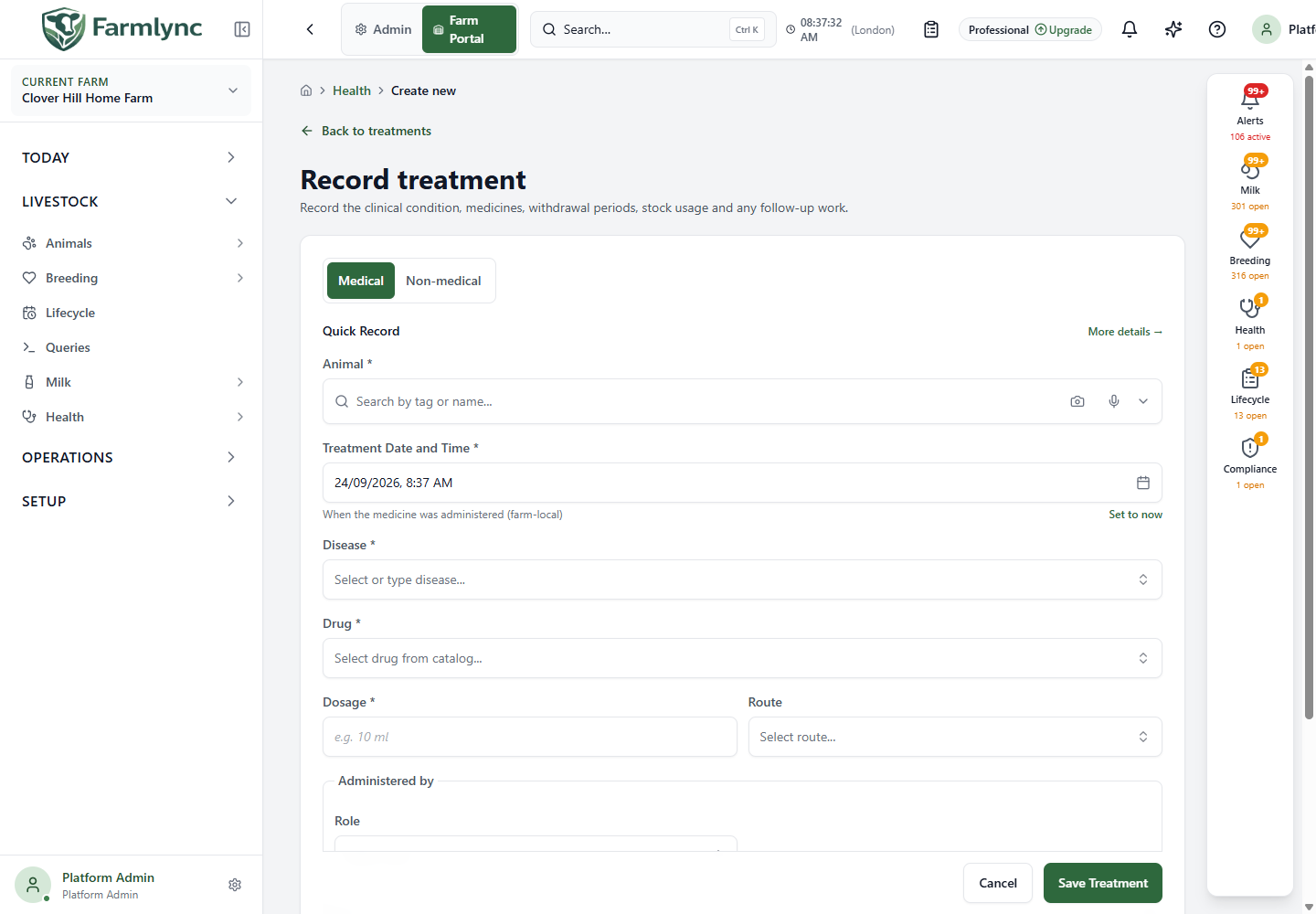
| Field/control | Required input, meaning and limits |
|---|---|
| Animal * | Search by tag/name and select the actual animal. Selection from an animal-specific action may be fixed. A typed search alone is not a selection. |
| Treatment Date and Time * | The actual administration date/time in the farm’s timezone. Defaults to now. Set to now resets it; use the actual earlier time when back-recording. This time affects withdrawal coverage. |
| Disease * | Select an adopted disease or type and commit a custom description, up to 200 characters. A selected catalogue disease supplies its code. A custom description does not create a new library entry. |
| Treatment case | Appears after selecting an animal. Optional: attach to an open case for that animal, leave No case for a standalone treatment, or choose + New case…. |
| New case name * | Appears when creating a case. Required, up to 200 characters. The case and treatment are saved together; choosing this option alone does not create the case. |
| Drug * | Select the actual medicine from the farm’s available Medicine products, or choose + Custom drug (manual entry). A selected product can populate dosage, route, course and withdrawal details. Check every suggestion. |
| Drug name * | For Custom drug, the form switches to detailed entry and displays this field. Required, up to 200 characters. This records the name without creating an inventory product. |
| Dosage * | Required instruction text, up to 100 characters, copied from the actual administration/prescription record. It is not automatically parsed into an inventory quantity. |
| Route | Optional administration route: Oral, Intramuscular, Intravenous, Subcutaneous, Topical or Intramammary. Choose the route actually used. |
| Administered by | Choose Farmer, Staff, Veterinarian or Other person, then select/enter the person. Once a role is chosen, a name is required. Maximum name length 200 characters. This can differ from the user entering the record. |
| Notes | Optional factual context. Keep to 1,000 characters, the server’s accepted limit, even though the medical form currently permits more typing. The microphone appends dictated text where supported; check it before saving. |
| Deduct from inventory | Appears for a linked product. When on, saving includes its calculated stock usage. Confirm the stock unit and course rather than treating the dosage text as the stock calculation. |
| Save Treatment | Validate and save the medical record and its associated effects. |
| Cancel | Leave without saving this treatment. On the full page, a changed draft prompts before leaving. |
If the disease/drug list is empty, an administrator can use Setup → Add from library and receive the required stock. The drug picker normally filters out tracked products with no on-hand stock; a custom medicine remains available for a factual record that is not drawn from this farm’s tracked stock. Do not fabricate a product or stock receipt to make the dropdown look populated.
Review suggested information
Section titled “Review suggested information”A product selection can reuse previously entered dosage, route and course values for that farm. Milk/meat withdrawal defaults come from the product catalogue, not a remembered user preference. A disease-linked active treatment protocol may fill still-empty medicine fields. These are starting values, not confirmation that today’s treatment is identical.
Where a previous-treatment prefill is offered, review the animal, time, condition, medicine, course and withdrawal details after using it. A new save creates a new treatment; it does not edit the earlier one.
If Quick Record validation finds a problem in a hidden detail, the form opens the detailed layout and highlights the affected field.
More details — medicines and course
Section titled “More details — medicines and course”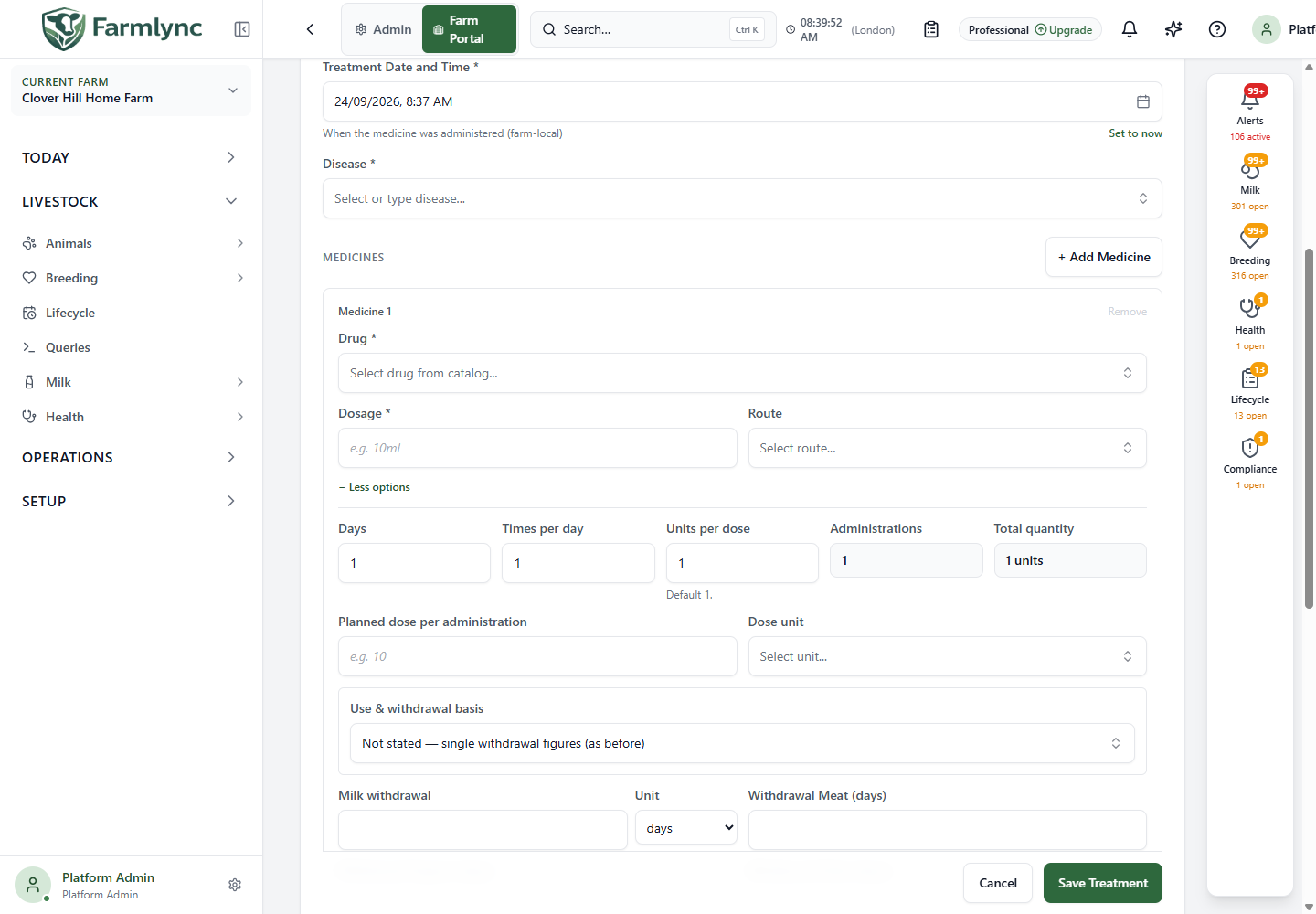
Select + Add Medicine for another medicine given in this treatment. Each has its own product, dosage, route, course, withdrawal and stock settings. The server accepts 1–20 medicine lines. Remove deletes an unsaved line; the only remaining line cannot be removed. Expand a medicine’s + More options to inspect the following controls.
| Field/display | Accepted value and meaning |
|---|---|
| Days | Whole number at least 1; defaults to 1. Number of days in the recorded course. |
| Times per day | Whole number at least 1; defaults to 1. Administrations per day. |
| Units per dose | Whole number at least 1; defaults to 1. Inventory units consumed per administration, using the product’s stock unit. It is not the animal’s body weight or the count of animals. |
| Administrations | Calculated as Days × Times per day. |
| Total quantity | Calculated as Days × Times per day × Units per dose, in inventory units. |
| Planned dose per administration | Optional positive numeric amount, at most 9,999,999.999 and up to three decimal places. Supply Dose unit with it, or leave both blank. |
| Dose unit | Select the unit associated with that planned amount. The amount/unit describe a plan; they are separate from the inventory-unit multiplier. |
| Is Antibiotic | Whether this medicine is recorded as an antibiotic. Check against the actual product. An antibiotic flag displays a withdrawal warning. |
| Batch / Lot Number | Optional medicine lot identifier, at most 100 characters. |
| Drug Expiry Date | A date control is displayed, but this manual input is currently not included in the saved treatment request. Do not rely on it as retained expiry evidence. Maintain the expiry on the inventory batch and retain source evidence. |
| − Less options | Collapse the detail area without necessarily clearing its values. |
For the quantity calculation alone: 3 days × 2 administrations/day × 1 inventory unit gives 6 administrations and 6 inventory units. This arithmetic does not prescribe a clinical course. Enter only the course and quantities actually supported by your records.
The planned dose amount is not proof that each administration occurred. Do not interpret a course total or planned quantity as separate timestamped administration records.
Milk, meat and other withdrawal controls
Section titled “Milk, meat and other withdrawal controls”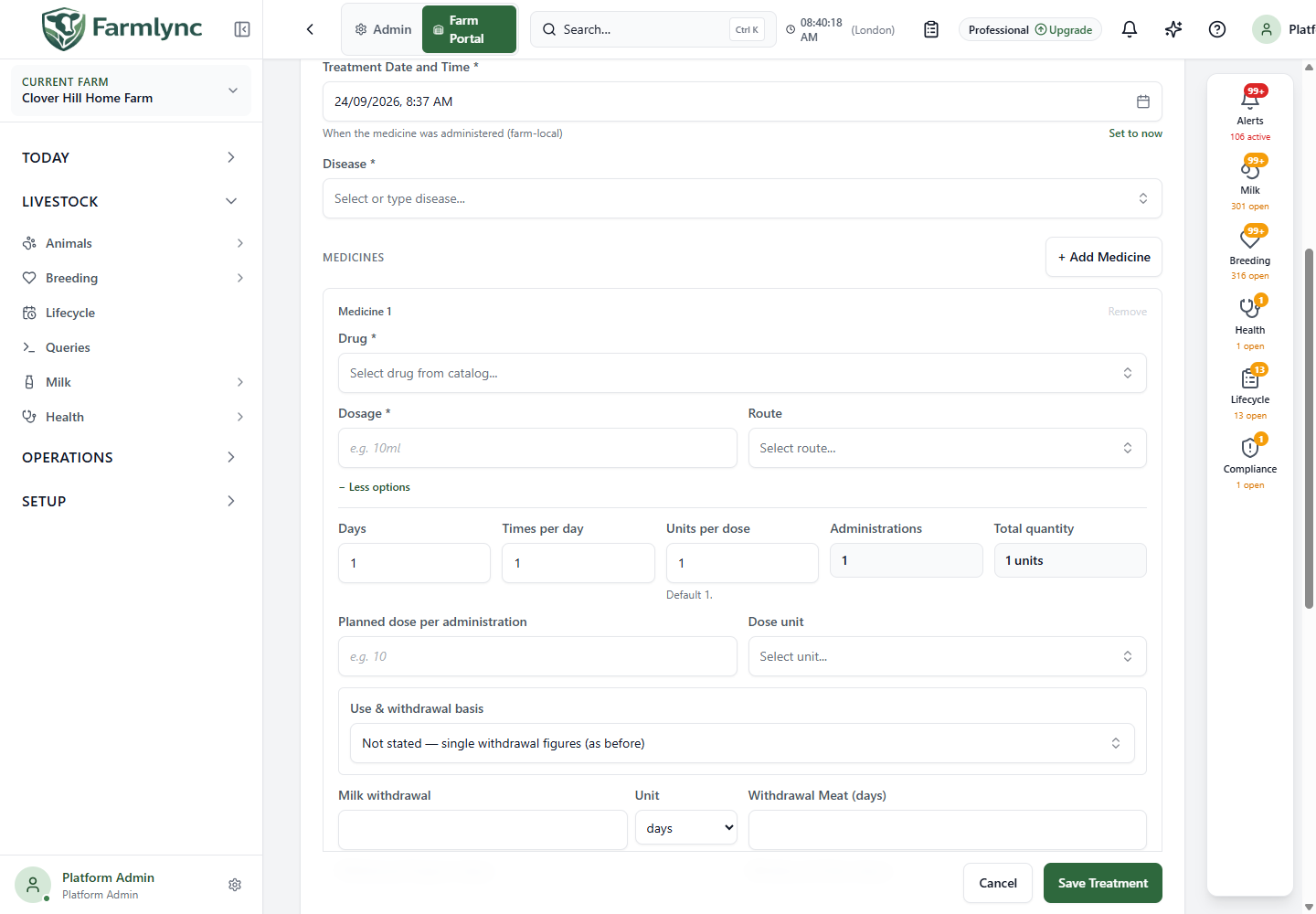
Each medicine’s Use & withdrawal basis determines which inputs are shown. Record the applicable documented basis. Do not choose a less restrictive option merely to get past a validation message.
| Basis | What the form asks you to record |
|---|---|
| Not stated — single withdrawal figures | Direct milk/meat figures without a declared authorised/cascade basis. This choice does not establish that there is no withdrawal. |
| Authorised use — the product SPC withdrawal applies | Product withdrawal basis and values, with any applicable prescribed information. SPC means the product’s official summary of characteristics. |
| Cascade (off-label) — statutory minimum rules apply | Product basis, prescribed withdrawal and prescriber/evidence information for the application’s configured jurisdictional rule evaluation. |
Direct withdrawal fields
Section titled “Direct withdrawal fields”| Field | Accepted value |
|---|---|
| Milk withdrawal + Unit | Non-negative whole number. Select days or hours. Hours accept 0–2,400; use the precision in the source instruction. |
| Withdrawal Meat (days) | Non-negative whole days. |
| Withdrawal Organic (days) | Optional non-negative whole days for the declared additional restriction. |
| Withdrawal Other (days) | Optional non-negative whole days for another declared restriction. |
Blank means no figure was supplied in that input; it is not a substitute for a known zero. The form can show calculated dates, but always check the saved treatment and the animal’s effective holds afterwards. With multiple medicines or treatments, one shorter interval does not cancel another longer hold.
Declared product/prescription fields
Section titled “Declared product/prescription fields”| Field/control | What it records |
|---|---|
| Product milk withdrawal | Select SPC figure, Not authorised for food-producing animals, Not applicable to this use, or Unknown. |
| SPC milk days / OR SPC milk hours | Required when the milk basis is SPC. Supply one precision, not both. Non-negative whole values; hours at most 2,400. |
| Product meat withdrawal | The corresponding product basis for meat. |
| SPC meat days | Required for meat SPC basis; non-negative whole days. |
| Prescribed Milk days / OR milk hours | Supplied prescribed withdrawal, where applicable. Use one precision, not both; hours at most 2,400. |
| Prescribed Meat days | Supplied prescribed meat withdrawal in non-negative whole days. |
| Prescription reference | Optional identifying reference, at most 200 characters. |
| Prescribing vet (register) | Select the saved prescriber where available. |
| Prescriber name | Enter the documented prescriber when using a name; at most 200 characters. This is not automatically the person who administered the medicine. |
| Evidence reference | For a cascade minimum confirmation, record the actual prescription/instruction reference; at most 300 characters. |
| Confirmed date and time | When that confirmation was given. Required together with its evidence reference; an evidence-only or time-only confirmation is incomplete. |
Switching to a declared basis clears the direct milk/meat figures so that there are not two competing inputs. Switching away from Cascade clears cascade-only confirmation fields. Organic/Other remain separate declared intervals.
The live resolution summary can show product figures, statutory minimums, prescribed values and effective values, or Cannot be saved as declared with a reason. An unsupported jurisdiction, unknown required basis or missing evidence may prevent resolution. A preview is not a saved treatment, and the server re-evaluates on Save. Have the responsible prescriber clarify incomplete instructions rather than guessing values.
Stock usage and cost
Section titled “Stock usage and cost”Deduct from inventory records usage of the linked product when the treatment is saved. The allocation preview shows the proposed batches, their expiries, available quantity, requested quantity and any shortage. Allocation follows the stock system’s batch rules; a typed Batch / Lot Number does not itself select an inventory batch.
Ordinary medicine stock shortages do not necessarily prevent recording the clinical fact: the stock ledger may record a shortfall which must then be investigated. A controlled-substance stock check can refuse an insufficient quantity. A preview warning that treatment can still be saved is not a promise that every medicine will pass its final checks.
If the medicine came from outside tracked farm stock, record that fact correctly and leave deduction off where appropriate. Turning deduction off does not cancel withdrawal requirements.
| Cost field | Meaning |
|---|---|
| Vet cost | Optional non-negative veterinary fee for this standalone treatment. At most two decimal places, up to 99,999,999.99. |
| Other costs | Optional other actual costs, with the same numeric limits. |
| Medicine cost | Valued from the stock actually consumed; do not enter it again in Other costs. |
For a treatment linked to a veterinary visit, the visit owns the veterinary fee. Adding a separate Vet cost to that linked treatment is rejected to prevent double counting.
Follow-up and cases
Section titled “Follow-up and cases”Select + Add Follow-up to display:
- Follow-up Date: intended follow-up day. It may suggest treatment date plus the first medicine’s duration; review the suggestion, especially for historical entries.
- Follow-up Type: Recheck, Booster vaccine, PD check, Blood test, Lab result or General, using the displayed choices.
- Remove: clears both follow-up fields and hides the section.
A follow-up creates a record of intended future work, not proof that the check, test or administration has happened. Review it in the treatment and daily-work/calendar surfaces.
A treatment case groups related care for one animal. The server refuses attaching a treatment to another animal’s case or to a closed case. Creating an inline case does not automatically close it when this treatment is saved.
Non-medical activity fields
Section titled “Non-medical activity fields”Choose Non-medical for genuinely drug-free work. Do not record an administered medicine in this mode: it intentionally creates no medicine stock usage or withdrawal window.
| Field | Meaning and limits |
|---|---|
| Animal * | Select the animal receiving the activity. |
| Activity * | Choose from the offered activity list. |
| Describe activity * | Appears for Other; required descriptive text, up to 200 characters. |
| Activity Date and Time * | Actual farm-local date/time of the activity. |
| Carried out by | Role and actual person, as with medical recording; name up to 200 characters. |
| Cost | Optional non-negative amount. |
| Follow-up date/type | Optional later work to schedule, using the offered types. |
| Notes | Optional, up to 1,000 characters. |
| Save Activity | Save the drug-free activity. |
After saving
Section titled “After saving”- Wait for Treatment recorded successfully (or the activity success result). The full-page flow returns to Treatments; a contextual panel closes.
- Find the animal and date. Open the record and check the condition, medicine lines, performer, course and costs.
- Inspect the animal’s current withdrawal restrictions, including hour-precision endpoints where present. Check affected milk lots if back-recording treatment over an earlier milking.
- Check the linked case/follow-up and stock movement where applicable.
- Use Correct treatment for a mistaken saved record. Do not enter a second treatment solely to amend the first.
Animal status/access, a duplicate administration, case mismatch/closure, invalid medicine details, unresolved declared withdrawal, a controlled-stock shortage or changed reference data can prevent saving. Read the error before retrying. The treatment, required stock effects and milk restrictions are intended to save together; an unsubmitted form is not a treatment record.
For preparation, see Set up health stock. For recorded milk under a hold, see Tank collection and safety.