

Health overview and checks
What this page helps you do
Section titled “What this page helps you do”The Health overview brings clinical work and active restrictions together; Health checks store individual observations. Use these views to find an animal needing attention and record the check that was actually performed.
Open Livestock → Health → Overview. This is the clinical summary for the selected farm. It combines treatment and vaccination records, active withdrawal restrictions, stock signals, health checks and scheduled work. A missing or unavailable metric is not proof of no condition: the page shows an unavailable warning if its animal or inventory indicator cannot load, and offers Retry when the latest overview refresh fails.
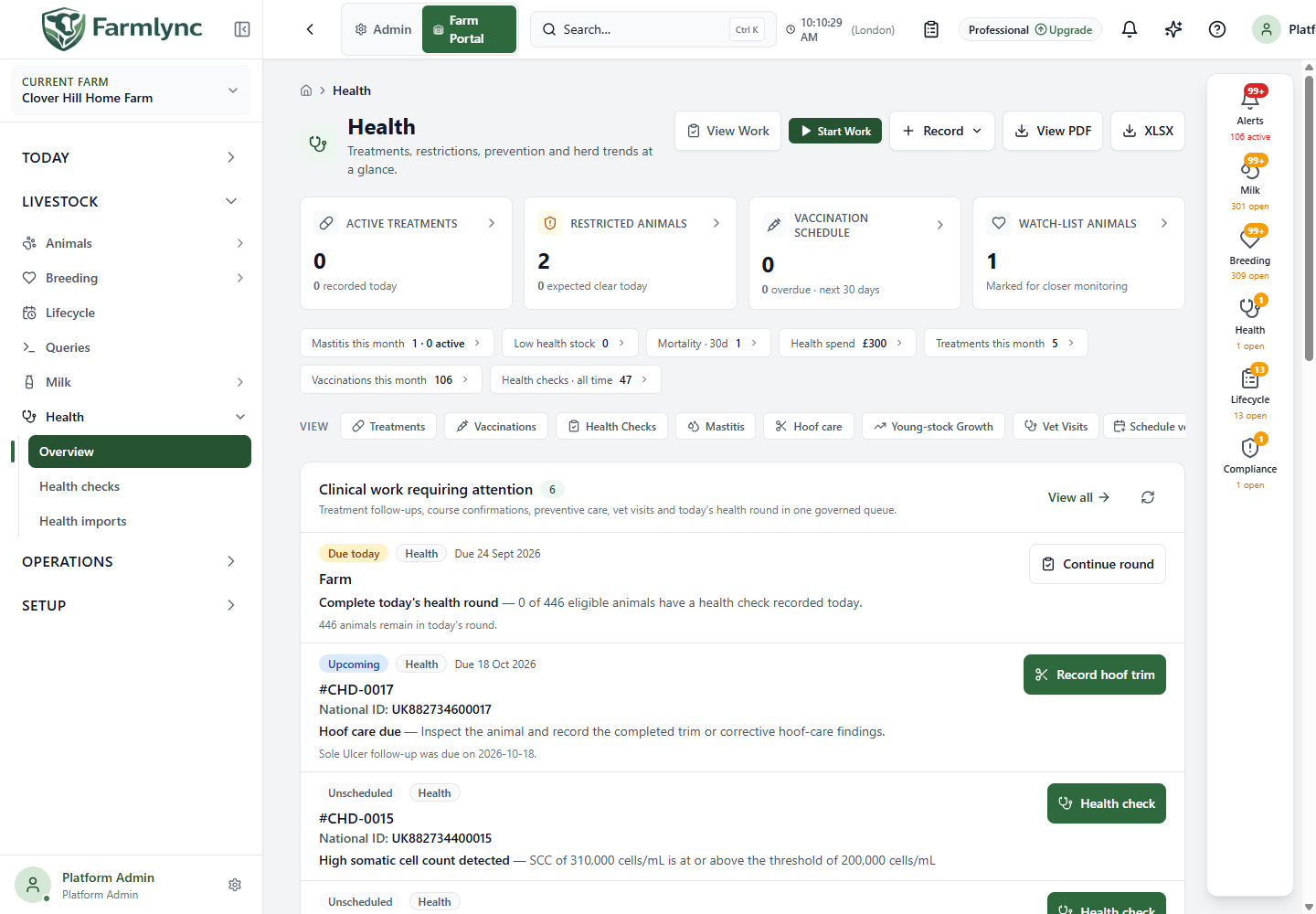
Header and summary indicators
Section titled “Header and summary indicators”View Work opens the Work list filtered to Health; Start Work opens execution mode focused on health tasks. On desktop, Record opens actions for Treatment, Vaccination, Batch Vaccination, Health Check, Mastitis, Hoof Trim, Body Condition / Weight and Receive Medicine/Vaccine. The mobile action button provides the recording shortcuts. View PDF opens the farm-wide health report in a new tab and XLSX downloads a spreadsheet. Those export controls appear on desktop. For the fields in each recording action, follow the relevant recording form or page guide; the actions are not interchangeable.
The four linked summary tiles have these meanings:
| Tile | What it counts and where it leads |
|---|---|
| Active treatments | Active treatment records; its smaller figure is treatments recorded today. Opens the Treatments list filtered to Active. |
| Restricted animals | Distinct animals grouped from active treatment withdrawals, not the number of treatment rows. Its smaller figure is animals expected to clear today. Jumps to Withdrawal clearance below. |
| Vaccination schedule | Upcoming vaccination rows for the next 30 days, including overdue rows. The smaller figure counts overdue rows. Jumps to Due & upcoming vaccinations. |
| Watch-list animals | Animals flagged for closer monitoring. Opens the Animals list filtered to Watch list. |
The compact indicators below show Mastitis this month and active mastitis cases, Low health stock, Mortality · 30d, Health spend, Treatments this month, Vaccinations this month and Health checks · all time. Select an indicator to open its linked list or section. The Health spend figure uses the displayed report period and recorded treatment, vaccination and vet-visit costs; it is not a forecast of all farm costs. Use the View links for Treatments, Vaccinations, Health Checks, Mastitis, Hoof care, Young-stock Growth and Vet Visits; Schedule vet beside Vet Visits opens its scheduling form. Clinical work requiring attention shows a governed preview of health jobs and links to the Work list for the full queue.
Withdrawal and vaccination panels
Section titled “Withdrawal and vaccination panels”Withdrawal clearance groups active treatment withdrawals by animal and displays both the animal count and treatment count. Select Milk restricted, Meat restricted, Both restrictions or Clearing today, or use the All/Milk/Meat/Both/Clearing today pills, to filter its table. The eight-bar Animals becoming fully clear chart shows Today, Tomorrow, 2–6 days and 7+ days; selecting a bar filters the animals listed underneath. Clear day filter removes that selection. The table shows Animal, Restriction, Reason/treatment, Clear dates and Effective wait, with five animals per page. Open an animal’s withdrawal details to see its contributing treatments and specific end dates. The + Treatment button starts a new treatment record. Never release milk or meat on the basis of a completed treatment alone; check the applicable clear dates and safety process in Treatment list and withdrawal follow-up.
Due & upcoming vaccinations can be filtered to All, Overdue, This Week (due in 0–7 days) or Upcoming (more than seven days away), then optionally to one vaccine through All Vaccines. The list is paged. + Record starts a single vaccination. For batch vaccination, select rows for the same vaccine and choose Batch Vaccinate; selecting the vaccine first enables the filtered Select all control. The panel prevents mixing different vaccines in one batch. Clear Selection resets the chosen rows. Review each animal and the vaccine before submitting the batch; see Record vaccination.
Read the health charts
Section titled “Read the health charts”Common conditions lists recorded treatment conditions from the last 30 days and compares each count with the preceding 30 days. Its change indicator is a count difference, not a disease incidence rate. Select a condition to open Treatments searched for that name. Health spend totals recorded treatment, vaccination and vet-visit costs for the dates shown on the card, with one amount per category and a record count. A blank amount means no value was available to display; it does not prove a zero-cost farm.
Body condition shows the number of animals scored and their average score. Its segmented bar and five count/percentage labels group the scored animals into Under-conditioned, Below target, Target, Above target and Over-conditioned bands. View records opens Health Checks; Record opens the Body Condition / Weight form when permitted. Welfare-score trend plots herd-average scores by farm-local month for the last 12 months. Switch its control between Mobility, Body condition, Cleanliness and Swelling. Hover a point to see the average and number of checks. The graph needs at least two monthly points; otherwise it asks for more checks. TB and Johne’s test results are not plotted as welfare scores. The trend is based on recorded checks, so incomplete checking can distort it. + Record health check opens the check form.
Health checks
Section titled “Health checks”The Health overview links to the Health checks guide. Use it for the list filters, every single-check field, batch recording, partial-result recovery and audited corrections. A batch applies one shared assessment to all selected animals; separate animals needing different findings before saving.