

Treatment list, corrections and withdrawal follow-up
What this page helps you do
Section titled “What this page helps you do”The saved-treatment workflow tracks what happened after care: outcomes, corrections, course completion and produce clearance. Use it to reconcile the clinical record with stock and withdrawal safety before releasing milk or meat.
Use this page after administering care. For the initial form and its medicine, stock, course and withdrawal fields, see Record a treatment. This guide covers what to do with the saved record and its resulting food-chain restrictions.
Find a saved treatment
Section titled “Find a saved treatment”Open Farm → Health → Treatments. The list initially covers the recent 90 farm-local days. A record outside that window may still exist: change From/To or select Show all treatments before concluding it is missing.
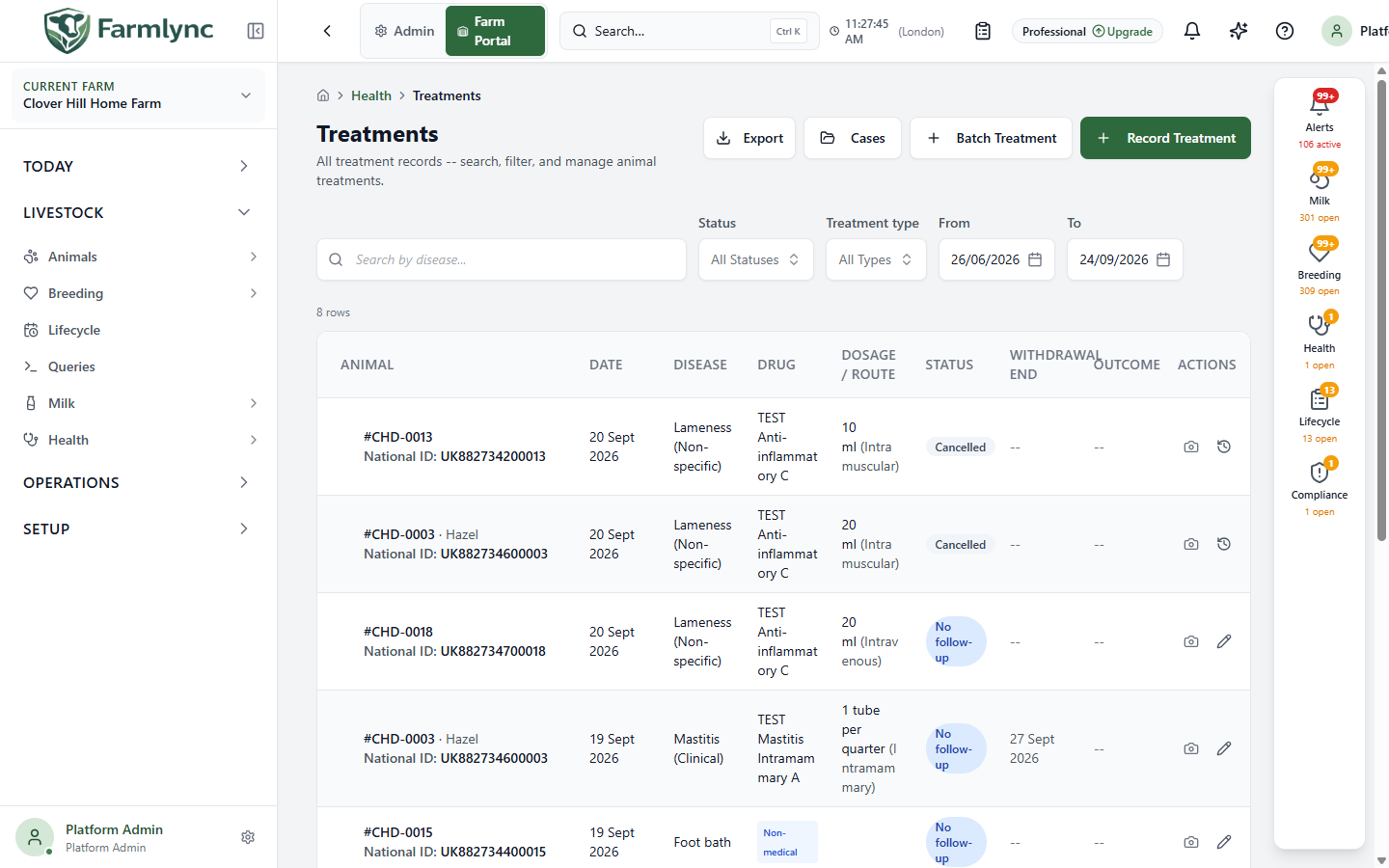
| Control | What it does |
|---|---|
| Search by disease | Searches the condition description; it is not a general tag search. The search applies after a short typing delay. |
| Status | Narrow to Active, Completed or Cancelled; clear to show all. |
| Treatment type | Medical, Non-medical, or all. Non-medical activities do not have medicine or withdrawal fields. |
| From / To | Bound the treatment dates in the farm’s timezone. |
| Clear filters | Remove active search and date/status/type filters. |
| Export | Download all records matching the current filters, not only the visible page, as CSV. |
| Cases | Open the treatment-case manager; a case groups care for one animal. |
| Batch Treatment / Record Treatment | Open the batch or single-animal recording workflow. Do not use these to amend an existing administration. |
The desktop table shows the animal, treatment/date and condition, drug/course, withdrawal end, outcome and actions. On a small screen, tap a card to expand its details and actions. A row’s History opens its correction/void history. Use that history to understand what changed; the most recent list values alone do not tell the entire story.
Choose the right follow-up action
Section titled “Choose the right follow-up action”| Action | Use it when | What to expect |
|---|---|---|
| Outcome | The result of care is known. | Select an outcome and optionally explain it in Notes. Available outcomes are Ongoing, Recovered, Chronic management, Deceased and Failed. Ongoing keeps the treatment active; every other outcome completes it. A Failed result can open a new, linked treatment form if Switch to a different medication remains checked. Save that new form separately after review. |
| Extend follow-up instead | More observation is needed and there is no terminal outcome yet. | Set a later follow-up date. This is available only while the treatment is Active with an Ongoing outcome; it changes the planned check without claiming recovery or failure. |
| Complete | The active treatment course should be closed. | Confirm Mark completed. This is a separate course-status action from recording an outcome. Check any withdrawal hold independently. |
| Correct | A saved detail was entered incorrectly. | Make an audited edit with a mandatory reason; see below. Do not create a duplicate treatment to fix a typo. |
| Void | The recorded treatment should be cancelled as an erroneous record. | Available only within the farm’s configured void window (24 hours if unchanged). The confirmation explains the stock and withdrawal reversal and requires a reason. The original remains in the audit history. |
| History | You need the earlier values and reason. | Read the correction and void entries without changing the treatment. |
Record one treatment outcome
Section titled “Record one treatment outcome”Open Outcome on the treatment row. Farmlync loads the latest saved version before enabling the form so that one user’s decision does not silently overwrite another person’s change.
| Control | What to enter or check |
|---|---|
| Outcome * | Choose Ongoing, Recovered, Chronic management, Deceased or Failed. Ongoing keeps the treatment Active. Any other choice changes it to Completed. An outcome already recorded on a completed treatment cannot be replaced from this form; use the supported correction history instead. |
| Switch to a different medication | Appears only after choosing Failed, and only where the page supports the linked follow-on workflow. It starts checked. Leave it checked to open a new treatment form linked to the failed course; clear it when no replacement treatment is being recorded now. The outcome saves first, and the new treatment saves only when you separately submit its form. |
| Notes | Optional factual explanation applied to this outcome, up to 1,000 characters. |
| Update Outcome | Saves the outcome. Related alerts and work can take a moment to refresh after the saved clinical change. |
| Cancel | Closes the panel without saving. It is disabled while the save is in progress. |
Recording Deceased here describes the treatment result; it does not replace the animal departure/death workflow. Check the animal’s lifecycle status separately.
Extend the follow-up date instead
Section titled “Extend the follow-up date instead”Choose + Extend follow-up instead when the animal still needs observation and it would be misleading to record recovery or failure.
| Control | What it does |
|---|---|
| New follow-up date | Choose a farm-local date later than both today and the current follow-up date. The treatment must still be Active with outcome Ongoing. |
| Extend | Saves the later date. The old due alert is cleared and scheduled work follows the new date. |
| Cancel | Collapses this alternative without changing the treatment. |
Do not use Ongoing merely to postpone a due task. If the clinical assessment is still genuinely ongoing, use the later follow-up date so the next review is explicit.
Record the same outcome for several treatments
Section titled “Record the same outcome for several treatments”The bulk checkbox is narrower than the row action: only active treatments with a follow-up date can be selected. Select rows, including across pages, then choose Record Outcome in the selection bar. A single request supports at most 200 distinct treatments.
| Control | What to enter or check |
|---|---|
| Applying one outcome to n of n treatments | Lists the selected animal tags. All rows start checked. Clear an animal that needs a different decision. Select all restores excluded rows. At least one must remain selected. |
| Outcome * | One of Ongoing, Recovered, Chronic management, Deceased or Failed, applied to every checked treatment. Ongoing keeps each successful treatment Active; terminal outcomes complete it. |
| Switch to a different medication for all | Appears for Failed where the page supports a linked batch treatment. It starts checked and opens the batch-treatment form with only the animals whose Failed outcome saved successfully. Review that separate form before submitting it. |
| Notes (applied to all) | Optional shared explanation, up to 1,000 characters. Do not use a shared note when the animals need different clinical detail. |
| Record Outcome | Saves the outcome for the checked rows. The button is unavailable when no row is checked or a selected treatment cannot be resolved. |
| Cancel | Closes without saving any outcome. |
The result can be a partial success if, for example, a row changed after the list was loaded, no longer exists on this farm, is cancelled or already has an immutable completed outcome. Successful rows are committed and the result identifies failed treatment IDs. Inspect the failures and refresh before retrying; do not resubmit the successful rows. A Failed follow-on batch contains only the confirmed successes.
Correct a treatment without losing its history
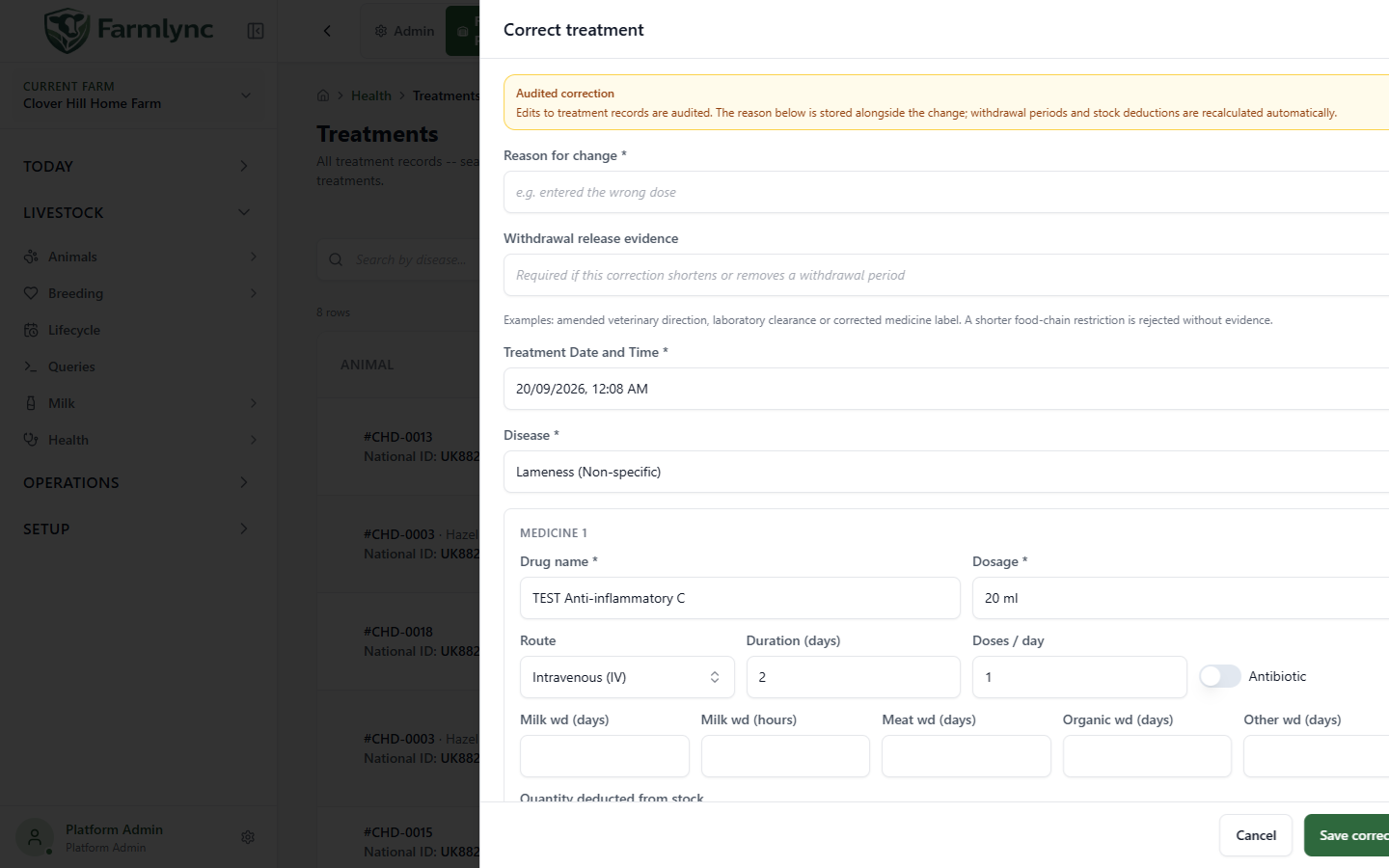
Section titled “Correct a treatment without losing its history”On the saved treatment row choose Correct (pencil). The panel loads the current detail before enabling edits. It preserves the treatment’s identity, case links and existing medicine lines. The current panel edits existing lines; it does not expose add/remove medicine controls. Use a new treatment for a newly administered medicine, rather than altering history to imply it was part of a past administration.
| Field | What to enter or check |
|---|---|
| Reason for change * | State the factual reason, up to 500 characters. The reason and before/after values are retained in correction history. |
| Withdrawal release evidence | Supply the supporting reference if the correction shortens or removes a restriction. The server requires 10–1,000 characters when supplied and refuses a reduced hold without it. Only an authorised Owner or Manager can approve such a reduction. |
| Treatment Date and Time * | Correct the actual administration time in the farm timezone. Moving it can change the restriction over previously recorded milk. |
| Disease * | Correct description, up to 200 characters. Disease code and treatment type are also part of the saved detail, but this panel does not expose them as editable controls. |
| Drug name * / Dosage * | Correct each existing medicine; name up to 200 and dosage up to 100 characters. A single-drug record displays its own Drug section. |
| Route | Select the actual route from the displayed list. |
| Duration (days) / Doses per day | Whole numbers of at least 1 on each medicine line. The single-drug form has Duration. |
| Antibiotic | Match the actual medicine; changing the switch is a clinical-record correction, not a substitute for reviewing withdrawal. |
| Milk wd (days/hours), Meat/Organic/Other wd (days) | Non-negative whole values. Milk hours may not exceed 2,400. For a line with an Authorised or Cascade use declaration, milk/meat effective values are read-only here; this panel does not change the underlying declaration. Organic/Other remain editable. |
| Quantity deducted from stock | Displayed for a linked medicine product. Changing it reverses the old consumption and deducts the corrected quantity; check the resulting stock ledger. |
| Administered by / Vet name | Identify the actual performer and veterinarian. A chosen performer role requires a person; names are limited to 200 characters. |
| Medicine cost / Vet cost / Other costs | Medicine cost is derived from consumed stock and is read-only. Vet/Other accept non-negative amounts, at most two decimal places. A visit-linked Vet cost is read-only here; edit the veterinary visit’s fee instead. Older records may show one legacy total. |
| Notes | Factual context, up to 1,000 characters. |
| Save correction / Cancel | Save the audited replacement or close without changing it. A stale record version requires a fresh review rather than overwriting another person’s edit. |
The server recalculates withdrawal and stock effects with the correction. A longer milk restriction can withhold already recorded milk that falls in the newly restricted period. A shorter restriction does not automatically release a milk lot that was withheld under the previous rule; that needs its own authorised correction. Inspect the animal’s restrictions, affected milk and inventory after saving.
Check withdrawal clearance
Section titled “Check withdrawal clearance”Open Farm → Health → Overview → Withdrawal clearance. This is a list of unique animals, grouped from active treatment withdrawals. Its badge also shows how many treatments contribute; those counts differ when an animal has more than one relevant treatment.
Use Milk restricted, Meat restricted, Both restrictions or Clearing today to narrow the list. The day bars show animals becoming fully clear today, tomorrow, following days or after seven days; clicking a bar filters the rows. All / Milk / Meat / Both / Clearing today below the chart also filter the list. Clear a selected day to return to the broader restriction view. Each row gives animal identity, restriction type, reason/treatment, applicable clear dates and effective wait; open its detail for the underlying record. Page through the results when necessary.
Check each relevant produce type and exact end time before milk collection or animal movement. “Clearing today” means the time may still be in the future. A course can also remain on an open withdrawal hold until its final administration is confirmed. A projected end date alone does not lift that hold.
Confirm the final course administration
Section titled “Confirm the final course administration”When the work list offers Confirm course completion, open it only after someone observed the final dose. This action is available for a declared medicine course whose withdrawal is waiting for completion confirmation. It is not offered for a legacy or undeclared-use treatment whose restriction already anchors at its planned end.
The panel identifies the animal, condition, medicine and treatment start where those details are available.
| Control | What to enter or check |
|---|---|
| Final Administration Date and Time * | Enter the exact farm-local minute when the last dose was actually given. It cannot be in the future or before the treatment started. A date without a time is refused because milk withdrawal can be hour-sensitive. |
| Release evidence | Optional when the observed completion preserves or lengthens the projected restriction. It becomes mandatory if the entered time would end any withdrawal earlier than the projection. Enter the supporting vet instruction, course log or equivalent reference, up to 500 characters. |
| Reason for correction | Appears and is mandatory when authorised Farmlync Support performs the action. It records why the support correction was needed, up to 500 characters. |
| Confirm completion | Records one confirmation for the current course revision and recalculates the restriction from the observed final administration. |
| Cancel | Closes without confirming. |
Owners, Managers and Vets with treatment-recording authority can confirm a course. If confirmation shortens a withdrawal, the saver must also have the Owner/Manager inventory-management authority; evidence alone does not grant that authority. The animal must currently stand on the selected farm, including after an internal transfer.
Confirming the course:
- closes the open course-completion hold for the current course revision;
- re-anchors milk and other withdrawal end times at the observed final administration;
- can withhold previously recorded milk if the real course ended later than planned;
- writes an attributed clinical correction record; and
- does not automatically release milk that was already withheld when a shorter restriction is confirmed.
A material correction to the medicine course creates a new course revision and can require confirmation again. A course already confirmed for its current revision cannot simply be confirmed a second time with another timestamp; use the audited correction workflow for a wrong record.
This confirmation is different from Mark completed on a treatment row. Mark completed changes treatment status; Confirm course completion records the observed last administration that controls an open food-chain hold. Review the resulting exact clear time before releasing milk, meat or an animal.
If the displayed hold conflicts with source treatment, prescription or test evidence, use the supported correction path with an authorised person. Do not merely wait for a date, change a filter or record an unrelated treatment to hide the conflict. For milk already in a tank or lot, continue with Tank collection and safety.