

Heat detection — single and batch recording
What this page helps you do
Section titled “What this page helps you do”Heat detection records an observed sign, not a completed service. Use it to place an animal in the correct breeding window and decide whether follow-up service work is needed.
A heat detection records what you observed and when. It does not record insemination or confirm pregnancy. Use Breeding → Record → Record Heat for one animal and Batch Heat for several animals observed at the same time. Animal actions and work items can supply a preselected animal.
Before recording
Section titled “Before recording”Choose the correct farm. You need Record breeding events permission. The normal single-animal workflow requires an active female beyond Calf stage, enrolled in the Breeding Program and not marked Do Not Breed. The animal search also hides animals on an active breeding hold. Do not use a fixed animal, a saved selection or a batch seed to bypass that hold.
Use the actual observation, not a predicted heat or reminder. Enter time in the farm’s timezone. A single heat record cannot be more than five minutes in the future. A second heat for the same animal on the same farm-local day is refused. Check history before retrying a save whose response was interrupted.
Single-animal screen
Section titled “Single-animal screen”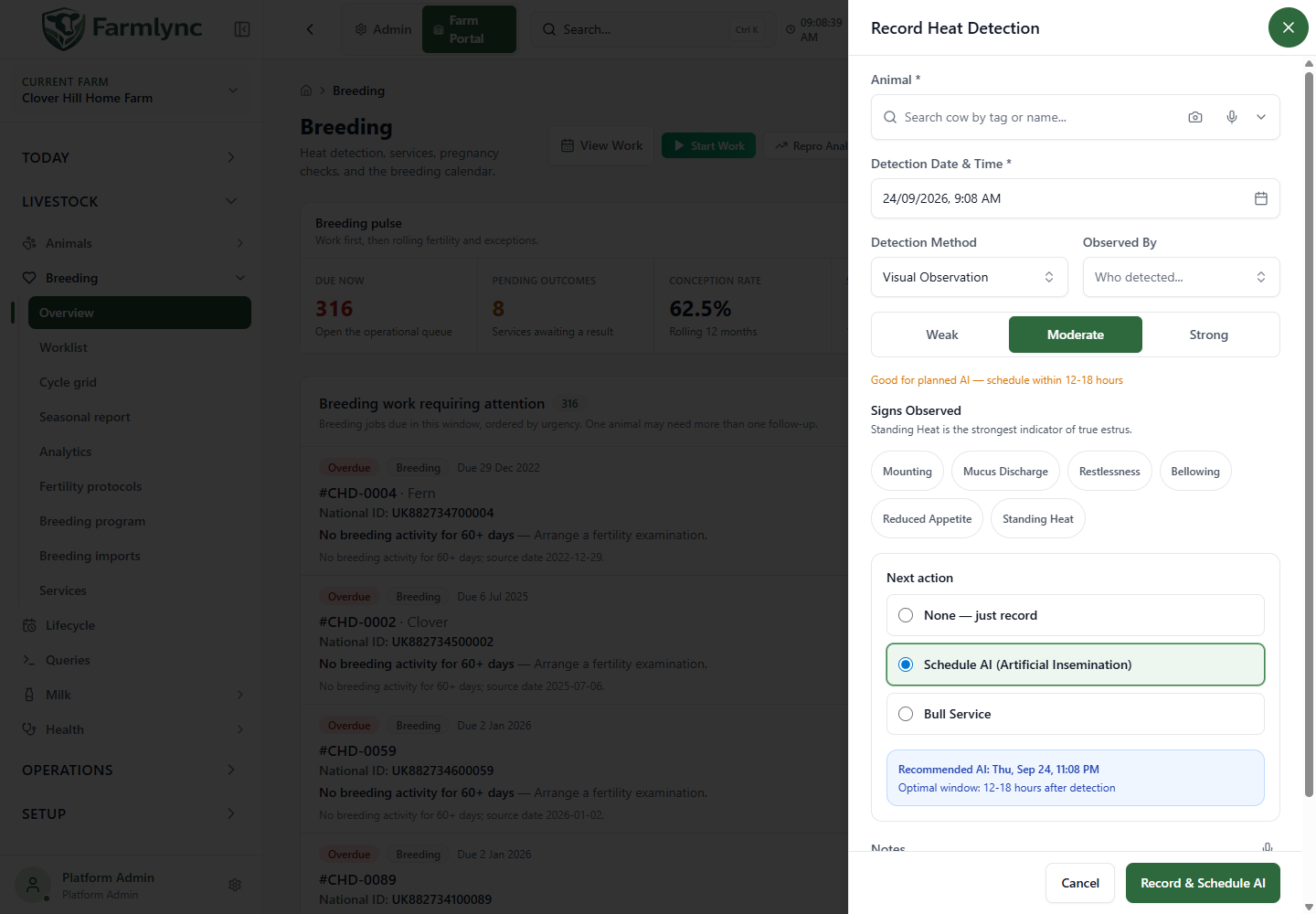
| Control | What to enter and how it behaves |
|---|---|
| Animal | Required. Search by tag/name and select the correct animal. When opened for a specific animal, that animal can be fixed. |
| Cycle context | Read-only heat number, reproductive status, previous heat and estimated next heat. Next expected day is the last recorded heat day plus 21 days; this is a planning estimate. |
| Detection Date & Time | Required. Defaults to farm time now. Change it to the actual observation time. |
| Detection Method | Required; defaults to Visual Observation. Choices: Visual, Activity Monitor, Tail Paint and Pedometer Alert. Selecting a device-related method does not connect a device. |
| Observed By | Optional role: Farmer, Staff or System. Distinct from the signed-in account recording the entry. |
| Intensity | Required: Weak, Moderate or Strong. Default Moderate. The timing hint changes with the choice. |
| Signs Observed | Mounting, Mucus Discharge, Restlessness, Bellowing, Reduced Appetite and Standing Heat. Select all observed signs; click again to remove. Selecting Standing Heat changes intensity to Strong. Removing the sign does not automatically restore the previous intensity. |
| Next action | Where service hand-off is supported: None — just record, Schedule AI (Artificial Insemination), or Bull Service. Moderate/Strong suggest Schedule AI; Weak suggests None. Review this choice. |
| Notes | Optional, maximum 1,000 characters. The microphone can append dictated text when supported; check it before saving. |
A currently confirmed/late-pregnant animal shows a warning. Verify its identity and the observation. This is not a pregnancy-loss diagnosis; recording heat does not itself change pregnancy state to Open.
AI timing information
Section titled “AI timing information”| Intensity | Displayed window after detection | Suggested time passed to service form |
|---|---|---|
| Strong | 6–12 hours | 8 hours |
| Moderate | 12–18 hours | 14 hours |
| Weak | 18–24 hours | 20 hours |
These are application planning hints, not confirmation that the animal is ready to serve. Review service date/time against the actual work performed.
Save and the next screen
Section titled “Save and the next screen”- Record Heat saves the observation without opening a service form.
- Record & Schedule AI saves the heat first, then opens AI recording with the animal and heat linked.
- Record & Add Service saves the heat first, then opens natural-service recording.
- Opening that next form does not save a service. Save it separately only when it represents the actual event. Cancelling it leaves the already-saved heat in place.
- Cancel before saving discards the unsaved heat form.
After a successful single recording, check Heats and the animal timeline. Applicable pending heat-watch work is completed and work/alert views are refreshed. Alert generation also depends on enabled rules. A heat success message does not establish that an insemination has been recorded.
Batch Heat screen
Section titled “Batch Heat screen”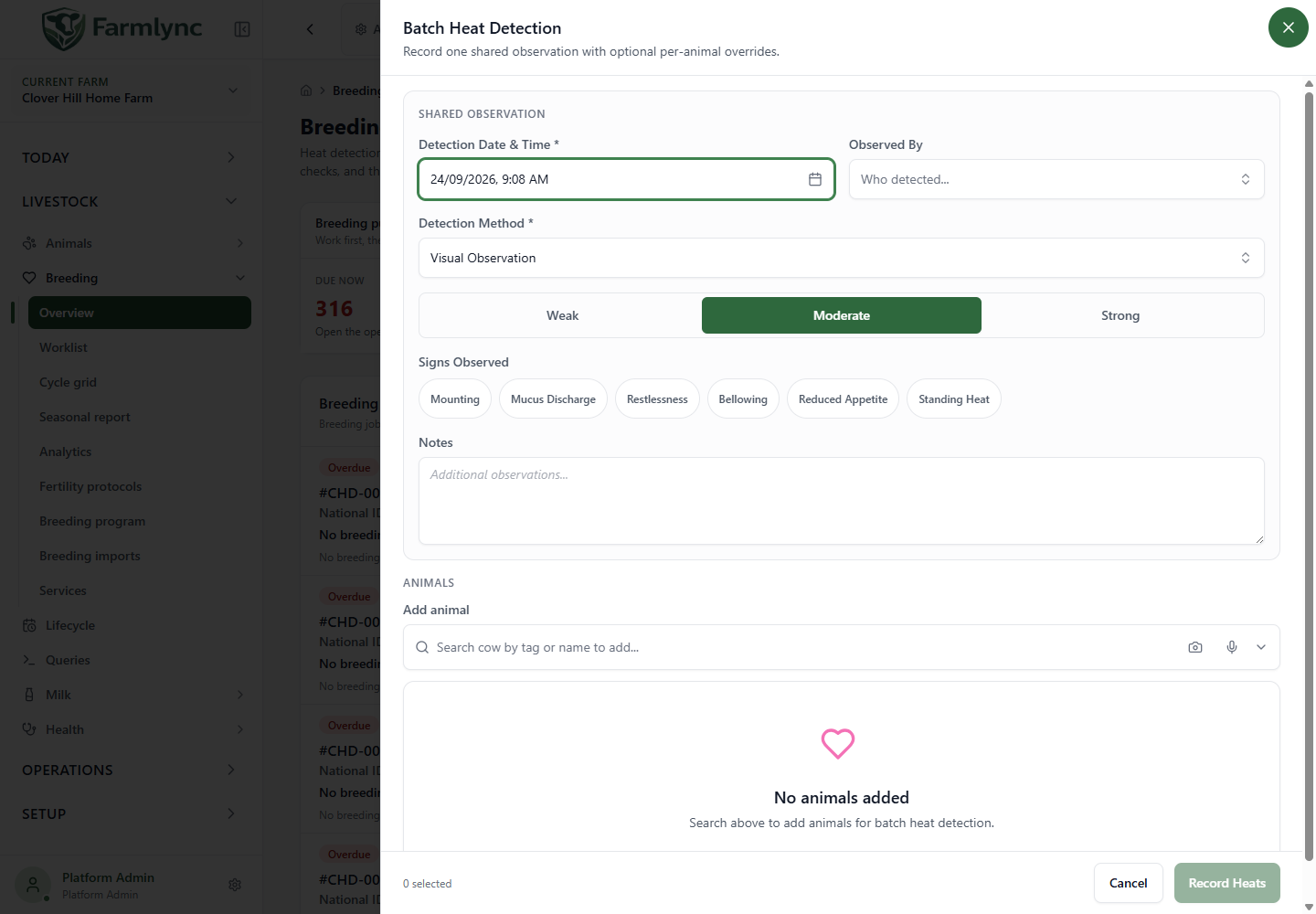
Use batch for animals sharing the time, method and observer. Split different observation times into separate batches or use the single form.
Shared observation
Section titled “Shared observation”Detection Date & Time, Observed By, Detection Method, Intensity, Signs Observed and Notes have the meanings above. Defaults are farm time now, Visual and Moderate. Shared Standing Heat changes shared intensity to Strong. There is no batch Next action/service hand-off.
Animal list and overrides
Section titled “Animal list and overrides”| Control | How to use it |
|---|---|
| Selection tray context | Eligible animals selected elsewhere can seed the list. Read skipped/limit notices; do not assume every selected animal was included. |
| Add animal | Search for another animal. Existing selections are excluded. Up to 500 animals per request. |
| Select all / individual checkbox | Include/exclude rows from this save. Unchecked rows stay in the draft but are not submitted. |
| Clear all | Clears the draft animal list; does not delete records. |
| Remove row | Removes that animal from the draft. |
| Expand row | Opens overrides; smaller screens show corresponding cards. |
| Intensity override | Shared, Weak, Moderate or Strong. Shared inherits the setting above. |
| Signs override | A non-empty set replaces shared signs. Standing Heat also makes the row Strong. Leaving all override signs blank inherits shared signs; it does not mean “no signs”. |
| Notes override | Non-empty text replaces shared notes. Blank inherits them. Keep within 1,000 characters. The current row control and batch API do not enforce that limit, so longer text can make the whole persistence step fail. |
| Recent heat warning | Flags a heat on the chosen day or within seven days before/after it. The preview uses a bounded recent list, not complete history. The server checks same-day duplication on save. |
Submit, results and retry
Section titled “Submit, results and retry”- Review shared details, selected animals and overrides.
- Click Record Heats.
- Read both success and failure lists. Ineligible animals or duplicates can fail while others are recorded.
- Retry failures returns only failed animals to the form, preserving their overrides. Successful animals are not added to the retry.
- Correct the reason before resubmitting, or close the results and review saved heats.
A network interruption is not proof that nothing saved. Check results/history before making a replacement batch.
The current batch command does not repeat every single-animal safety check. In particular, it does not reject a future observation time, a Calf-stage animal or an animal on an active breeding hold. Use only genuine observations for eligible breeding animals even if a seeded selection or control permits another entry. Batch recording writes timeline and alert events, but it does not currently complete the pending heat-watch work item that the single command completes; review the Work list after a batch.
Worked example
Section titled “Worked example”Two eligible cows were observed together. Enter the actual time, Visual and shared Moderate intensity. Add both. Expand the cow that showed Standing Heat and select that sign; her override becomes Strong. Leave the other on Shared. Save and inspect both results. Record AI/natural service separately when performed.
Next: Breeding service or pregnancy diagnosis.