

Breeding Cycle Grid and Bray board
What this page helps you do
Section titled “What this page helps you do”The Cycle Grid groups animals by reproductive timing and status. Use it to identify who may need a heat check, service or pregnancy diagnosis rather than reading every event history separately.
Open Breeding → Cycle grid. Use this page to understand where animals sit in the breeding cycle and review their recorded events. Use the linked Worklist when you want to carry out a breeding action.
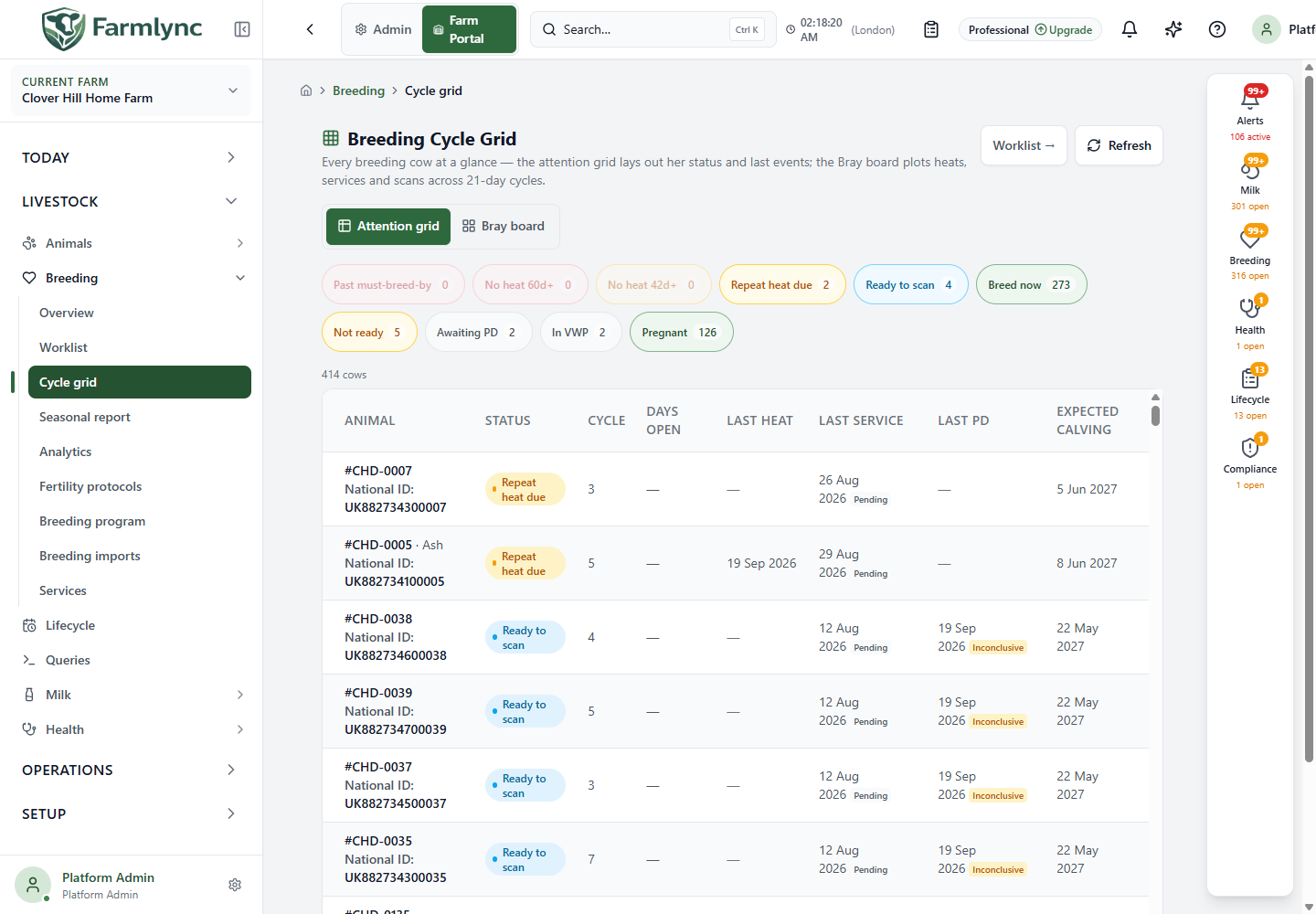
Page controls
Section titled “Page controls”| Control | What it does |
|---|---|
| Attention grid | Shows one row per animal with current status and latest events. This is the starting view. |
| Bray board | Places recorded breeding events into 21-day columns for each animal. |
| Reproductive-status chips | Select a status to show only that group. Select the same chip again to remove the filter. A zero-count chip is unavailable unless it is the currently selected filter. |
| Refresh | Recalculates the view from current records. |
| Worklist → | Opens the related reproductive worklist with its available recording actions. |
| Animal identity | Opens that animal’s record. |
Counts are for this breeding cohort, not every animal on the farm. Animals outside the breeding programme or on an active breeding hold are not included in the visible grid. Farmlync recalculates each displayed status from records and settings; you do not drag an animal into a status column.
Understand the status chips
Section titled “Understand the status chips”| Status | How to interpret it |
|---|---|
| Past must-breed-by | An open, unserved cow is beyond the deadline calculated from last calving plus the configured days-open threshold. |
| No heat 60d+ | No observed heat for at least 60 days in the relevant open breeding cohort. If there is no heat record, days since calving provide the fallback. |
| No heat 42d+ | The corresponding observed-heat gap is at least 42 days but has not reached the higher-priority 60-day category. |
| Repeat heat due | There is an unresolved service, no confirmed pregnancy, and the service is reaching the next configured heat interval. This is a timing prompt, not a recorded observation of heat. |
| Ready to scan | An unresolved service has reached the application’s scan window, normally 30 days after service. |
| Breed now | Open and outside the waiting period, subject to readiness checks and the animal’s current facts. |
| Not ready | An enrolled, unserved maiden heifer has not met the configured minimum age or weight evidence needed for the normal Breed now state. Read the explanation on the row. Animals outside the breeding programme or on an active hold are inactive and omitted instead. |
| Awaiting PD | A service is recorded, but it is still before the later repeat-heat/scan window. PD means pregnancy diagnosis. |
| In VWP | Still within the voluntary waiting period after calving. VWP is the configured interval before breeding resumes. |
| Pregnant | A qualifying positive pregnancy diagnosis is recorded after the animal’s last calving. |
An animal has one primary bucket in this view. For example, a cow beyond the must-breed-by deadline is not also counted in every no-heat bucket. Served animals are classified by their service/scan timing before the open-cow no-heat checks.
Rows are ordered by attention priority: Past must-breed-by first, followed by the no-heat, repeat-heat, scan, breeding-readiness and waiting states. Within one status, cows with the greatest Days open appear first. The page is not alphabetically sorted and does not offer manual column sorting.
Why can Work show a different no-activity count? The cycle grid measures observed heat within the breeding cohort. The general Work list can measure any breeding activity over a wider population. Those are different questions; compare the definition as well as the number.
Attention grid columns
Section titled “Attention grid columns”| Column | Meaning |
|---|---|
| Animal | Tag/name and identification details according to farm display settings. Select it to investigate. |
| Status | Current calculated reproductive bucket. Not ready can include an explanatory message. |
| Cycle | The recorded current breeding-cycle number, when available. This is not the same as the Bray board’s C1/C2 time-column number. |
| Days open | Days since last calving for an open cow in this calculation. A dash is expected for some animals, including maiden heifers or a confirmed-pregnant state; it is not zero days. |
| Last heat | Most recent recorded heat date. |
| Last service | Most recent service date and its current outcome. |
| Last PD | Most recent pregnancy-check date and result. |
| Expected calving | The available calculated or manually recorded due date. For a served animal without pregnancy confirmation, a service-based date is provisional. |
Positive/Conceived results use green; Negative/Failed use red; Inconclusive uses amber; other or unresolved outcomes use neutral styling. The text is the result; do not rely on colour alone.
A Failed or Early Loss service no longer anchors a continuing service cycle, even though it can remain visible as the latest service. That is why the row may show a failed service alongside an open status.
On narrow screens the same animals use compact cards. Open the animal record if the compact card does not show the detail you need.
Read the Bray board
Section titled “Read the Bray board”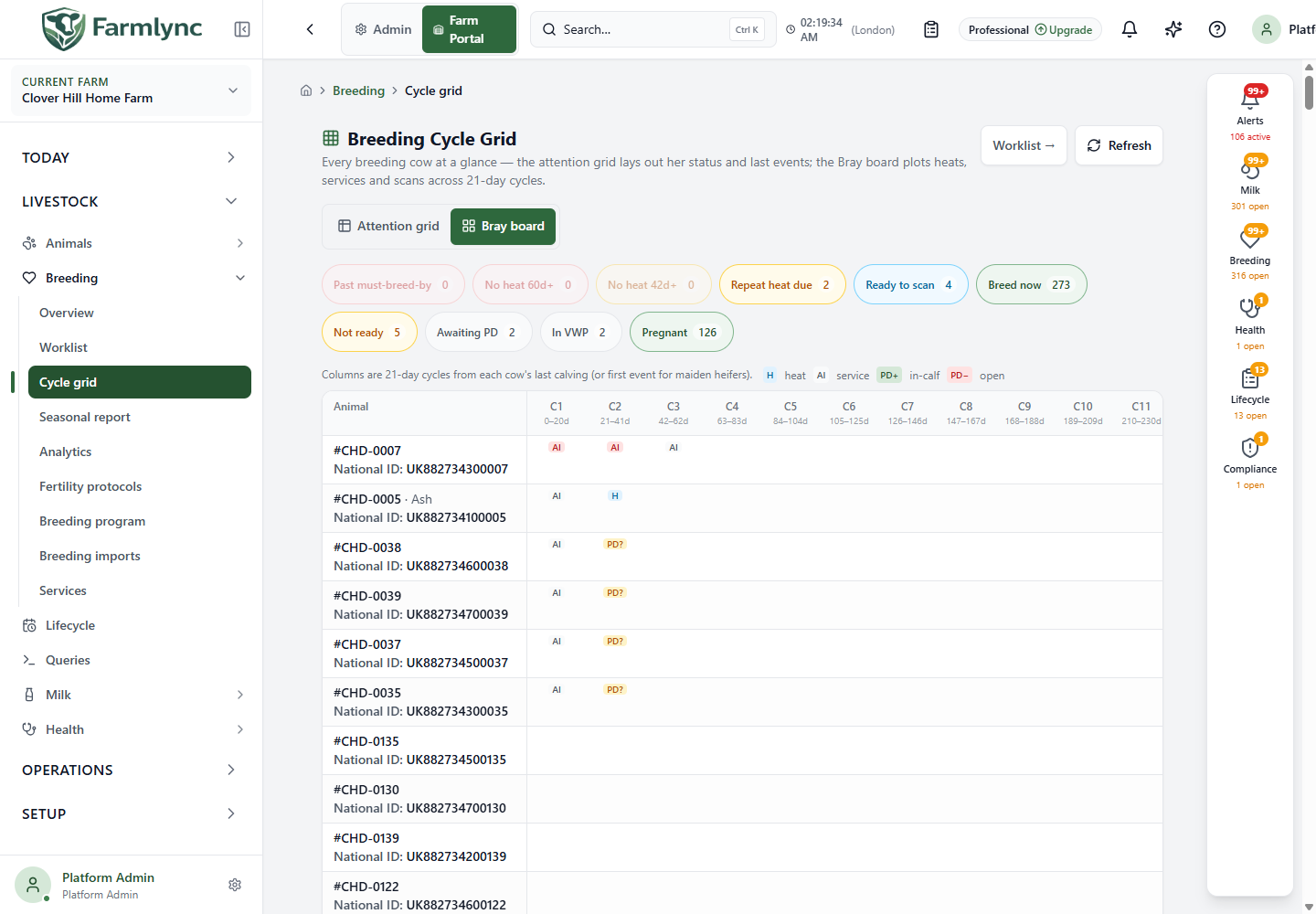
Each row starts its time scale at that cow’s most recent calving. For a maiden heifer, it starts at her first recorded breeding event. Different rows can therefore represent different calendar dates in the same column.
- C1: 0–20d is the first 21-day period from that row’s starting date.
- C2: 21–41d is the next period, followed by later 21-day columns.
- Scroll horizontally to inspect later columns. The animal column stays at the left.
- The board is capped at 18 columns; it is not the complete lifetime event history.
- The number of columns follows the widest current row, using today or the latest plotted event, then stops at the 18-column cap.
- Hover over a marker to see its event description and actual date.
| Marker | Meaning |
|---|---|
| H | A recorded heat observation. |
| AI | A recorded service. The board uses this marker for service events; consult the service record for the actual service type. |
| PD+ | Positive pregnancy check. |
| PD− | Negative pregnancy check. |
| PD? | A pregnancy check with another or unresolved result; inspect its tooltip/record. |
| Ab | Recorded abortion. |
Multiple markers in a cell mean multiple events in that period. Blank cells mean no included event is shown; they are not proof that nothing happened. Events before the current row’s starting date belong to earlier history and are not plotted on this board.
Example: review an animal waiting for a scan
Section titled “Example: review an animal waiting for a scan”Select Ready to scan, open a candidate’s history and check the last service and PD records. Use Worklist to open the permitted pregnancy-check action after the examination has occurred. Return and refresh the grid to review the resulting state. Do not record a positive result merely to move the animal out of the Ready to scan group.