

Vaccination protocols — schedules, rules and alerts
What this page helps you do
Section titled “What this page helps you do”Vaccination protocols define planned preventive-care schedules and the work they create. Use them to keep the schedule consistent while recording each real administered dose separately.
Open Health → Vaccination protocols. A vaccination protocol is a set of rules that helps identify animals needing a vaccination. It creates scheduled work and alerts; it does not record that a vaccination has been administered.
Use your farm’s agreed vaccination programme when entering rules. Example names in a catalogue or screenshot are not a recommendation for a particular animal or country.
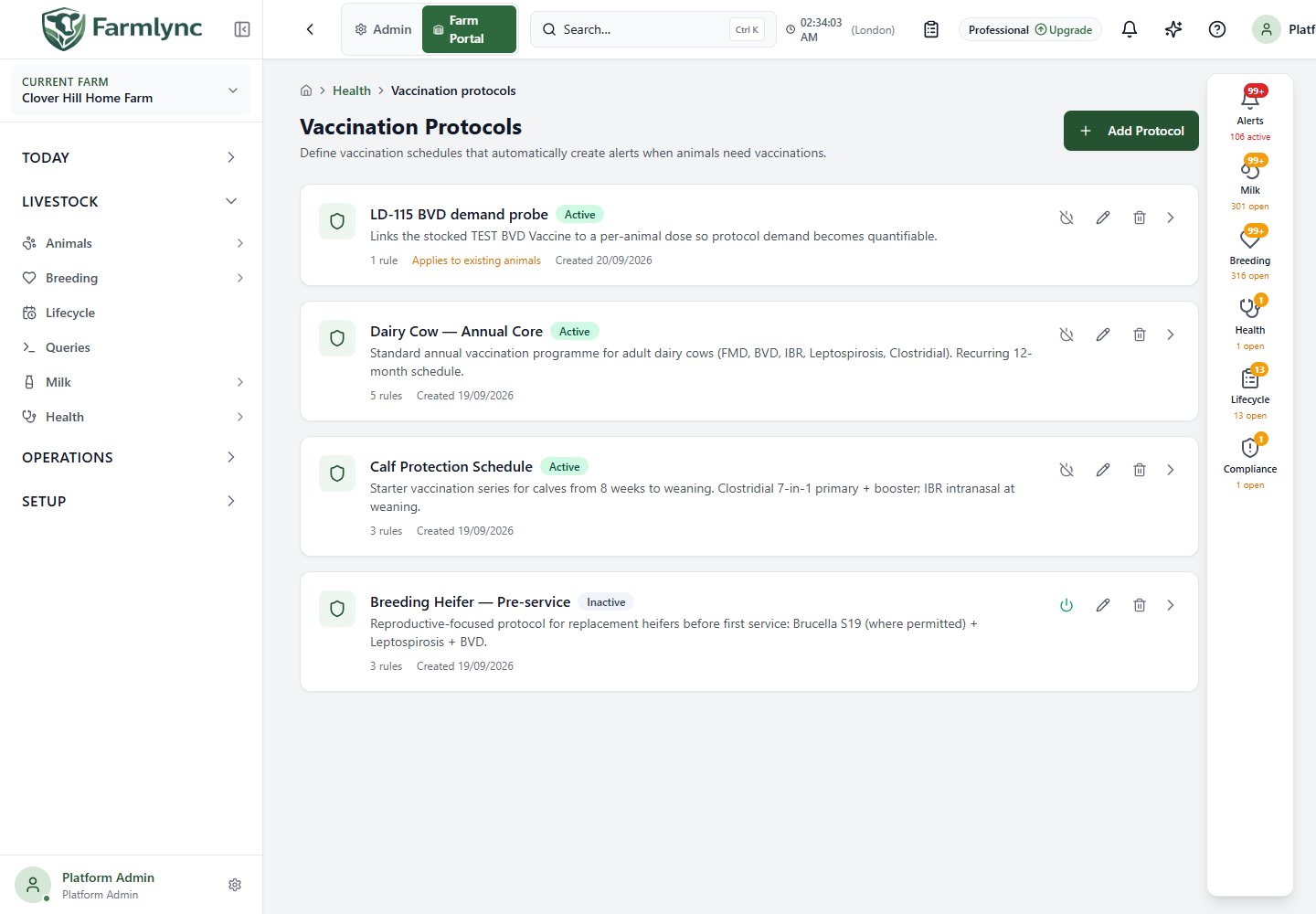
Understand the protocol cards
Section titled “Understand the protocol cards”| Item | Meaning or action |
|---|---|
| Name and description | Identify the schedule and its intended use. |
| Active / Inactive | Whether the protocol is enabled to generate work. Individual rules also have their own active switch. |
| Rule count | Number of active rules, rather than the total number including disabled rules. |
| Applies to existing animals | Shows that the activation-time review of the existing herd was requested. See the limitation below before relying on this switch. |
| Card heading / chevron | Expand or collapse the rule list. Inactive rules appear struck through. |
| Activate protocol | Requests an impact preview and confirmation before enabling an inactive protocol. |
| Deactivate protocol | Disable an active protocol. This does not delete vaccination records. |
| Edit protocol | Change its details and rules. |
| Delete protocol | Confirm removal of the protocol and its associated rules. This is not the same as deactivating it. |
| Previous / Next | Move through the list when there are more than 20 protocols. |
The server requires permission to record vaccinations for changes. Available controls also depend on the page’s current edit permissions.
Create a protocol
Section titled “Create a protocol”- Select Add Protocol.
- Enter a name and optional description.
- Decide whether to request an immediate evaluation of animals already on the farm.
- Complete at least one vaccination rule.
- Review the target animals, trigger, dose number and inventory quantity. Select Create.
New protocols created here are active. Copies adopted from the global catalogue initially arrive inactive, without a farm inventory-product link. Review and customise those copies before activating them.
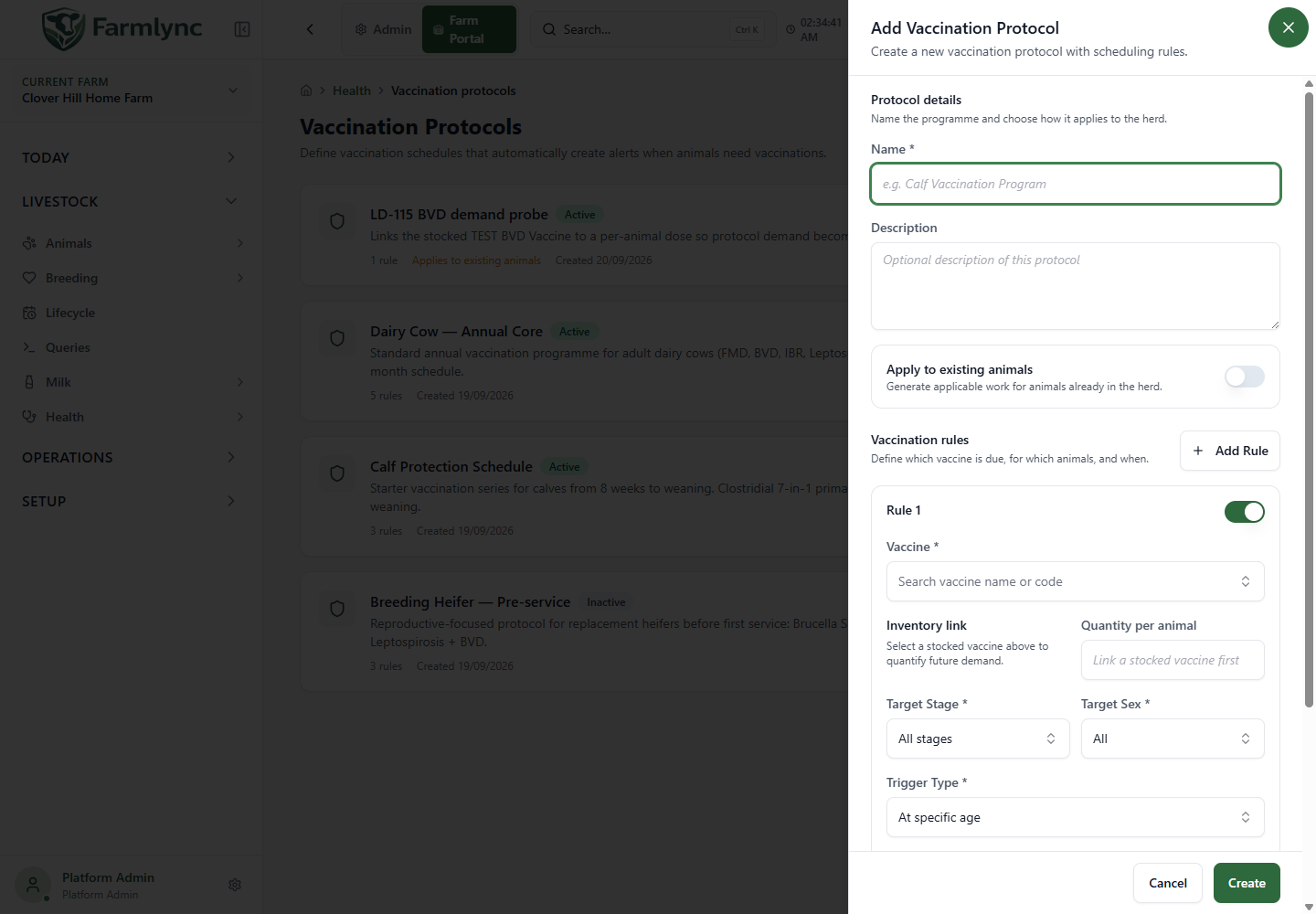
Protocol details
Section titled “Protocol details”| Field | Accepted input and purpose |
|---|---|
| Name * | Required, up to 200 characters. Choose a name not already used by another protocol on this farm. |
| Description | Optional explanation, up to 2,000 characters in this form. |
| Apply to existing animals | Off initially. When on, creating or activating the protocol requests an activation-time evaluation of the existing herd. |
| Active | Shown when editing. Turning it off prevents the protocol from remaining an active schedule. |
| Cancel | Discard the unsaved form. |
| Create / Update | Save the protocol and its current rule list. A success notification confirms the save. |
Current limitation: the periodic vaccination evaluator considers matching animals under active protocols without using Apply to existing animals as a permanent exclusion. Leaving that switch off is therefore not a reliable way to limit an active protocol to future arrivals. Keep the protocol inactive if it must not generate work for the current herd.
Every control in a vaccination rule
Section titled “Every control in a vaccination rule”| Field or control | Accepted input and effect |
|---|---|
| Add Rule | Add another rule to the same protocol. At least one must remain. |
| Rule … active | Enable or disable this rule without removing it from the form. |
| Remove rule | Remove the selected rule before saving. Available when there is more than one rule. |
| Vaccine * | Search by name or code. The current picker offers inventory-tracked Health/Vaccine products available to this farm. Selecting a product supplies its vaccine name, code and inventory link. |
| Inventory link | Displays whether the rule has a farm stock product for purchase-demand calculations. An adopted rule may need a local product selected here. |
| Quantity per animal | Positive quantity in the linked product’s base unit. Required when an inventory product is linked; unavailable without a link. This is the amount per animal, not the total for the whole herd. |
| Target Stage * | All stages, Calf, Heifer, Lactating or Dry. Defaults to All stages. |
| Target Sex * | All, Male or Female. Defaults to All. |
| Trigger Type * | At specific age, When entering lifecycle stage, or Recurring interval. The next required field depends on this choice. |
| Age (days) * | For At specific age only: a positive whole number of days after birth. |
| Interval (months) * | For Recurring interval only: a positive whole number of calendar months. |
| Dose Number * | Positive whole number; starts at 1. Identifies the dose in an age-based schedule. It is not the volume administered. |
| Priority | Non-negative whole number; starts at 0. This stored rule value is not the alert’s Low/Medium/High/Critical severity. Configure alert severity through Alert rules. |
| Notes | Optional rule instructions, up to 1,000 characters in this form. |
The linked stock product must still be active on this farm and be an inventory-tracked Health item when you save. If it is unavailable, choose a valid farm product before retrying.
The expanded card currently describes linked quantities as “reserved per animal”. Treat them as planned demand: saving a protocol does not itself deduct or set aside a particular stock batch. Record actual administration through the vaccination form.
How the three triggers work
Section titled “How the three triggers work”At specific age
Section titled “At specific age”The scheduled due date is the animal’s farm-local birth date plus Age (days). For example, age 90 schedules a due date 90 days after birth; it does not mean 90 days after you create the protocol.
The periodic check includes eligible animals within the seven-day lead window and animals already overdue. It checks recorded vaccine identity and dose number. A matching vaccination with the required dose number or a higher one satisfies the age-rule check.
Separate rules can describe different dose numbers and ages. Enter the agreed ages explicitly; the form does not calculate the second dose’s timing from the first rule.
When entering lifecycle stage
Section titled “When entering lifecycle stage”This prompts for an active animal in the targeted lifecycle stage if there is no recorded vaccination for that vaccine identity. All stages allows any current stage. A stage-related prompt can end when the animal leaves that stage.
This is not automatically a “repeat at every stage entry” instruction: an existing vaccination for the same identity can prevent the prompt. Use the correct trigger for the programme you intend to run.
Recurring interval
Section titled “Recurring interval”The periodic check takes the last recorded vaccination for the same identity, converts its date to the farm’s timezone and adds the configured number of calendar months. It begins showing upcoming work around the seven-day lead window. With no matching vaccination history, it treats the gap as due now.
The same vaccine may appear in more than one protocol. The periodic evaluator combines matching prompts for the same animal and scheduling step; for recurring rules it uses the earliest due date. Do not interpret duplicate schedules as permission to administer a duplicate vaccination.
Why names and codes matter
Section titled “Why names and codes matter”Matching uses a normalised vaccine code, with the recorded name as a fallback when a code is absent. Unrelated text entered as a vaccine name may not match a protocol’s code. Check the vaccine identity and dose number in the actual vaccination record before dismissing apparently duplicate work.
Activate an adopted or inactive protocol
Section titled “Activate an adopted or inactive protocol”- Expand and inspect its rules.
- Use Edit to adjust targets, timing and local inventory links. Save.
- Select Activate protocol on its card.
- Read the confirmation: it describes the herd evaluated, predicted alerts, affected animals and a vaccine breakdown where available.
- Confirm Activate, or cancel and adjust the schedule.
- Check Alerts and Work after the evaluation has run.
If the vaccination-protocol alert rule is off, the preview explains that activation will not raise those alerts. Enable that rule in Alert rules when appropriate.
If the preview cannot be loaded, the page says it could not check the scope and still lets you decide whether to activate. For a large herd, cancel and retry the preview if you need to understand the impact first.
The preview and periodic evaluator are not identical calculations in the current implementation. Their stage and prior-dose handling differ for some triggers, and the periodic check also discovers upcoming work. Treat the preview as activation-time information, not a guaranteed final total for every later evaluation. Creating a new active protocol or changing Active inside the edit form does not use the card button’s separate preview dialogue.
Complete vaccination work
Section titled “Complete vaccination work”Open the relevant job from Work or the animal’s Health records and record the vaccination actually administered. Check animal, vaccine, date, dose number, quantity and any stock details in that form before saving.
An alert acknowledgement means someone has seen it; it is not a vaccination record. Dismissing an alert also does not establish that the animal received a vaccine. Qualifying recorded facts allow the alert system to re-evaluate the condition.
Deactivating or deleting a protocol does not erase past vaccinations. Existing alerts may change on a later evaluation, subject to the alert rule’s resolution settings; do not expect every card to disappear at the instant you save.
Troubleshooting
Section titled “Troubleshooting”| Problem | Check |
|---|---|
| Vaccine search is empty | Check that the appropriate Health/Vaccine stock product exists on this farm and is inventory tracked. Adopt or create the farm product first. |
| Save fails after choosing a vaccine | Supply a positive quantity per animal in its base unit and ensure the linked product is still active. |
| No work after activating | Check protocol and rule active switches, Alert rules, animal status/stage/sex, birth date, prior vaccination identity and timing. |
| Many old animals become due | Age dates are measured from birth; recurring rules with no matching history become due. Review the schedule and historic records rather than recording vaccinations that were not performed. |
| Existing animals receive prompts with the switch off | See the periodic-evaluation limitation above. Off is not a lasting exclusion for an otherwise active protocol. |
| Expected booster differs from the activation preview | Review dose history and the actual Work/Alerts results after periodic evaluation; the activation and periodic calculations currently differ. |
Continue with Health and treatments and Alerts for the surrounding workflow.