

Daily Health rounds
What this page helps you do
Section titled “What this page helps you do”Health rounds provide a daily checklist of animals requiring a general examination. Use the roster to record the checks actually performed and leave unexamined animals pending.
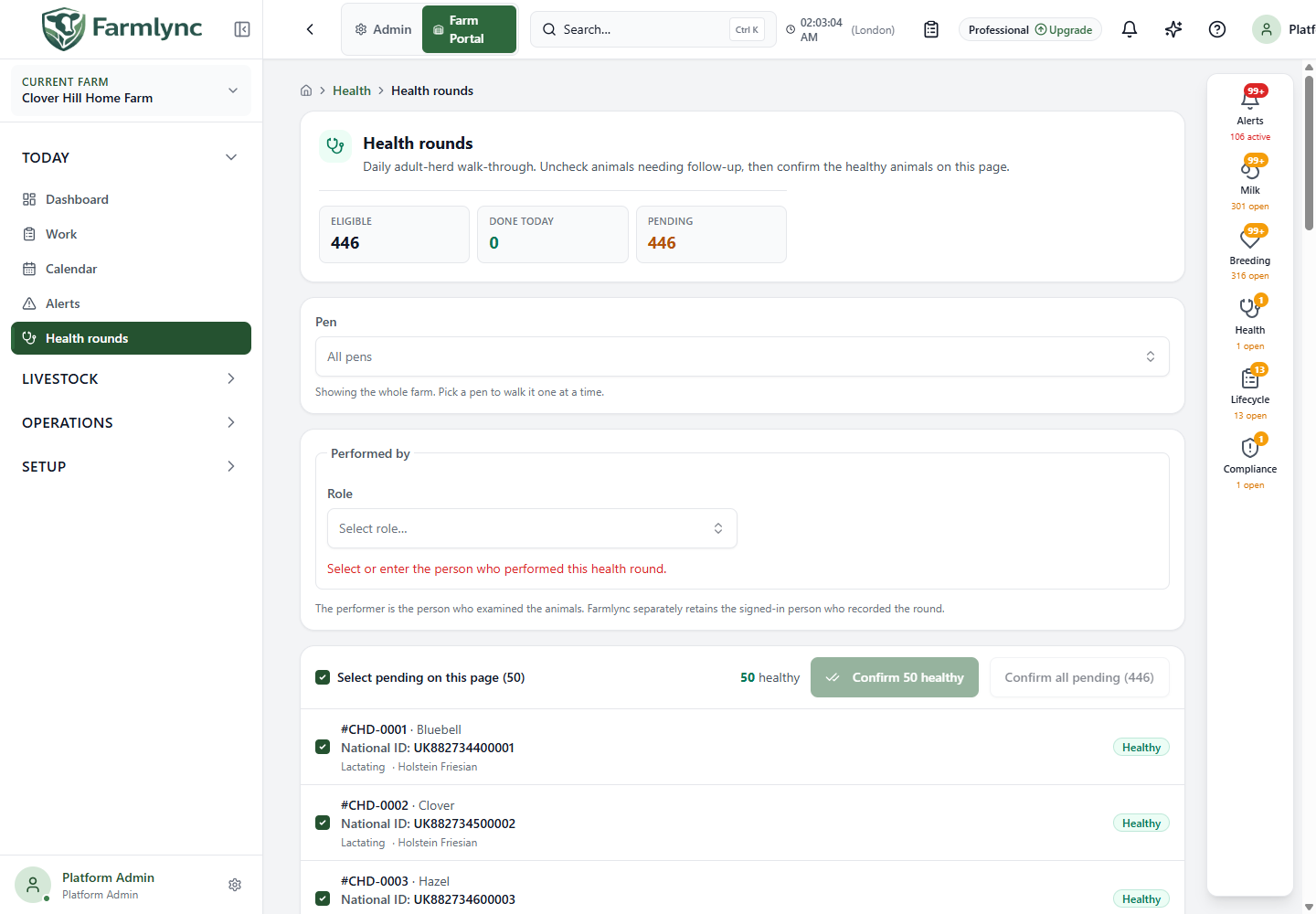
Open Health rounds in the farm portal. This is the daily general-examination roster, not a vaccination list or a treatment form. Use it after checking the animals, to record those for which no abnormalities were noted.
Which animals appear?
Section titled “Which animals appear?”The roster includes active farm animals except those currently classified as Calf or Weaner. An animal without a recorded lifecycle stage can also appear. Calf and weaner checks are recorded through their relevant health workflows rather than this roster.
An animal is Done today when it already has a non-deleted General Exam dated within the current farm-local day. A vaccination, treatment or a different kind of health check does not, by itself, complete this general-examination round.
The totals describe the selected farm or pen, not just the visible page. “Today” follows the farm’s timezone.
Controls above the list
Section titled “Controls above the list”| Control | How to use it |
|---|---|
| Pen | Leave All selected for the whole eligible farm roster, or choose a pen. The totals and whole-round confirmation then apply to that pen. Changing the pen clears the local follow-up marks, so review the new scope. |
| Page size | Choose 25, 50, 100, 250 or 500 animals. The initial page size is 50. This changes the visible rows, not the whole-round totals. |
| Page navigation | Review another page without recording it. Keep track of animals you have actually checked. |
| Performer | Identify the person who carried out the checks. This can differ from the person signed into Farmlync. |
Identify the performer
Section titled “Identify the performer”Choose a role: Farmer, Staff, Veterinarian or Other. Where offered, choose a farm person or a saved veterinary contact. If the person is absent from the list, choose Person not listed — enter a name. Other uses a typed name. A manually entered name supports up to 200 characters.
The signed-in user may be filled in when their farm role matches the selected role. Check the selection rather than assuming the person doing the data entry performed the examination. Farmlync keeps the recording user separately.
Read and change a row
Section titled “Read and change a row”| Row state or control | Meaning |
|---|---|
| Animal identity | Check the tag and name against the animal examined. |
| Checked pending animal | Included in the visible-page healthy confirmation. Pending animals initially appear selected unless you have marked them for follow-up. |
| Unchecked / Follow-up | Excluded from the healthy confirmation and left pending. |
| Done today | A General Exam is already recorded for today. It is not available for another confirmation through this round. |
| Page selection control | Changes the pending animals on this page together. It does not mark the entire farm examined. |
Follow-up is a local round marker. Unchecking an animal does not create a diagnosis, treatment or scheduled follow-up appointment. Record the appropriate detailed health check, treatment or follow-up separately. The local marks are associated with this farm and day; do not rely on another user’s device seeing them.
Confirm the checked animals on this page
Section titled “Confirm the checked animals on this page”- Examine the animals represented by the checked rows.
- Uncheck any animal needing further attention.
- Check the performer.
- Read the count on Confirm … healthy.
- Submit only when that count represents animals for which you can record the examination.
This creates a General Exam for today with the finding “No abnormalities noted during daily round.” It is a saved clinical record, not just a visual tick in a checklist. Successfully recorded animals become Done today.
Use a detailed health-check form instead when an animal has findings or recommendations that need recording. Do not confirm an animal healthy merely to clear the work list.
Confirm all pending animals
Section titled “Confirm all pending animals”When pending animals extend beyond the visible page, Confirm all pending offers a whole-round action with a separate confirmation dialog. It includes unseen pending animals in the selected farm or pen, excluding the animals marked for follow-up.
Before confirming, check the scope, exclusions and performer. Use this only when the entire included group has genuinely been examined. If you have reviewed only one page, use the page confirmation instead.
The server rechecks which animals are still pending. The whole-round action supports up to 5,000 pending animals; larger pending rosters must be confirmed page by page. Large rounds are saved in smaller groups. If a later group fails, earlier saved examinations can remain recorded.
Check the result or recover from an error
Section titled “Check the result or recover from an error”- Review the success or failure message and refreshed Done today / pending totals.
- If only some animals succeeded, inspect the remaining pending animals before retrying.
- After a connection or whole-round error, refresh the roster first: some examinations may already have saved.
- Retry only the remaining work. The whole-round action resolves the current pending roster again.
- If the page is read-only, a user with the required health-recording permission must save examinations.
An empty pending list means the eligible scope has General Exams recorded today. It does not mean the farm has no illness, withdrawal holds, vaccinations due or other health work.
Worked example
Section titled “Worked example”You check a pen of 60 animals and find two requiring further examination. Select the pen, mark those two as Follow-up, identify the examiner, and confirm the other 58 only after examining them. Then open the appropriate detailed health workflow for the two exceptions. The round markers alone do not tell another team member what illness was found or arrange their next check.