

Cull dashboard, decisions and Cull list
What this page helps you do
Section titled “What this page helps you do”Cull review brings candidate animals, the reasons for review and recorded decisions together. Use it to plan a herd decision while keeping the review separate from a later actual sale, cull or death record.
The Cull dashboard helps prioritise animals for review. The Cull list tracks recorded decisions. Neither removes an animal from your herd: an actual departure is recorded separately through Farm Exit.
Open and filter the Cull dashboard
Section titled “Open and filter the Cull dashboard”Open Animals → Cull dashboard.
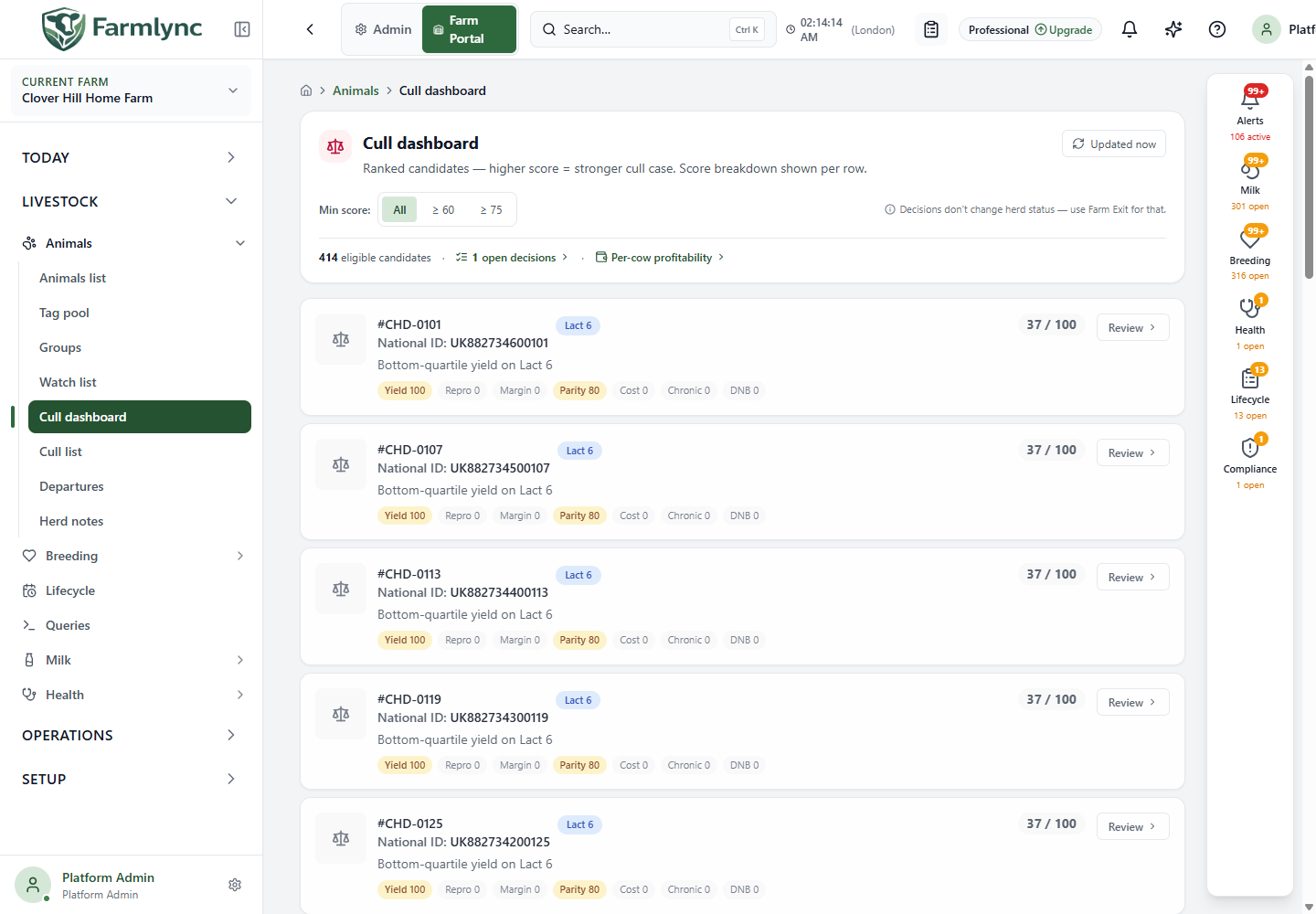
| Control or figure | Meaning |
|---|---|
| Min score: All | Shows all eligible candidates, including low-scoring animals. This is the initial view. |
| Min score: ≥ 60 | Shows candidates scoring at least 60 out of 100. |
| Min score: ≥ 75 | Narrows the review to candidates scoring at least 75. |
| Refresh | Fetches the latest candidate ranking and decision counts. |
| Eligible candidates | Number matching the current candidate query and score filter, not the entire herd population. |
| Open decisions | Opens the Cull list for decisions already made but not followed by a departure. |
| Per-cow profitability | Opens the separate financial report to inspect the income and cost evidence. |
| Page controls | Move through 25 candidates per page. |
Eligible candidates are active female animals in the Lactating, Dry or Heifer lifecycle stages. An animal whose latest decision is Kept is omitted from the candidate ranking for 60 days after that decision. Missing lifecycle data can also explain an absent candidate.
Read a candidate card
Section titled “Read a candidate card”Each card shows its animal identity, lactation number when available, previous decision, score and a short explanation. Select the animal identity to inspect its record. Review opens the decision form when you have permission to manage animals.
Higher scores indicate a stronger case for review under Farmlync’s model. Amber styling begins at 60; the score badge changes to red at 75. These are ranking indicators, not automatic instructions to cull and not a probability that an animal is unprofitable.
What contributes to the score?
Section titled “What contributes to the score?”The current composite combines seven components. The chips on a card display each component’s own score from 0 to 100; they are not already-weighted points, so simply adding the chips does not reproduce the final score.
| Chip | Interpretation | Weight in final score |
|---|---|---|
| Yield | Lower recorded 305-day yield relative to the comparison sample increases this component. Hover to inspect the available yield value. | 25% |
| Repro | Higher services per conception increases this component, using breeding data over the preceding 365 days. | 20% |
| Margin | Lower estimated margin relative to the available sample increases this component. Hover for the estimated amount and window. | 15% |
| Parity | Rises by 20 component points per lactation above lactation 2, capped at 100. Lactations 1 and 2 contribute zero here. | 15% |
| Cost | Higher year-to-date treatment cost relative to the available sample increases this component. | 10% |
| Chronic | 100 when the animal has an unresolved Chronic Disease watch-list flag; otherwise zero. | 10% |
| DNB | 100 when Do Not Breed is recorded; otherwise zero. | 5% |
For example, a parity chip of 60 contributes 9 points to the final score: 60 × 15%. Farmlync combines the weighted components and displays a whole-number result.
Missing data contributes zero for that component; it does not prove good performance. Comparing two animals with very different record completeness therefore needs care. The ranking can change after new milk, breeding, cost or decision records are entered, and after changes to the comparison sample.
Understand the Margin chip
Section titled “Understand the Margin chip”This estimate uses milk in the window priced at the farm’s currently applicable milk price, minus recorded feed, health and breeding costs. Its date range begins 90 farm-local days before today and includes today. Animals need milk data in the window; animals with a known days-in-milk value below 60 are excluded from this margin sample. Without a configured milk price, the margin component is absent.
Feed-cost inclusion also depends on the plan’s full inventory-and-cost feature. Missing or unavailable costs affect the estimate. This is not audited net profit: use the linked profitability report and underlying records to review what was included. A “bottom-quartile margin” means low relative to the sample; it does not by itself prove a negative cash margin.
Record a cull decision
Section titled “Record a cull decision”Choose Review on the intended animal and check its tag in the form title.
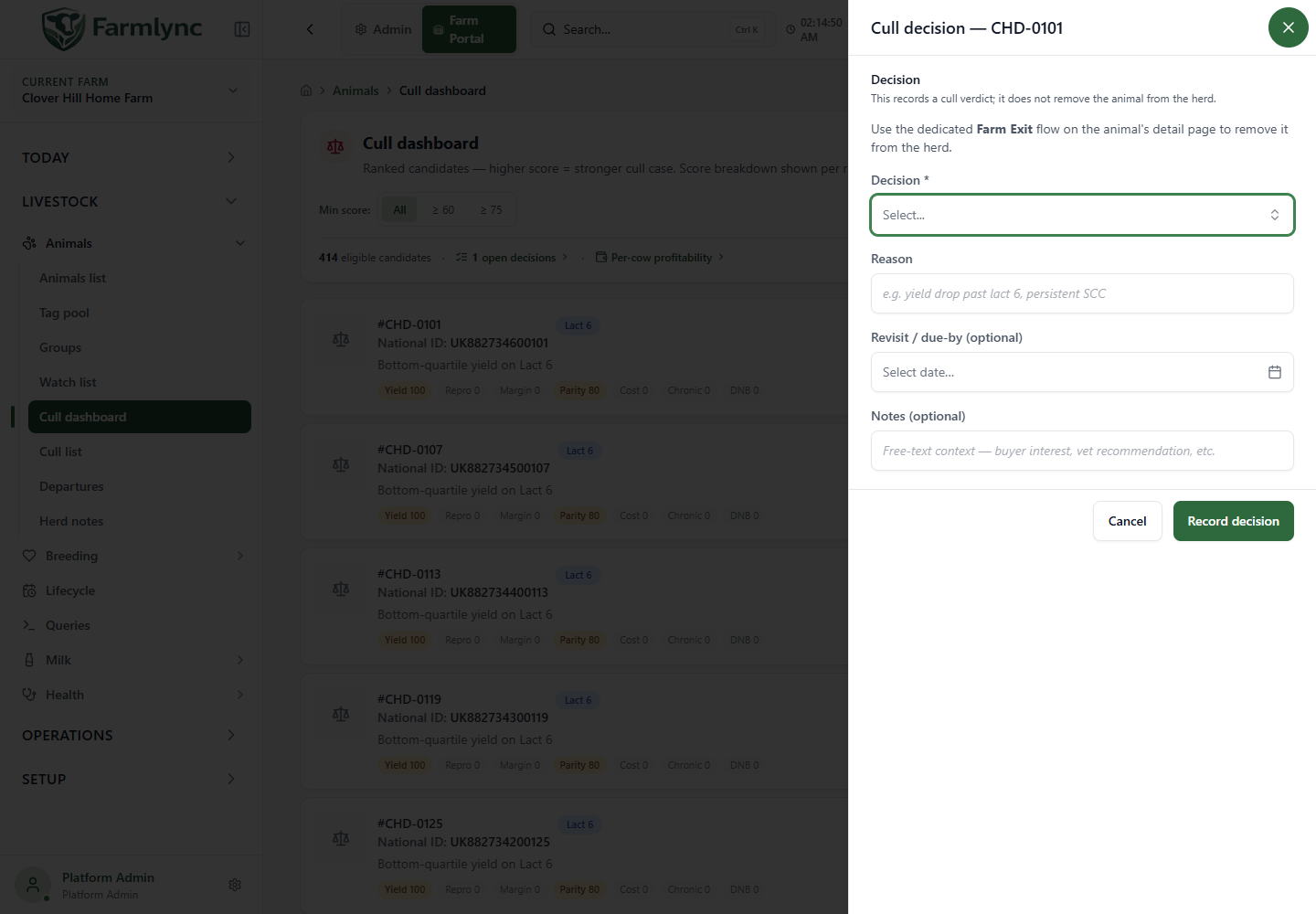
| Field | Required? | Values and use |
|---|---|---|
| Decision | Yes | To cull, Kept or Deferred. To cull records the intended action; Kept records a decision to retain the animal; Deferred records that a decision needs revisiting. |
| Reason | No | Up to 500 characters. Explain the evidence behind the decision in ordinary language. |
| Revisit / due-by | No | Select a calendar date when the decision should be revisited or acted on. The form does not require it to be a future date. |
| Notes | No | Up to 1,000 characters for additional context. |
| Record decision | — | Saves a new decision with the recording reviewer and time. |
| Cancel / Close | — | Closes and resets the form without saving the decision. |
Check the saved message and refreshed card/list. Recording a new decision adds to the animal’s decision history. It does not change Active status, record a sale, discharge a withdrawal hold or complete a government-registry movement.
Work through the Cull list
Section titled “Work through the Cull list”Open Animals → Cull list, or follow Open decisions from the dashboard.
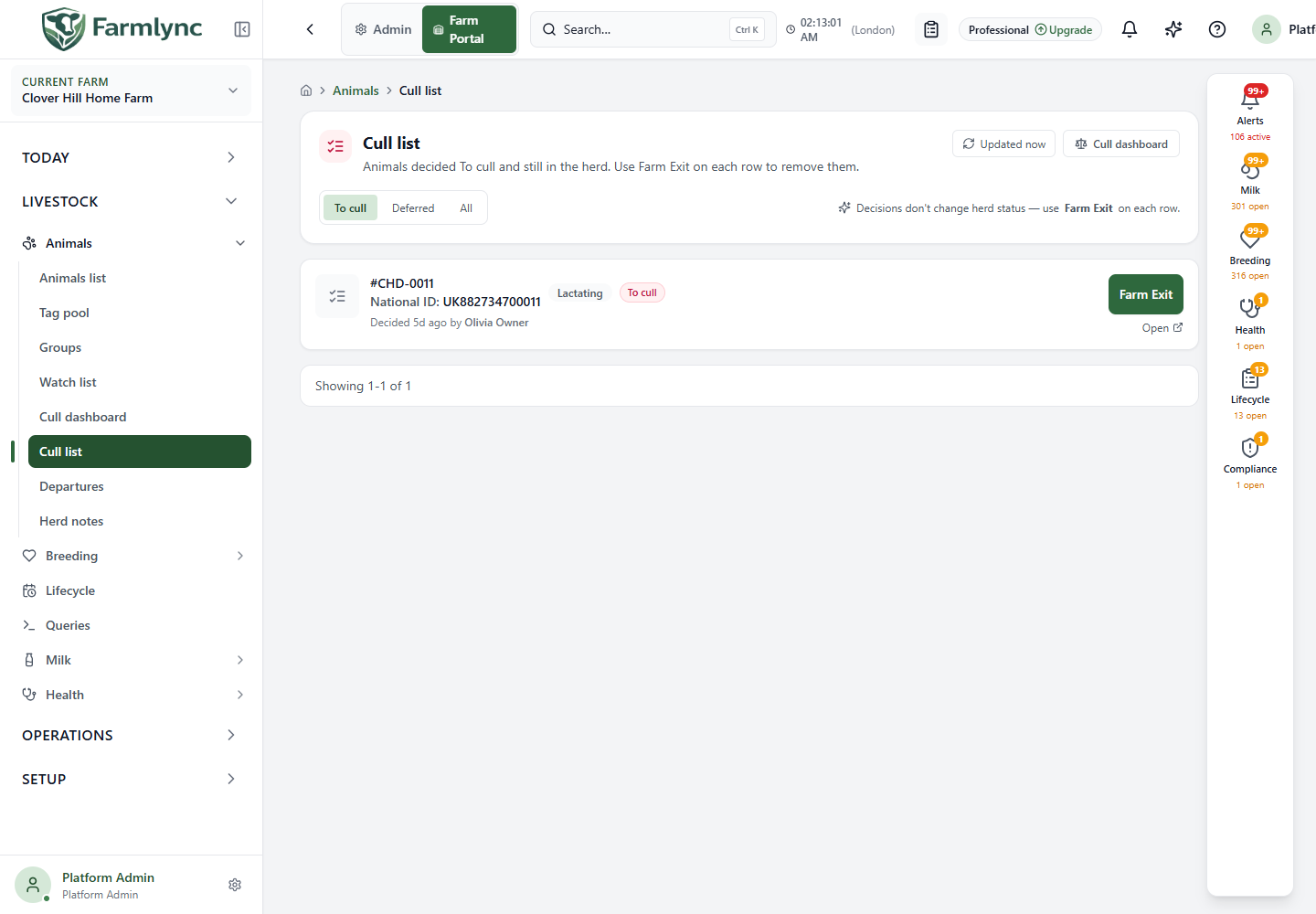
| Control | What it shows or does |
|---|---|
| To cull | The open To cull decision queue. |
| Deferred | Decisions deferred for further review. |
| All | The available decision list including kept decisions. |
| Animal identity / Open | Opens the animal record for further checking. |
| Farm Exit | Available on a To cull entry when permitted; opens the separate departure workflow. |
| Refresh / pagination | Refreshes the queue or moves through its 25-row pages. |
Rows include the latest decision, any recorded reason, reviewer/time and revisit date where provided. Check that this remains the decision you intend to act on before opening Farm Exit.
Example: review without prematurely removing an animal
Section titled “Example: review without prematurely removing an animal”Open a high-scoring candidate and review its milk, breeding, health and financial records. If you need veterinary advice first, save Deferred with a revisit date and reason. If you later decide to cull, record To cull. When the animal actually leaves, use Farm Exit with the real date, reason and destination details. The decision and the departure are separate records of separate events.