

Alert Rules — generation, defaults and configuration
What this page helps you do
Section titled “What this page helps you do”Alert rules decide which farm conditions generate an alert and when. Use this page to understand a noisy or missing alert and, where authorised, adjust a rule rather than repeatedly dismissing its results.
Open Today → Alerts → Alert Rules. Rules belong to the selected farm. An authorised farm Owner/Manager can change them; another farm’s settings are not changed by saving this page.
How alerts are generated
Section titled “How alerts are generated”Farmlync uses both recorded events and scheduled checks:
- A record changes. For example, milk recording, a treatment or a pregnancy result can raise or clear related alert conditions.
- Time passes or settings change. Scheduled checks examine such things as expected calving, follow-ups, overdue vaccinations and feed remaining.
- The farm’s rule is applied. Whether a rule is enabled, its threshold, severity and applicable source records affect the result.
- The alert’s current state is updated. Repeated evaluation of the same continuing condition does not intentionally create a fresh duplicate every minute. A new occurrence can appear after a condition genuinely clears and later returns.
- Work and notifications use the result. Work can combine several reasons into one actionable job. Email, push and inbox delivery are separate from the alert itself.
The scheduled checker wakes roughly once a minute and selects farms needing evaluation because records changed, their farm-local day changed or a backstop check is due. This is not a promise that every alert on every farm is regenerated within precisely 60 seconds. Processing load or an unavailable service can delay it.
Many dated reminders have a lead-in period, so seeing an alert does not always mean its due date has passed. Read the Due date and instruction. No upcoming vaccinations also does not mean “no vaccinations recorded”: history and future due work are different figures.
Read and change the rule list
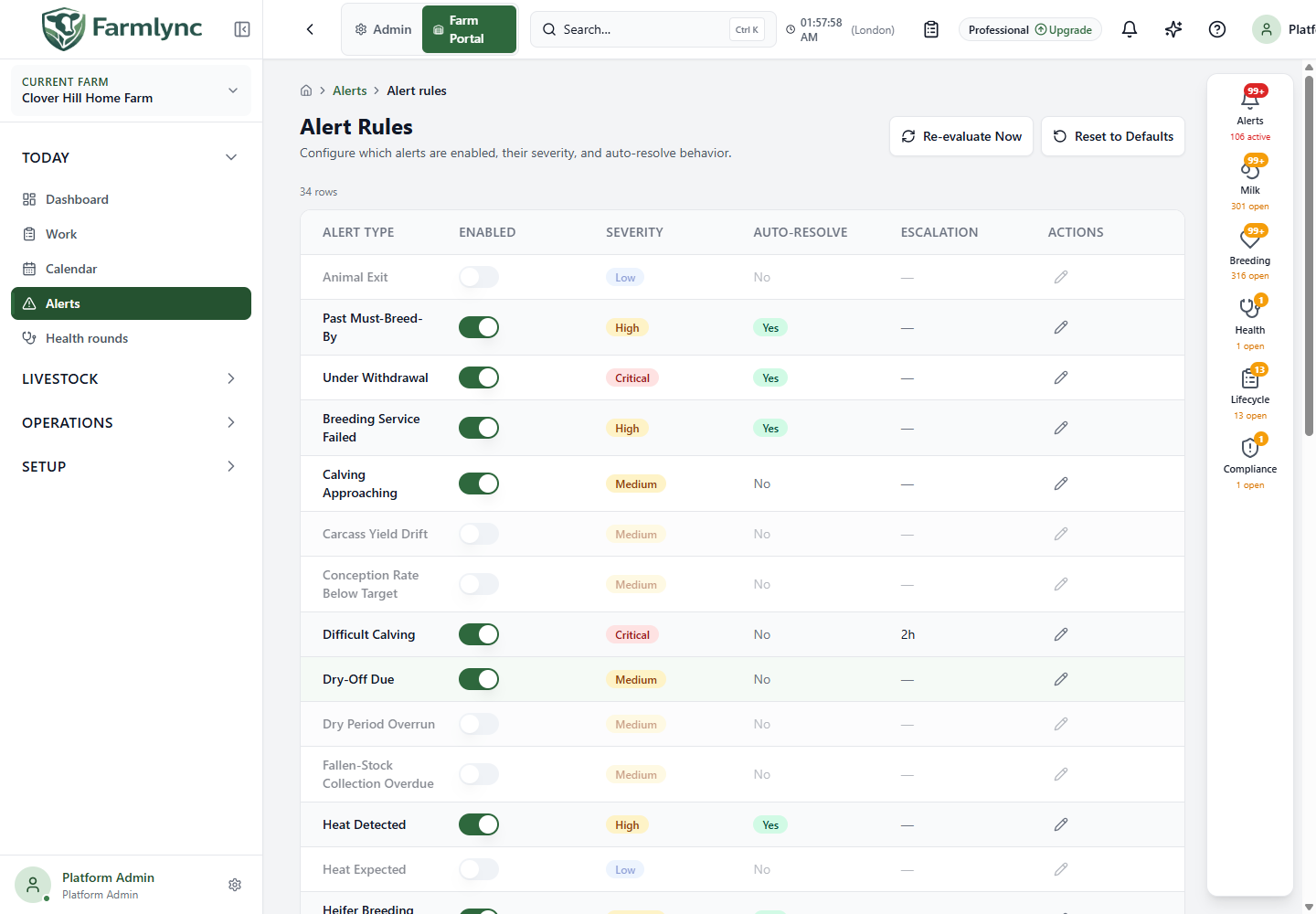
Section titled “Read and change the rule list”| Column/control | Meaning |
|---|---|
| Alert Type | The event or condition governed by this rule. |
| Enabled switch | Saves the enabled/disabled choice immediately. This is not a draft field waiting for a page-level Save button. |
| Severity | Priority used for the alert’s display. |
| Auto-Resolve | Whether automatic resolution is enabled for the rule; individual sources still determine when their condition has cleared. |
| Escalation | Configured hours, or a dash when no escalation interval is set. |
| Pencil / Edit | Opens the rule’s configuration form. |
| Re-evaluate Now | Requests a fresh farm evaluation. It queues work; it is not an immediate clinical reassessment or a synchronous refresh of every row. |
| Reset to Defaults | Opens a confirmation to replace custom rule settings with defaults. Custom thresholds and severity overrides are lost. |
The rule list’s saved values are the authority for your farm. The defaults below explain the starting configuration, not necessarily the current configuration of an established farm.
Edit a rule
Section titled “Edit a rule”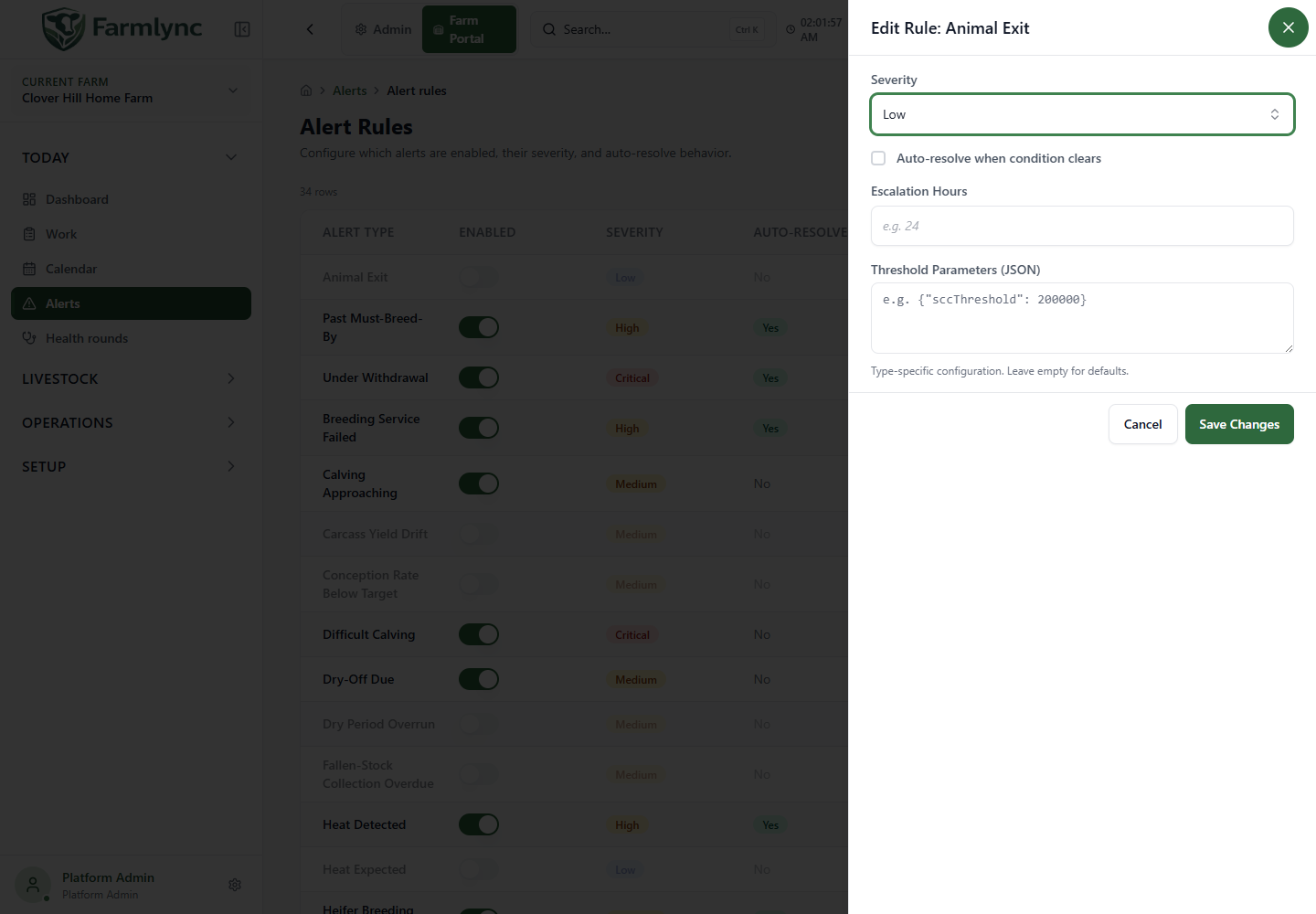
| Field | Valid entry and effect |
|---|---|
| Severity | Required. Choose Critical, High, Medium, Low or Info. |
| Auto-resolve when condition clears | Checkbox. Enables the rule’s supported automatic clearing behaviour. It does not create a missing event or alter medicine withdrawal times. |
| Escalation Hours | Optional positive whole number of hours. Leave blank for no escalation interval. Zero or negative values are not accepted. |
| Threshold Parameters (JSON) | Optional, rule-specific configuration. Use the exact parameter names below and numeric values without quotation marks. Leave blank for defaults. |
| Save Changes | Saves the form and requests re-evaluation of the farm. Check for success or a validation/error message. |
| Cancel / close | Leaves the rule as it was before opening the editor. |
Escalation currently checks Active High/Critical alerts against their configured interval. It increments their escalation level. Setting escalation hours on an Info or Low rule does not turn it into a High rule or guarantee an email at that time. The escalation process runs periodically, approximately every 15 minutes.
Threshold reference
Section titled “Threshold reference”These values describe software scheduling and detection settings. Choose clinical intervals and thresholds with your farm’s agreed veterinary and operating policy.
| Rule | Supported parameters and starting values | Interpretation |
|---|---|---|
| High SCC | sccThreshold: 200000 |
Alert when an accepted SCC observation is at or above this cells/mL threshold. |
| Yield Drop | percentThreshold: 20 |
Percentage-drop threshold against the seven-day comparison used by the yield rule. |
| Vaccination Overdue | overdueDays: 0 |
Extra overdue-day allowance for the latest recorded dose’s next-due date. Zero is supported. |
| Calving Approaching | windowDays: 14 |
Days ahead considered by the approaching-calving rule. |
| Heifer Breeding Overdue | firstBreedingAgeMonths: 15 |
First-breeding age for active heifers with no recorded service or heat history. |
| Weaning Eligible | weaningAgeDays: 56 |
Age threshold for the eligibility reminder, not an automatic weaning record. |
| Heat Expected | cycleDays: 21, toleranceDays: 3 |
Expected heat-cycle interval and window around it. |
| PD Check Due | daysAfterServiceThreshold: 30 |
Days after a pending service at which a pregnancy check is due. |
| Treatment Follow-up | leadDays: 7 |
How far ahead of an ongoing treatment’s follow-up date to bring it into the check. Zero is supported. |
| Withdrawal Ending Soon | leadDays: 3 |
Advance notice of a withdrawal ending. Zero is supported. This does not shorten the withdrawal. |
| Low Feed Stock | daysRemainingThreshold: 3, windowDays: 14 |
Alert when forecast days remaining is below the threshold; the window informs the forecast. |
| Possible Repeat Heat | windowStartDays: 18, windowEndDays: 24 |
Post-service window used to look for a possible repeat heat. |
| Dry Period Overrun | maxDryDays: 90 |
Dry-period duration threshold. |
| Past Must-Breed-By | leadDays: 7 |
Lead period for the deadline derived from breeding configuration. |
| Conception Rate Below Target | lookbackDays: 90, minResolvedServices: 20 |
Historical window and minimum resolved services before comparing with the farm’s configured conception target. |
| Carcass Yield Drift | driftPercentagePointThreshold: 3, recentWindowDays: 30, baselineWindowDays: 90, minCarcassesPerWindow: 5 |
Compare recent kill-out percentage with the farm’s own baseline; thin samples do not qualify. |
| Fallen-Stock Collection Overdue | overdueDays: 3 |
Overdue collection/disposal window. |
Most day/count parameters require positive whole numbers; the explicitly noted allowances permit zero. Feed-days and percentage thresholds can be decimal values where the rule supports them. Keep related windows meaningful, such as start before end.
For example, the High SCC form can contain:
{"sccThreshold": 200000}The Low Feed Stock form can contain:
{"daysRemainingThreshold": 3, "windowDays": 14}Do not paste every parameter into every rule. An unrecognised key is not a new setting. Several evaluators fall back to defaults for missing, invalid or unusable values, so a successful Save alone does not prove that a misspelled threshold is operating. Keep the existing valid structure, change only a supported value and review the resulting alerts.
Dry-off duration, voluntary waiting period and maximum lactation settings come from reproductive configuration, rather than duplicate JSON knobs on these rules. Vaccination protocol dates come from the active protocol and animal’s history.
Default-enabled and optional rules
Section titled “Default-enabled and optional rules”Default-enabled rules include difficult calving, high SCC, withdrawal ended, overdue vaccination, approaching calving, treatment recorded, heifer breeding overdue, heat detected, low feed stock, weaning eligible, dry-off due, under withdrawal, milk withheld after a late treatment, possible repeat heat, service failed, rescan due, reconfirmation due and past must-breed-by.
Optional rules start disabled, including yield drop, negative/inconclusive pregnancy results, animal exit, no milk recorded, heat expected, VWP elapsed, lactation too long, vaccination protocol due, PD check due, treatment follow-up, withdrawal ending soon, dry-period overrun, conception rate below target, carcass yield drift and fallen-stock collection overdue.
Review the Enabled column after setup. Creating or adopting a protocol is not the same as enabling every related alert rule. Likewise, disabling a reminder is not the same as disabling the clinical, stock or milk-safety rule behind the feature.
Re-evaluate and check the outcome
Section titled “Re-evaluate and check the outcome”- Save the intended rule change.
- Select Re-evaluate Now if you need a fresh pass explicitly.
- Wait for evaluation, then revisit or refresh Alerts and Work.
- Inspect one affected animal and the source dates/measurements.
- If the result still differs from your expectation, check the rule is enabled, its parameter names are correct, the animal is eligible and the source record is active.
Re-evaluation does not invent missing measurements, repeat a recorded vaccination or release withheld milk. If the source data is wrong, correct it in the owning farm screen.