

Vaccinations — single and batch recording
What this page helps you do
Section titled “What this page helps you do”Vaccination recording confirms a dose actually administered to one or more animals. Use it to preserve the vaccine, timing, performer and stock usage, rather than treating a due reminder as proof of vaccination.
A vaccination record documents administration to an animal. A vaccination protocol schedules reminders; it does not prove administration. Open Health → Vaccinations → Record Vaccination for one animal or Batch Vaccination for a shared round. An alert or work action can preselect the animal(s) and lock the vaccine code.
Use the actual product label and clinician’s instructions when recording. Software defaults are conveniences, not a recommended dose or schedule.
Single form — animal and product
Section titled “Single form — animal and product”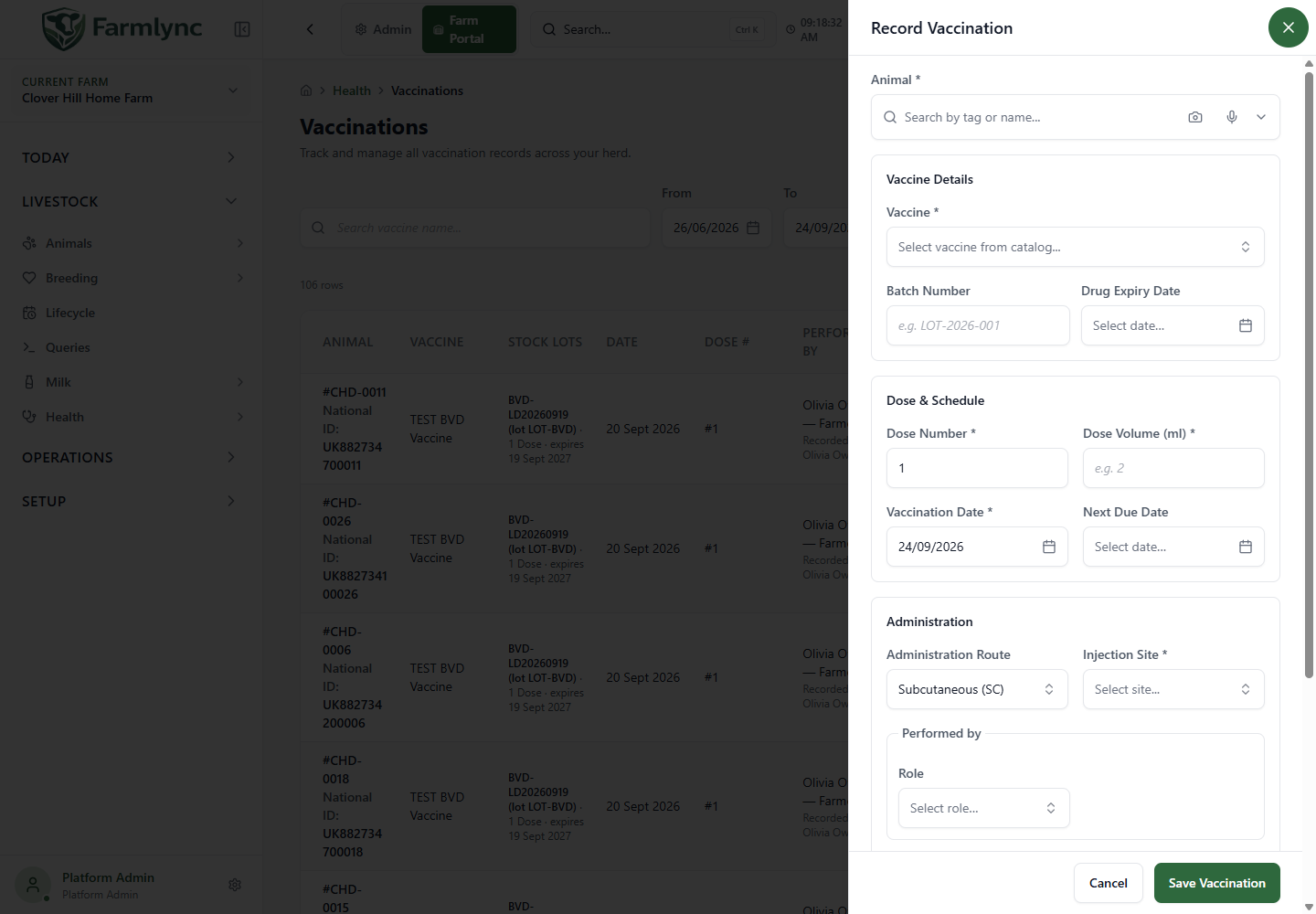
| Control | Meaning and valid values |
|---|---|
| Animal | Required; search and select. An animal/alert action can preselect it. Normal recording requires an active animal on this farm. |
| Vaccine | Required. Choose an active farm catalogue product, or the custom-vaccine option. Catalogue choices show available stock where known. |
| Vaccine Name | For custom input, required, maximum 200 characters. Catalogue choice fills its name. |
| Vaccine Code | Required for normal recording, maximum 50 characters. Catalogue choice fills it. Custom vaccine needs a stable code so reminders and duplicate checks can recognise it. |
| Locked vaccine | An alert-launched form can restrict the product/code. Choose a matching product rather than another vaccine merely to clear the alert. |
| Batch Number | Optional, maximum 100 characters. Enter the manufacturer’s lot number. This text is not a stock-batch allocation selector. |
| Drug Expiry Date | Visible in the form, but currently omitted from the save request. Maintain expiry on the inventory batch; do not rely on this input as saved evidence. |
Changing or clearing the product resets dependent values. Recheck dose, route, next due date and inventory deduction afterwards.
Administration fields
Section titled “Administration fields”| Control | Meaning and accepted input |
|---|---|
| Dose Number | Required integer at least 1. Course sequence, not millilitres or stock quantity. Defaults to 1; a recent-history suggestion can increment it. |
| Dose Volume (ml) | Required positive amount actually administered to this animal. Product or recent-use data may fill it; verify the actual dose. |
| Vaccination Date | Required farm-local date, default today or supplied opening-action date. Use the administration date. |
| Next Due Date | Optional, later than Vaccination Date. A known name-based schedule may suggest an interval; otherwise the form can suggest 12 months. Replace that suggestion with the actual plan. |
| Administration Route | Required. Oral, Intramuscular, Intravenous, Subcutaneous, Topical or Intramammary. Default Subcutaneous unless a catalogue product changes it. |
| Injection Site | Required by the form for Intramuscular, Subcutaneous and Intravenous. Choices: Left neck, Right neck, Left shoulder, Right shoulder, Rump, Other. Hidden for non-injection routes. |
| Performed by | Actual Farmer, Staff, Vet or Other person. A selected role requires a name; maximum 200 characters. The form may start with your account. |
| Cost | Optional nonnegative amount in the single form. A stock allocation preview can suggest cost; review any manual override. This field is absent from batch recording. |
| Notes | Optional. Keep Notes plus Reaction Notes within the server’s combined 1,000-character limit. |
Recent-history suggestions
Section titled “Recent-history suggestions”The form may copy a previous injection site/person and suggest the previous dose number plus one. This does not prove it is the same vaccine/course. Check before accepting. Revert clears these suggestions, restores the default performer and resets dose number to 1.
Reaction and follow-up
Section titled “Reaction and follow-up”| Control | Behaviour |
|---|---|
| Reaction | None, Mild, Moderate or Severe. Single form can be blank; batch starts at None. |
| Reaction Notes | Shown for a non-None reaction. Describe actual findings. Its text is appended to general Notes with a “Reaction notes:” prefix on save. |
| Follow-up / Recheck Date | Shown for Severe. This edits the same saved field as Next Due Date, not a separate appointment. |
For Severe, the form fills vaccination date + three days only if Next Due Date is empty. If a product already filled a booster date, that date is not replaced even when the caption suggests three days. Inspect and edit the follow-up date deliberately. Recording a reaction does not itself book a vet visit.
The form submits a Completed vaccination. It has no general status picker for a planned or skipped dose.
Inventory and units
Section titled “Inventory and units”Deduct from inventory can turn on automatically for catalogue stock with on-hand quantity and a supported conversion. No stock or an unknown unit conversion disables the toggle and explains why. Open product setup can take you to configuration.
| Product’s stock unit | One animal’s stock quantity |
|---|---|
| ml | Clinical dose volume in ml |
| Dose | One inventory Dose, regardless of the clinical ml value |
| Bottle/other configured unit | Clinical ml divided by the configured ml per stock unit |
For illustration, a 2 ml administration from inventory measured in 100 ml bottles equals 0.02 bottle. This demonstrates units, not a suitable clinical dose. Missing ml-per-unit data must be configured rather than guessed.
The preview shows on-hand, planned use and remainder. Allocation uses expiry order; a typed Batch Number does not force stock allocation from that lot. Check resulting consumption evidence where traceability matters. The single form can save without inventory deduction. The backend allows ordinary-item shortage handling but applies extra checks to controlled substances. A preview is not a guarantee that stock will remain unchanged before save.
Save one animal
Section titled “Save one animal”- Verify animal, vaccine/code and actual administration facts.
- Check dose number, volume, route/site and performer.
- Check due/follow-up date, reaction and stock toggle.
- Save once and wait for the result.
- Check Vaccinations, animal history and stock evidence.
The server rejects another vaccination for the same animal, vaccine identity and farm-local day. For a catalogue product, identity uses its catalogue ID (also matching an older uncatalogued record with the same name); for a custom vaccine it uses its name. Two different catalogue products can share a display name without becoming the same vaccination. The code is needed for recording and reminder matching, but is not the duplicate key. An interactive single save creates the medical fact and requested stock effect together. A custom name does not create a catalogue product. Alert completion depends on the matching code/record and relevant rules.
Batch vaccination — shared facts, individual records
Section titled “Batch vaccination — shared facts, individual records”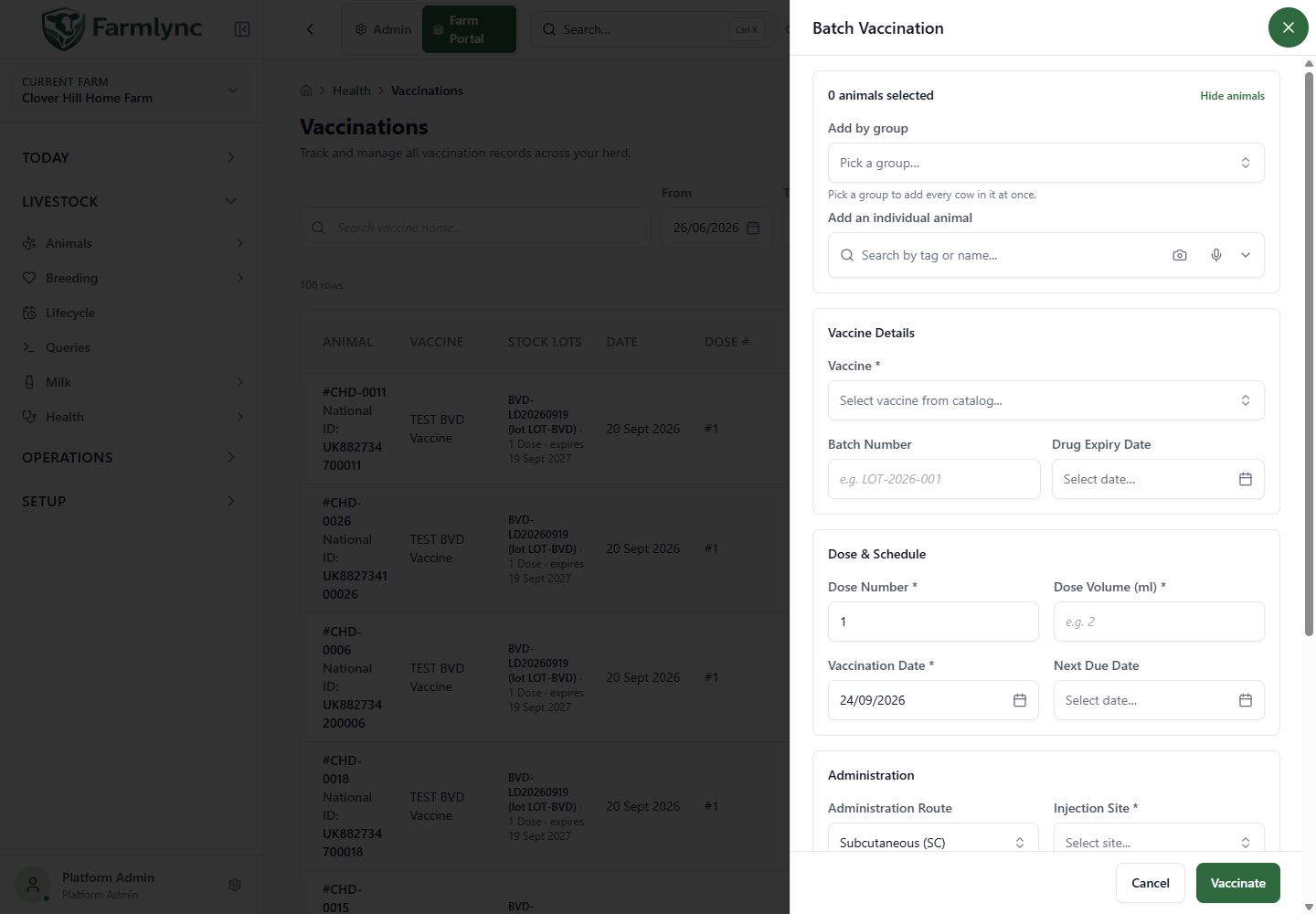
Batch is for animals that received the same vaccine, date, dose number, volume, route, site, performer and reaction details. Separate animals with different doses or reactions; this form has no per-animal clinical overrides.
Select animals
Section titled “Select animals”- The selection tray or work/alert action can seed the roster. Read skipped-entry messages.
- View animals / Hide animals expands or collapses the roster without changing it.
- Add by group adds group members, avoiding duplicates. Add an individual animal searches another tag/name.
- Removing a pill excludes the animal. Some work actions lock the roster and hide add/remove.
- A stage breakdown, when present, summarises the selected animals; it is not another filter.
- Submit at least one and at most 500 animals per request. Split a larger selection.
Shared fields and stock preview
Section titled “Shared fields and stock preview”Product, administration, reaction, due date and notes above apply to every selected animal. There is no individual Cost field or individual notes/result row. Dose Volume is per animal; total clinical volume is dose volume × animal count. Converted stock units are also multiplied by the count.
The stock preview lists batches, available amount, use, remainder and estimated total cost where available. When deduction is on, an insufficient-stock preview disables Vaccinate. Correct product/stock/count instead of silently dropping a real administration from the record.
Confirmation and partial results
Section titled “Confirmation and partial results”- Vaccinate N Animals opens an in-form confirmation; it has not saved yet.
- Review animal count, total volume/stock units, allocation and remainder.
- Confirm submits. Cancel inside confirmation returns to editing; main-form Cancel exits the unsaved workflow.
- Inspect successes and failures. Inactive animals or same-day duplicates can fail while others succeed.
- Retry failed returns only failed animals to the form. Completed animals stay completed. Close acknowledges the results.
Request-level validation can reject missing code, dose volume, injection site or stock conversion. Notes and Reaction Notes are concatenated on save, so keep the combined text within 1,000 characters even though the individual controls permit more.
Verify and correct
Section titled “Verify and correct”Check each saved animal/date/code, dose, route/site, next due date and stock evidence. An interrupted response is not proof that nothing saved; check history first. Vaccinations list has separate edit and void actions according to permission. Recording another dose is not an undo. A next-due date is a reminder, not evidence of future administration.
Related: Vaccination protocols and animal selection.