

Record a breeding service — every field
What this page helps you do
Section titled “What this page helps you do”A service record states when and how an animal was bred, with the sire or semen used. Use the form to keep service history, readiness and later pregnancy interpretation tied to the correct event.
Open Farm → Breeding → Record → Record Service. The panel is titled Record Breeding Service. It can also open from an animal or a recorded heat, with the animal/heat already supplied.
A breeding service records an event that actually happened. It is different from observing heat, scheduling insemination or confirming pregnancy. Use the actual farm-local date/time; do not save a recommended future insemination time as a completed service.
Before recording
Section titled “Before recording”Check that the selected animal, sire and date are correct. For AI, have the straw/batch information and the person who performed the service available. If using Farmlync semen stock, receive/setup the batch first through Semen stock.
The animal must be a female beyond Calf stage, in the Breeding Program, with eligible status and no applicable blocking condition. Readiness is checked for the selected service date. A current drug withdrawal, Do Not Breed flag, pending service outcome or pregnancy can block another service. Back-recording for an exited animal is permitted only where its event-date eligibility passes the server’s checks.
Saving requires Record breeding events permission for the selected farm. A visible animal or readiness result does not by itself grant permission to create the service.
Common fields
Section titled “Common fields”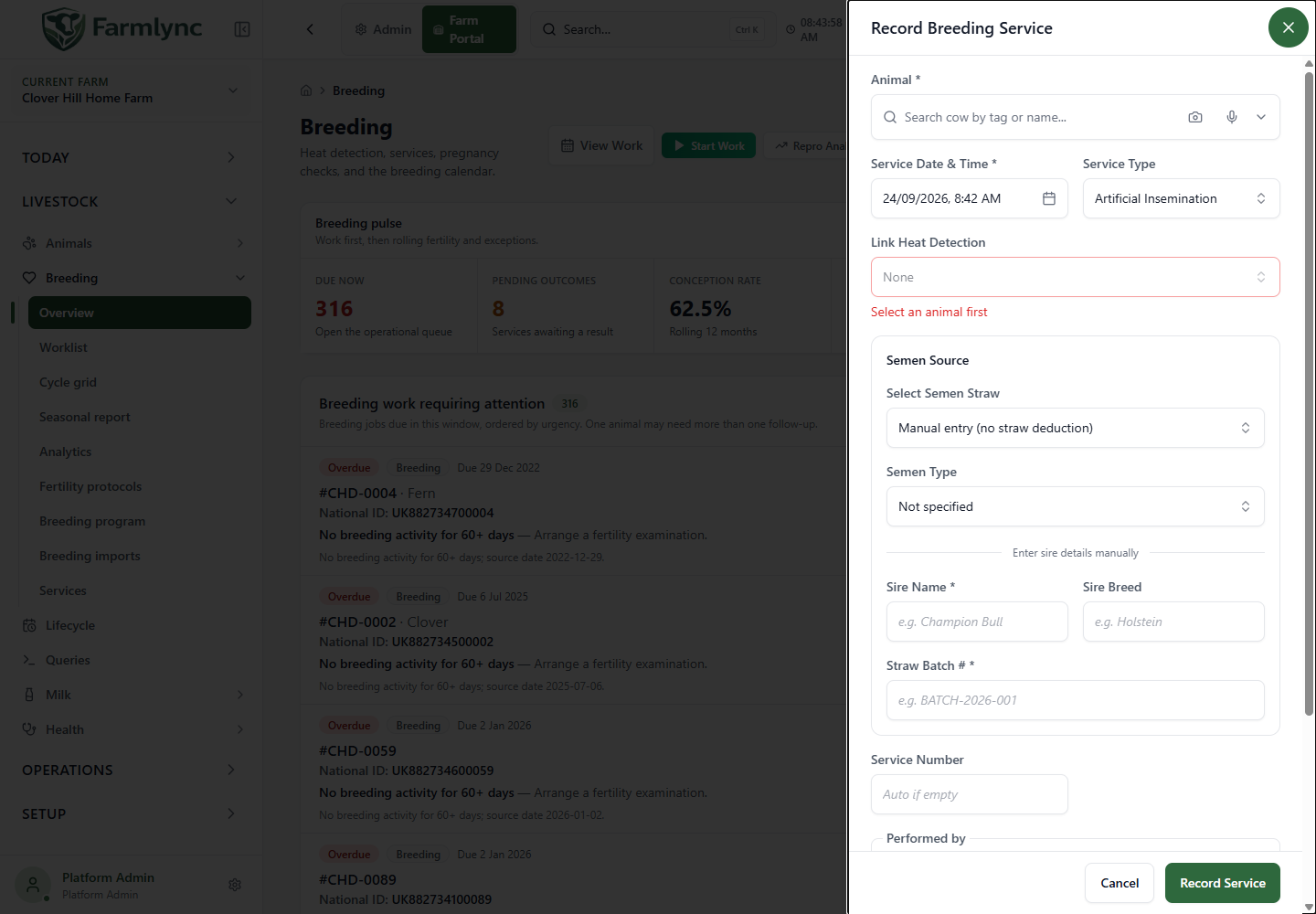
| Field/control | Purpose and accepted input |
|---|---|
| Animal * | Search and select the cow/heifer. It may already be fixed when opening from an animal. A search string without selecting a result is not enough. |
| Service Date & Time * | Actual service time in the farm’s timezone. Defaults to now, or an eligible past recommendation supplied by the heat workflow. Future services are rejected; this is not a booking field. |
| Service Type | Artificial Insemination, Natural Service or Embryo Transfer. Defaults to Artificial Insemination. Changing it clears sire/straw details, so review those again. |
| Link Heat Detection | Optional observed heat for this animal. Recent entries are offered and the most recent may initially be selected. Check that it is the right event; None leaves the service unlinked. |
| Linked Heat Detection | When the heat workflow already supplied the link, its details are displayed instead of an editable picker. |
| Service Number | A positive whole-number input is visible, labelled Auto if empty. Leave it blank: the current save path assigns the next number from the animal’s service history even when a number is entered. |
| Performed by | Choose Farmer, AI technician or Veterinarian, then the actual person. Select a farm user/saved professional where available or enter the name. Once a role is chosen, a name is needed. Keep it to 100 characters, the server limit. |
| Notes | Optional relevant service details, up to 1,000 characters. Where available, the microphone appends dictation; review it. |
| Record Service | Save the service after the current checks pass. |
| Cancel / Close | Leave without creating the service or consuming a semen straw. |
A recorded heat is optional, but any selected link must belong to this animal and farm. Do not link a different cow’s heat to get past an empty list.
Artificial insemination — semen source
Section titled “Artificial insemination — semen source”Choose either a received semen batch or manual sire details.
| Field/display | Meaning |
|---|---|
| Select Semen Straw | Select an available batch from semen inventory. Options show sire, breed, batch, remaining quantity and expiry where recorded. The current picker retrieves up to 50 available rows. |
| Manual entry (no straw deduction) | Use when no Farmlync semen-stock row represents the straw used. It records sire/batch details without decrementing a tracked straw. |
| Semen Type | Optional: Conventional, Sexed female, Sexed male or Beef, using the displayed labels. A chosen stock row can supply it. |
| Sire Name * | Manual sire name, up to 200 characters. Filled from a selected straw. You must identify the sire by a selected stock row, linked sire or name. |
| Sire Breed | Optional breed name, up to 100 characters; populated from the stock row where available. |
| Straw Batch # * | Required by this form for AI; up to 100 characters. Filled and locked when a stock row is selected. Enter the actual batch for manual entry. |
Selecting a batch alone does not consume it. A successful service save decrements one available straw and records the stock movement with the service. An unavailable, exhausted or expired batch can be rejected at save even if it was visible earlier. Review the stock record rather than substituting a different batch number.
Manual entry does not add a sire to the semen catalogue, receive new stock or create a straw movement. Use it only when that matches the record you need to make.
Natural service — bull selection
Section titled “Natural service — bull selection”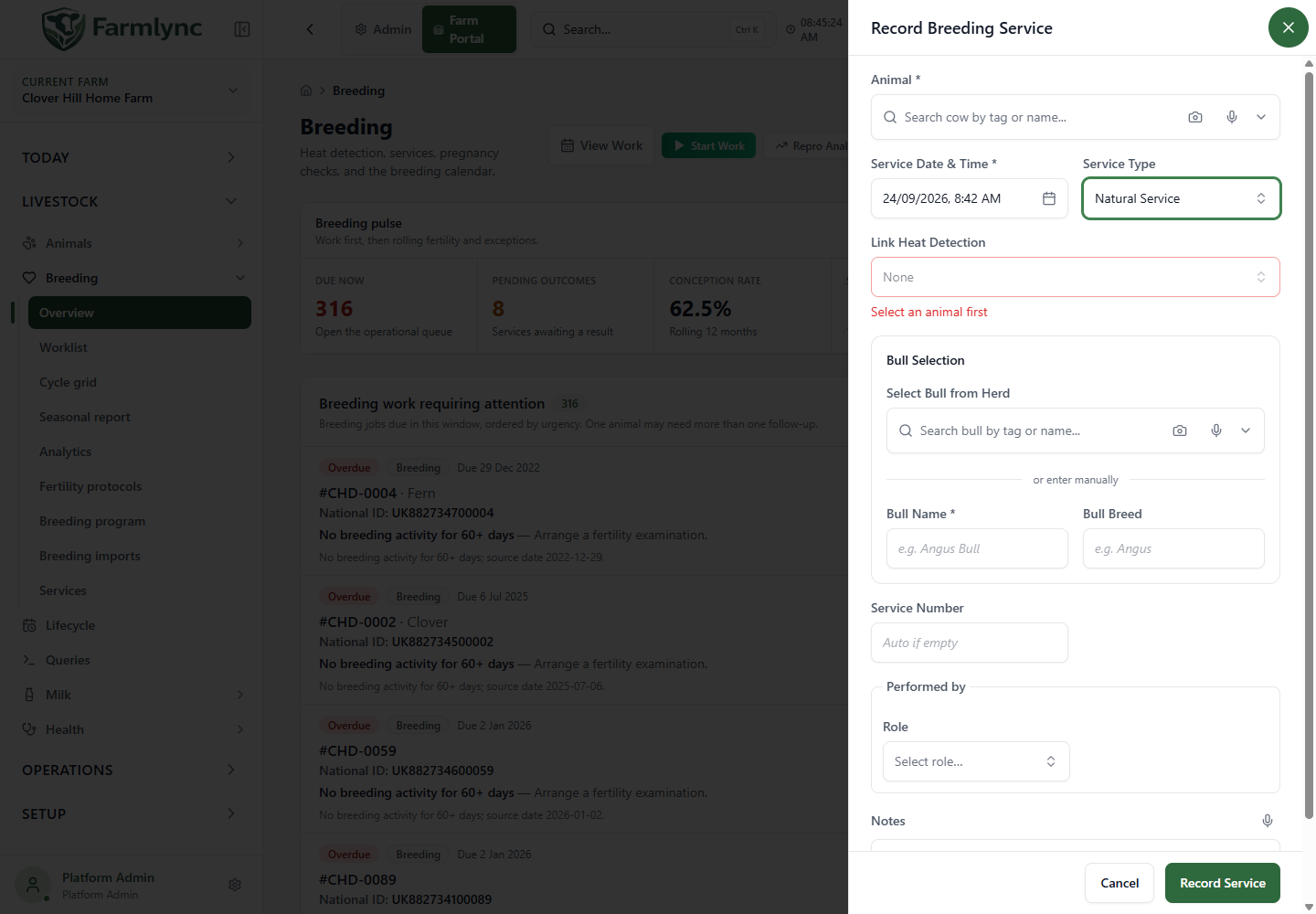
| Field/control | Meaning |
|---|---|
| Select Bull from Herd | Search an active male already registered on this farm. The animal being serviced is excluded. Selection supplies bull identity, name and breed. Confirm independently that the selected bull had reached the farm’s breeding-age standard on the service date; the current selector and save check do not calculate that age. |
| Bull Name * | For an external/unlinked bull, enter its name, up to 200 characters. A name alone does not create or link an animal record. |
| Bull Breed | Optional breed, up to 100 characters. |
When both parents are linked and pedigree information is available, the panel can show an inbreeding-risk advisory. It is advisory, not a pregnancy prediction or proof that missing ancestry carries no risk. It does not replace checking the actual sire identity.
Embryo Transfer option
Section titled “Embryo Transfer option”The service-type list includes Embryo Transfer, but the current form uses the same non-AI sire/bull section for it. It does not expose a dedicated donor, embryo batch, embryo-stock or transfer-grade workflow. Do not expect those details to be collected or tracked by choosing this service type.
Readiness and timing messages
Section titled “Readiness and timing messages”Readiness check
Section titled “Readiness check”The form loads the animal’s readiness for the selected date before enabling save. If this lookup fails, use its retry control; do not assume absence of a result means eligible.
For maiden heifers, the check uses the farm’s configured minimum breeding age and, where configured, target breeding weight. Some age/weight or missing-evidence results permit an Authorised override reason. That field accepts 10–500 characters explaining the actual reason. Other conditions, such as programme exclusion, a breeding hold or Do Not Breed, cannot be bypassed with that reason.
This override is not a universal bypass: sex, stage, withdrawal, pregnancy, duplicate-event and other server checks still apply. Update the appropriate prerequisite through its normal workflow when it is factually wrong.
AI timing advice from a heat
Section titled “AI timing advice from a heat”When the heat-to-service flow supplies detection time and intensity, the form compares the service time with its built-in advisory window: Strong 6–12 hours, Moderate 12–18 hours, Weak 18–24 hours after detection. Outside that range it shows a timing message, sometimes with the recommended time.
These are the application’s scheduling hints, not a command to change the historical service time. Enter when the service actually occurred and retain any relevant explanation. A standalone heat selection does not necessarily supply the same timing-advice context as opening directly from that heat.
What saving changes
Section titled “What saving changes”On success:
- The service is saved with its sire, actual time, performer, notes and automatically assigned sequence number.
- A selected semen-stock batch loses one straw through a linked movement.
- The animal’s breeding state becomes Bred and a pregnancy-check action is scheduled where applicable. This is not confirmation of conception.
- A matching pending Inseminate step in an active fertility protocol may complete when its due time is within the supported matching window.
- The success notification appears, and breeding/animal work views refresh.
Open Breeding → Services or the animal’s breeding history and verify the record. Check the batch balance when using inventory and inspect the next pregnancy-check work. Use the pregnancy-check/outcome workflow to record the later result.
If the service cannot be saved
Section titled “If the service cannot be saved”| Message or situation | What to check |
|---|---|
| Already recorded today | The server allows one service per animal per farm-local day. Open its history before retrying; the wording refers to the selected service day. |
| Pending breeding service | Record the genuine outcome of the previous pending service before another is admitted. Do not invent a failure simply to clear the message. |
| Pregnant animal | Review the pregnancy history. A real negative check or calving must be recorded where appropriate; a second service does not cancel a pregnancy. |
| Not in Breeding Program | Check the animal’s programme membership and whether enrolment is appropriate. |
| Under withdrawal / Do Not Breed / readiness hold | Review the underlying restriction. A free-text note does not remove it. |
| Sire/heat not found | Confirm the chosen record belongs to this farm and animal context. Reopen the selector after correcting the reference. |
| Semen unavailable or expired | Inspect the actual batch and remaining stock. The current tracked-batch check compares expiry with the time you save, so an expired batch is rejected even when back-recording a service that happened before expiry. Do not bypass this by pretending another batch was used; preserve the real service and stock evidence and ask an administrator to resolve the correction workflow. |
| Future date | Enter the actual completed-service time. Future work belongs in planning. |
After a definitive rejection, Re-check and submit as new attempt may appear. Use it only after fixing a prerequisite elsewhere and rechecking the preserved draft. It asks the server to evaluate again; it does not override the original reason.