

Breeding overview
What this page helps you do
Section titled “What this page helps you do”Breeding overview combines herd measures, open reproductive work and recent events. Use it to see where the breeding programme needs attention, then follow a card to the underlying animal or list.
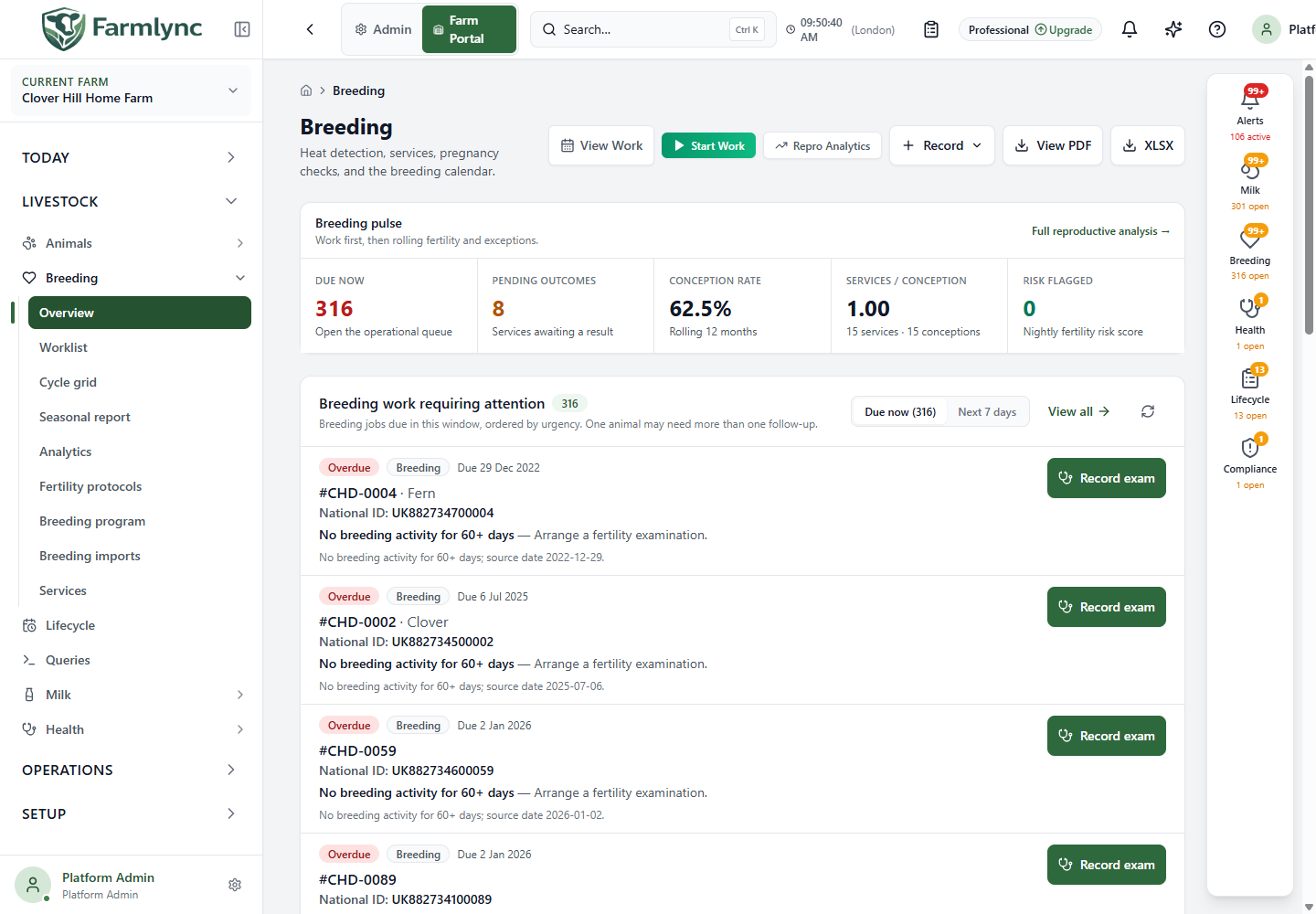
Open Livestock → Breeding → Overview for the farm-wide breeding picture. This is both a daily action page and a historical record page: use the upper sections to decide what must be done, then expand Breeding records when you need to inspect or correct what was recorded.
Advanced charts and fertility measures require the Advanced Breeding Analytics entitlement. If the farm does not have it, Farmlync shows an upgrade panel in place of those measures. The breeding work queue and the Heat, Service and PD recording flows remain available.
Viewing this page and generating its reports uses the farm analytics permission. Saving or correcting a heat, service, outcome, PD check or deletion requires Owner, Manager or Vet authority to record breeding events. The current page may still display those write controls to a Worker; the server refuses the save and no record is changed. This permission-display mismatch is recorded for correction.
Page actions
Section titled “Page actions”| Control | How to use it |
|---|---|
| View Work | Opens the Today work board already filtered to the Breeding domain. Use it when you need the full queue, filters and job controls rather than the dashboard preview. |
| Start Work | Opens execution mode focused on breeding jobs so compatible work can be selected and completed in sequence. It is disabled in support read-only access. |
| Repro Analytics | Opens the consultant-style Breeding analytics page for sire, conception, heat, risk and cohort analysis. |
| Record | On desktop, choose Record Heat, Batch Heat, Record Service, PD Check or Batch PD. Mobile provides the same choices through the floating quick-action button. Opening a form does not save a record; review and submit it. |
| View PDF | Generates the farm-wide breeding report and opens its preview in a new browser tab. It is a generated report, not a screenshot of the dashboard. |
| XLSX | Downloads the same farm-wide report data as a workbook, named using the current farm-local date. |
The PDF and workbook buttons are desktop controls and are unavailable during a read-only support session. Recording controls are also removed or disabled when the current access is read-only. Both report formats contain the farm header, service summary for the last 30 days, calvings expected during the next 30 days, PD checks due during the next 14 days, heats recorded during the last seven days and the reproduction-alert summary. These are fixed farm-local report windows; the Breeding records filters do not change them.
Breeding pulse
Section titled “Breeding pulse”The pulse is a compact operational and performance summary. Select a tile where it is interactive to open its source work or records.
| Tile | What it means and where it leads |
|---|---|
| Due now | Number of breeding jobs due at the farm now. Select it to scroll to Breeding work requiring attention. Its subtitle shows the count in the next seven days once that queue has loaded. |
| Pending outcomes | Services whose outcome is still pending. Select it to expand Breeding records, open Services and apply the Pending outcome filter. |
| Conception rate | Rolling 12-month conception percentage. A dash means Farmlync has no usable measure; it does not mean 0%. |
| Services / conception | Total services divided by conceptions in the available 12-month cohort. The subtitle shows both contributing counts so you can judge the denominator. |
| Risk flagged | Animals found by the nightly fertility-risk score. Select it to open the risk worklist in Repro Analytics. Review the animals rather than treating the count as a diagnosis. |
When source data is available, the interval strip also shows:
- Calving to 1st service — average days from calving to the first recorded service; the subtitle describes the contributing cohort.
- Calving to conception — average days from calving to the service that resulted in conception, with the conception count used.
- Calving index — average interval between consecutive calvings. Select it for the per-animal detail in Repro Analytics.
These values depend on complete, correctly dated calving, service and pregnancy records. Investigate a blank value or a small denominator before drawing a herd conclusion.
Breeding work requiring attention
Section titled “Breeding work requiring attention”Use Due now for work already due and Next 7 days for near-term planning. Jobs are ordered by urgency, and one animal can have more than one follow-up. The panel uses the same canonical work data as the Today work board, so a historical service or heat list is not a substitute for this queue: some jobs represent a record that is still missing or a future follow-up.
Open the animal or the job, check the observed condition, and record only the action actually performed. Batch-select compatible jobs when the same operation will be completed for several animals. For the full controls, use Work board or Execution mode.
Current breeding position and calving forecast
Section titled “Current breeding position and calving forecast”With Advanced Breeding Analytics, Current breeding position summarizes parts of the active, in-program cohort that Farmlync can place from current reproductive evidence. Animals with a non-null breeding-hold reason are currently excluded even after a dated hold has expired; that known calculation gap is recorded for correction.
- Open currently means a previously served animal whose latest service outcome is Pending, Failed or Early Loss. Never-served open animals are not included. Bands are elapsed days since that latest service: 0–60, 61–90, 91–120, 121–150 and 150+. Select the total or a band to open the exact animals behind it.
- In calf shows confirmed pregnant animals for which Farmlync can calculate an expected calving date from a manual date, linked service or days-post-service evidence. A confirmed pregnancy without enough due-date evidence is not included in this total. Bands are 0–60, 61–120, 121–180, 181–240 and 241+ days in calf. Select the total or a band to inspect the matching animals.
- Open worklist moves to the detailed reproductive worklist.
The Calving forecast appears when at least one expected calving exists in the next 12 months. Each bar is the number expected in that month. Select a bar to open the farm calendar at that month, or choose View calendar. Use the spread to plan dry-off work, feed, maternity space and labour; the forecast depends on recorded pregnancy checks and expected-calving dates.
Fertility rates
Section titled “Fertility rates”Expand Fertility Rates to compare 3-, 6- and 12-month windows. The YoY column compares the current rolling 12 months with the equivalent previous 12-month window.
| Row | Interpretation |
|---|---|
| Conception Rate | Share of resolved services recorded as conceived for that period. The Services (resolved) row gives the denominator. |
| Early Loss Rate | Recorded early pregnancy losses as a share of conceptions. Read this beside conception rate: a higher conception rate with more early loss may not represent the same improvement as the top line alone suggests. |
| Heat Detection Rate | Recorded heat-detection performance for the period. The Heats detected row shows the underlying count. |
| Pregnancy Rate | Conception rate multiplied by heat-detection rate, divided by 100. It is a calculated herd measure rather than a count of positive PD checks. |
A dash means the period has no valid result. Do not compare percentages without also checking the counts, period and data completeness.
Breeding records
Section titled “Breeding records”Expand Breeding records only when you need history or correction controls. Lists load on demand and show 15 rows per page. Changing a tab or filter returns to page 1.
Controls shared by the tabs:
- From and To limit the event date. They are shared while you move between tabs, and changing either returns the list to page 1.
- Cycle can show all cycles, each animal’s current open cycle, or a numbered cycle from 1 to 12.
- Animal searches by tag or name and restricts the list to that animal.
- Export page exports only the rows currently visible on that page. It is not a full-history export and is unavailable in read-only access.
Services
Section titled “Services”Use Outcome to restrict the list to a configured service outcome. Each row shows the animal, service date and type, breeding cycle, service number within that cycle, lifetime service number where different, sire and outcome.
- Select the row to open the service detail.
- Select the outcome badge or pencil to update the result. This is disabled in read-only access.
- Use the delete action only for an incorrect service record. Read the confirmation and check the effect on cycle state, work and semen stock before confirming.
- Select the animal identity to open the animal without opening the service.
The Heats tab uses the date, cycle and animal filters. Rows show animal, detection date, breeding cycle, detection method, intensity and up to the first three recorded signs. Additional signs are represented by a count. Use Record Heat for one animal or Batch Heat for several animals. Delete only a wrongly entered heat after checking any related service and scheduling effect.
PD checks
Section titled “PD checks”Use Result to filter pregnancy-diagnosis outcomes in addition to date, cycle and animal. Rows show the animal, check date, cycle, method, result, days after service and expected calving date where calculated. Use PD Check for one animal or Batch PD for several. Delete only an incorrect diagnosis after checking its effect on pregnancy status, expected calving and follow-up work.
For individual follow-up, use the Reproductive worklist, Cycle grid or Seasonal report. The dedicated recording guides explain the complete fields for Heat, Service and Pregnancy check.